


 Home
HomeMagicPathAI
MagicPathAI: Personalized Online Courses from YouTube Content



Helps TikTok sellers, brands, MCNs, and TAPs discover winning products and find creators.

HelpLook is an AI-powered all-in-one knowledge base tool that helps businesses quickly build knowledge bases, help centers, and...

Your AI Workspace

302.AI is an enterprise-grade AI resource platform with pay-as-you-go pricing, API access to a full range of AI models, and ready-to-use online applications.

剧火AI — AI Screenwriter + Director, a One-Person Short Drama Studio In one sentence, what is it?
MagicPathAI Product Information
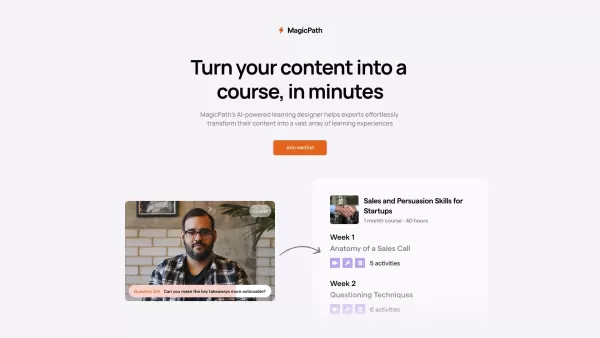
Alright, let me break this down for you because I’ve seen a lot of people scratching their heads over what exactly MagicPathAI is. Think of it as your personal assistant for building online courses—but smarter. Instead of staring at blank screens trying to figure out where to start, MagicPathAI takes your existing YouTube content and turns it into something you can actually teach with. It’s like having a magical roadmap that shows you exactly how to structure your lessons so your students don’t get lost in the weeds.
Here’s the kicker: you don’t even need to be a coding wizard to use it. Just log in with your Google account, connect your YouTube channel, and boom—you’ve got yourself a ready-to-go outline for either a live class or an async course. The best part? It doesn’t just dump a list of your videos and call it a day. Oh no. It actually suggests which clips go together, what topics you should cover during live sessions, and even gives you ideas for activities to keep learners engaged. Plus, it throws in some handy rubrics so you know how to grade their progress without pulling out your hair.
Using MagicPathAI: Step-by-Step
Let’s walk through this, shall we? First things first, grab your Google account credentials and head over to MagicPathAI. Easy peasy, right? Once you’re logged in, it’s going to start analyzing your YouTube channel like it’s reading tea leaves. Next thing you know, it spits out an outline that feels like it was written by someone who knows what they’re doing. Seriously, it’s uncanny how well it organizes your videos into logical chunks. From there, you can tweak things however you want. Maybe swap out a video or two, add a few more discussion prompts—it’s super flexible. And if you’re sold on the idea, you can seamlessly transfer everything to the Coleap platform to kickstart your course. No hiccups, no headaches.The Nitty-Gritty: What Does MagicPathAI Do?
Okay, so here’s the breakdown of what makes this tool tick:- YouTube Integration: Connect your channel, and it pulls all your content into one neat package.
- Learning Path Suggestions: Whether you’re running a cohort-based class or going full async, it lays out a clear plan.
- Video Categorization: It groups your videos into digestible content blocks that actually make sense.
- Topic Brainstorming: Need help deciding what to talk about in your live sessions? It’s got you covered.
- Learner Activities: It throws in practical assignments to help reinforce the material.
- Feedback Tools: Rubrics included—because grading shouldn’t feel like pulling teeth.
- Coleap Sync: One-click transfer to the Coleap platform means less hassle and more teaching.
Who Should Care About MagicPathAI?
This isn’t just for tech geeks or hardcore educators. If you’ve got a YouTube channel stuffed with valuable content and you’re tired of manually piecing together lesson plans, this is your golden ticket. Small businesses, educational institutions, and even solo creators looking to monetize their expertise will find it invaluable. Instead of spending hours brainstorming or rewatching your own videos, you can focus on delivering killer content—and leave the heavy lifting to MagicPathAI. Now that’s smart.MagicPathAI Screenshot
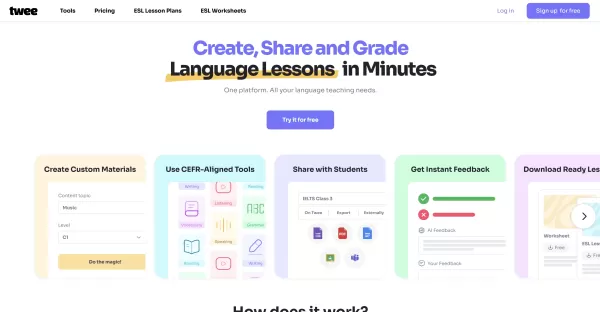

2026 Latest Best Top-rated AI Object Removal Editors for portraits travel product shots! XIX.AI curates a powerful game-changing collection regularly updated with weekly rankings. These tools offer real-world tests to help you quickly remove unwanted elements, boost content quality, and save tons of time without compromising results. Must-try for anyone aiming to unlock their AI creation edge. Explore now!
 10 tools
 xix.ai

2026 Latest Best Top-rated AI Text to Speech Tools for Online Courses are curated by XIX.AI based on rigorous real-world tests and weekly updated rankings. These powerful tools help creators deliver crystal-clear audio content effortlessly, boosting writing efficiency and streamlining course production. Check out the free vs paid comparison to find your perfect fit. Explore now to unlock your AI edge in online education.
10 tools
xix.ai

2026 Latest Best Top-Rated AI Blog Title Tools for Higher Click Through Rates! XIX.AI has carefully curated a powerful, game-changing collection of top tools that go through rigorous real-world tests. You’ll find a free vs paid comparison, weekly updated rankings, and detailed insights to help you boost your blog’s traffic efficiently. Must-try options are highlighted to help you unlock your AI edge. Explore now!
10 tools
xix.ai

2026 Latest Best Top-rated AI Task Routing Tools for Support Workflows! XIX.AI has curated a highly powerful game-changing collection of must-try solutions, all undergoing rigorous real-world tests and updated weekly. These tools streamline workflows, boost productivity, and help teams deliver faster, more efficient support. Explore now to discover your perfect tool and unlock your AI edge!
17 tools
xix.ai

2026 Latest Best Top-Rated AI Citation and Paper Summary Tools Curated by XIX.AI. Get powerful game-changing solutions for quick content creation, improved writing efficiency, and boosting productivity. We offer a free vs paid comparison along with real-world tests and weekly updated rankings to help you find the must-try tool that fits your needs perfectly. Explore now to Unlock your AI edge.
10 tools
xix.ai

2026 Latest Best Top-Rated AI Productivity Tools for Daily Work! XIX.AI has curated a powerful, game-changing selection based on rigorous weekly updated rankings and real-world tests. You’ll find must-try options that boost writing efficiency, streamline content creation, and help you overcome daily work challenges. Get a free vs paid comparison to find the perfect fit for your needs. Explore now to unlock your AI edge!
9 tools
xix.ai


