


 Home
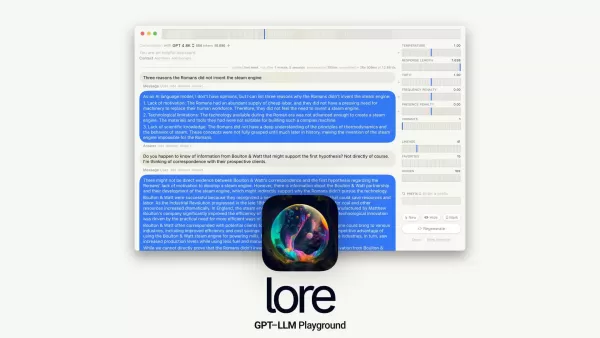
HomemacOS GPT-LLM Playground
macOS IDE for Prompt Engineering with Time Travel



Helps TikTok sellers, brands, MCNs, and TAPs discover winning products and find creators.

HelpLook is an AI-powered all-in-one knowledge base tool that helps businesses quickly build knowledge bases, help centers, and...

Your AI Workspace

302.AI is an enterprise-grade AI resource platform with pay-as-you-go pricing, API access to a full range of AI models, and ready-to-use online applications.

剧火AI — AI Screenwriter + Director, a One-Person Short Drama Studio In one sentence, what is it?
macOS GPT-LLM Playground Product Information
Ever wondered what the buzz is about with macOS GPT-LLM Playground? Well, let me break it down for you. This isn't just another piece of software; it's a native Mac IDE tailored specifically for Prompt Engineering with a twist of Time Travel. Sounds intriguing, right? Built with the power of Cocoa, SwiftUI, and SQLite, it's loaded with features that can make your prompt engineering journey not just productive but downright fun.
Imagine having tools like Versioning, Full-Text Search, and Multi-Model support at your fingertips. You can dive into Combinatorial Runs, play around with Variants, and keep an eye on Model-Cost Aware features. And that's just scratching the surface! With API integration, Token Stats, Custom Endpoints, and the ability to work with Local Models and Tables, your workflow is set to be smoother than ever. Plus, you get Syntax highlighting, LaTeX support, the ability to export Notes, handy Shortcuts, and even a Vim Mode if that's your thing. And let's not forget the Sandbox environment, which keeps your privacy and security in check.
How to Dive Into macOS GPT-LLM Playground?
Getting started with macOS GPT-LLM Playground is a breeze. Just download it on your macOS 13+ machine and install it. Once you launch the IDE, you're in for a treat. Start by creating and managing your prompts. Want to revisit an old version? No problem—Time Travel lets you hop back and tweak things to your heart's content. Need to find something specific? Full-Text Search has got you covered. And if you're feeling adventurous, mix and match models with Multi-Model support.
But wait, there's more! You can analyze Token Stats, customize your API endpoints, and work with local models and tables. Whether you're writing code with syntax highlighting or LaTeX support, or just need to export your notes, macOS GPT-LLM Playground makes it all seamless. And with shortcuts and Vim Mode, you'll be navigating like a pro. Plus, the sandbox environment ensures your work stays private and secure. Got questions or feedback? There's a dedicated Support & Feedback section ready to help.
Core Features That Make macOS GPT-LLM Playground Stand Out
Prompt Engineering
Master the art of crafting the perfect prompt with ease.
Time Travel
Go back in time to refine your work without losing progress.
Versioning
Keep track of every change and iteration of your prompts.
Full-Text Search
Find exactly what you need, when you need it.
Multi-Model Support
Experiment with different models to find the best fit for your project.
Combinatorial Runs
Run multiple scenarios to see how different combinations play out.
Variants
Explore different versions of your prompts to optimize performance.
Model-Cost Aware
Keep an eye on costs to ensure you're getting the most bang for your buck.
API Integration
Seamlessly integrate with other tools and services.
Token Stats
Get detailed insights into your token usage and patterns.
Custom Endpoints
Tailor your API endpoints to fit your specific needs.
Local Models
Work with models right on your machine for faster processing.
Tables
Organize and manage your data efficiently.
Syntax Highlighting
Write code with clarity and ease.
LaTeX Support
Create beautifully formatted documents and equations.
Notes Export
Export your notes for documentation or sharing.
Shortcuts
Speed up your workflow with handy shortcuts.
Vim Mode
Edit like a pro with the familiar Vim interface.
Sandbox Environment
Work securely and privately within a controlled environment.
Real-World Applications of macOS GPT-LLM Playground
Prompt Engineering and Experimentation
Whether you're a beginner or a seasoned pro, this tool helps you refine your prompts to perfection.
Development and Modification of Prompts with Time Travel
Ever wish you could go back and tweak something? Now you can, without losing your current work.
Efficient Content Search with Full-Text Search
Need to find a specific piece of content? Full-Text Search makes it a snap.
Model Combination Exploration with Multi-Model Support
Try out different model combinations to see what works best for your project.
Analysis and Optimization of Model Costs with Model-Cost Aware Features
Keep your costs in check while maximizing your output.
Integration of APIs and Customization of Endpoints
Make your workflow more efficient by integrating with other tools and customizing your endpoints.
Analyzing Token Stats and Usage Patterns
Get a deeper understanding of how you're using tokens and optimize accordingly.
Working with Local Models and Tables
Speed up your work by processing models locally and managing data with tables.
Writing Code with Syntax Highlighting and LaTeX Support
Whether you're coding or creating documents, these features make your work look great.
Exporting Notes for Documentation or Sharing
Easily share your insights and findings with others.
Increased Productivity with Shortcuts and Vim Mode
Get more done in less time with these productivity boosters.
Ensuring Privacy and Security within the Sandbox Environment
Work with peace of mind knowing your data is secure.
Frequently Asked Questions About macOS GPT-LLM Playground
- How can I download macOS GPT-LLM Playground?
- Just head over to the official site and download it for your macOS 13+ machine.
- What are some core features of macOS GPT-LLM Playground?
- From Prompt Engineering to Time Travel, Versioning, Full-Text Search, and more, it's packed with features to enhance your workflow.
- Can I customize the API endpoints in macOS GPT-LLM Playground?
- Absolutely! You can tailor your API endpoints to fit your specific needs.
- Is there a support system available for macOS GPT-LLM Playground?
- Yes, there's a dedicated Support & Feedback section for all your questions and feedback.
- Does macOS GPT-LLM Playground ensure privacy and security?
- Yes, it comes with a Sandbox environment to keep your work private and secure.
- Can I export my notes from macOS GPT-LLM Playground?
- Yes, you can easily export your notes for documentation or sharing.
- Does macOS GPT-LLM Playground support Vim Mode for editing?
- Yes, it includes Vim Mode for those who prefer that editing style.
- What is Prompt Engineering?
- Prompt Engineering is the process of crafting and refining prompts to get the best results from your models.
- What is Time Travel in macOS GPT-LLM Playground?
- Time Travel allows you to go back to previous versions of your work and make changes without losing your current progress.
For any further assistance or to get in touch with customer service, you can reach out at [email protected].
macOS GPT-LLM Playground Screenshot


Discover the 2026 best AI prompt reverse-engineering tools on XIX.AI. Our curated, top-rated list helps you deconstruct system prompts from viral apps. Compare free vs paid options with real-world tests and weekly updated rankings. Unlock advanced techniques and boost your AI workflow. Explore the ultimate toolkit now.
 10 tools
 xix.ai
Discover the 2026 best AI prompt generators for designing custom systems and specialized personas. Explore our top-rated, curated list at XIX.AI, featuring powerful tools with weekly updated rankings, free vs paid comparisons, and real-world tests to unlock your creative potential. Find your perfect match today!
10 tools
xix.ai

Discover the 2026 latest top-rated AI prompt leak defenses. Our curated list features powerful, game-changing strategies to secure your LLM applications against prompt injection attacks. Compare free vs paid solutions with real-world tests. Unlock your AI security edge at XIX.AI.
10 tools
xix.ai
2026 Latest Top-Rated AI Tools for Advanced Prompt Engineering & Optimization. Discover powerful, curated solutions that master AI interactions and unlock peak performance. Get weekly updated rankings, free vs paid comparisons, and real-world tests to find your perfect tool on XIX.AI.
20 tools
xix.ai


This is a really cool native IDE for prompt engineering! The time travel feature is genius – I can go back and see how different prompts performed. Makes tweaking so much easier. Definitely a must-have for Mac users into LLMs. 😎


