


 Home
HomeMacaify - Make your Mac-AI-fy



Helps TikTok sellers, brands, MCNs, and TAPs discover winning products and find creators.

HelpLook is an AI-powered all-in-one knowledge base tool that helps businesses quickly build knowledge bases, help centers, and...

Your AI Workspace

302.AI is an enterprise-grade AI resource platform with pay-as-you-go pricing, API access to a full range of AI models, and ready-to-use online applications.

剧火AI — AI Screenwriter + Director, a One-Person Short Drama Studio In one sentence, what is it?

What is AI Excel Bot?AI Excel Bot uses advanced AI algorithms to help you build complex Excel and Google Sheets formulas in seconds. By leveraging natural language processing, it makes writing, editing, and understanding formulas much easier. Whether
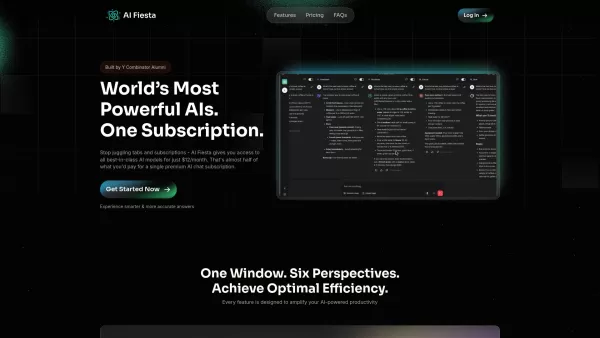
What is AI Fiesta? AI Fiesta revolutionizes AI access by bringing together the world's leading AI models under one roof. Rather than juggling multiple subscriptions, users can seamlessly switch between powerhouse models like ChatGPT, Gemini Pro, Clau
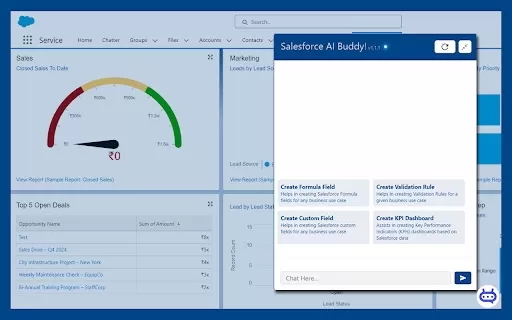
Ever wished you had a trusty sidekick to tackle those pesky Salesforce tasks? Enter Salesforce AI Buddy, the Chrome extension that's like having a tech-savvy friend by your side. This nifty tool is a game-changer for anyone diving into the world of Salesf
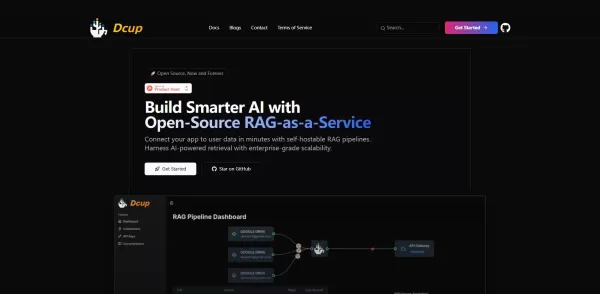
What is Dcup?Dcup is an advanced AI assistant built to streamline and optimize your daily workflows. It provides a suite of capabilities such as task automation, smart scheduling, and efficient data management. By leveraging cutting-edge AI technolog

What is Toki? Toki is an AI-powered calendar assistant and time management tool that simplifies scheduling for both individuals and groups. It utilizes advanced AI to understand inputs from voice, text, images, and complex contexts, then organizes th
Macaify - Make your Mac-AI-fy Product Information
What is Macaify - Make your Mac-AI-fy?
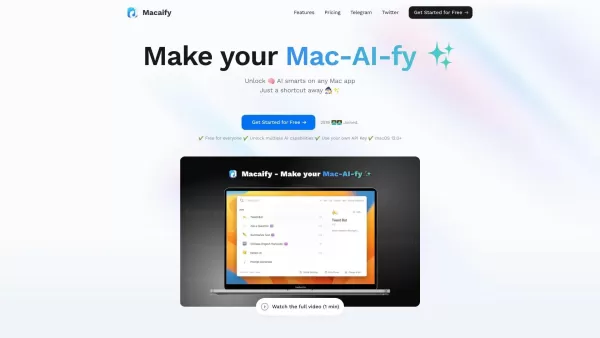
Macaify is a Mac application that helps you harness the power of AI in your daily computer use. It smoothly integrates AI technology like ChatGPT into any Mac app, enabling you to handle text, generate code, and automate tasks more effectively. By setting up customized AI assistants for specific jobs, Macaify boosts your productivity, cuts down on manual work, and becomes an essential tool for any Mac user aiming to supercharge their workflow with advanced AI.
Who will use Macaify - Make your Mac-AI-fy?
- Everyday Mac Users
- Software Developers & Coders
- Writers & Content Creators
- Business & Productivity Professionals
How to use the Macaify - Make your Mac-AI-fy?
- Step 1: Download and install Macaify from the official site.
- Step 2: Launch the app and sign in to your account.
- Step 3: Set up and personalize AI assistants for your specific tasks.
- Step 4: Use the provided keyboard shortcuts to bring Macaify into any Mac app.
- Step 5: Start AI-powered tasks like text editing, coding, or automation directly from the interface.
- Step 6: Review and fine-tune your AI assistants' performance to get the best results.
Platform
- macOS
Macaify - Make your Mac-AI-fy's Core Features & Benefits
The Core Features
- Wide AI Integration
- Fully Customizable AI Assistants
- Seamless Mac App Integration
- A Library of Ready-to-Use AI Templates
- Quick Shortcut Key Access
The Benefits
- Boosted Productivity & Focus
- Significant Time Savings
- Smarter Workflow Automation
- Access to Diverse AI Tools
- Simple, Intuitive Interface
Macaify - Make your Mac-AI-fy's Main Use Cases & Applications
- Writing & Text Processing
- Programming & Code Generation
- Repetitive Task Automation
- Creative Content Development
- Streamlining Daily Workflows
Macaify - Make your Mac-AI-fy's Pros & Cons
The Pros
Brings AI directly into any Mac application with a simple keyboard shortcut
Offers a library of over 1000 customizable AI assistant templates
Allows for efficient, keyboard-only operation to keep you in your flow
Provides a free plan with core features, plus flexible paid options for heavier usage
Future updates will add image generation, semantic search, and web content processing
The Cons
Exclusive to macOS, so it's only for Mac users
A few advanced capabilities are still under development
The software is not open source, which limits community modifications
Macaify - Make your Mac-AI-fy's Pricing
Free plan available? | YES |
|---|---|
Free trial details | |
Pricing model | Freemium |
Credit card required? | No |
Paid plans start at | 8 USD / month |
Lifetime plan available? | No |
Billing frequency | Monthly |
Details of Pricing Plan
Free
0 USD / month
- Unlimited number of AI assistants
- 1000+ pre-built assistant templates
- Use AI seamlessly in any app or scenario
- Connect your own API key
- Search the latest internet (coming soon)
- Monthly quota: 50 actions
Standard
8 USD / month
- All Free Plan features included
- AI-powered image generation
- AI-powered image search
- Voice AI commands
- AI chart and graph creation
- Monthly quota: 1000 actions
Plus
20 USD / month
- All Standard Plan features included
- Priority support from expert team
- Monthly quota: 3000 actions
For the most current pricing, please visit: https://macaify.com
FAQs of Macaify - Make your Mac-AI-fy
What is Macaify?
Macaify is a Mac app that adds AI capabilities directly into your existing applications to automate and enhance your workflow.
Is Macaify free?
Macaify has a free version with basic features, plus paid plans for more advanced capabilities and higher usage limits.
What platforms does Macaify support?
Macaify is designed for and currently only supports macOS.
How do I install Macaify?
Simply download the installer from the Macaify website and follow the setup instructions.
How do I customize AI robots in Macaify?
Open the Macaify settings to personalize your AI assistants, tailoring their instructions and behavior to your specific tasks.
Can I use Macaify with any Mac app?
Yes, Macaify is built to work alongside any application on your Mac.
Do I need an account to use Macaify?
Yes, creating an account is required to sync your settings and access all features.
Is there customer support available for Macaify?
Yes, customer support is provided. You can reach the team via their dedicated support email.
Can Macaify help with coding tasks?
Absolutely. Macaify can generate code, explain functions, and assist with various programming-related activities.
Are there any tutorials available for Macaify?
Yes, you can find helpful tutorials and getting-started guides on the Macaify website.
Macaify - Make your Mac-AI-fy Company Information
Website:
https://macaify.comCompany Name:
MacaifySupport Email:
Facebook:
NAX (Twitter):
https://x.com/macaifyYouTube:
NAInstagram:
NATikTok:
NALinkedIn:
NA
Macaify - Make your Mac-AI-fy Screenshot




2026 Latest Best Top-rated AI Object Removal Editors for portraits travel product shots! XIX.AI curates a powerful game-changing collection regularly updated with weekly rankings. These tools offer real-world tests to help you quickly remove unwanted elements, boost content quality, and save tons of time without compromising results. Must-try for anyone aiming to unlock their AI creation edge. Explore now!
 10 tools
 xix.ai

2026 Latest Best Top-rated AI Text to Speech Tools for Online Courses are curated by XIX.AI based on rigorous real-world tests and weekly updated rankings. These powerful tools help creators deliver crystal-clear audio content effortlessly, boosting writing efficiency and streamlining course production. Check out the free vs paid comparison to find your perfect fit. Explore now to unlock your AI edge in online education.
10 tools
xix.ai

2026 Latest Best Top-Rated AI Blog Title Tools for Higher Click Through Rates! XIX.AI has carefully curated a powerful, game-changing collection of top tools that go through rigorous real-world tests. You’ll find a free vs paid comparison, weekly updated rankings, and detailed insights to help you boost your blog’s traffic efficiently. Must-try options are highlighted to help you unlock your AI edge. Explore now!
10 tools
xix.ai

2026 Latest Best Top-rated AI Task Routing Tools for Support Workflows! XIX.AI has curated a highly powerful game-changing collection of must-try solutions, all undergoing rigorous real-world tests and updated weekly. These tools streamline workflows, boost productivity, and help teams deliver faster, more efficient support. Explore now to discover your perfect tool and unlock your AI edge!
17 tools
xix.ai

2026 Latest Best Top-Rated AI Citation and Paper Summary Tools Curated by XIX.AI. Get powerful game-changing solutions for quick content creation, improved writing efficiency, and boosting productivity. We offer a free vs paid comparison along with real-world tests and weekly updated rankings to help you find the must-try tool that fits your needs perfectly. Explore now to Unlock your AI edge.
10 tools
xix.ai

2026 Latest Best Top-Rated AI Productivity Tools for Daily Work! XIX.AI has curated a powerful, game-changing selection based on rigorous weekly updated rankings and real-world tests. You’ll find must-try options that boost writing efficiency, streamline content creation, and help you overcome daily work challenges. Get a free vs paid comparison to find the perfect fit for your needs. Explore now to unlock your AI edge!
9 tools
xix.ai


