


 Home
HomeMac Translation
AI powered translation app for Mac users.



Helps TikTok sellers, brands, MCNs, and TAPs discover winning products and find creators.

HelpLook is an AI-powered all-in-one knowledge base tool that helps businesses quickly build knowledge bases, help centers, and...

Your AI Workspace

302.AI is an enterprise-grade AI resource platform with pay-as-you-go pricing, API access to a full range of AI models, and ready-to-use online applications.

剧火AI — AI Screenwriter + Director, a One-Person Short Drama Studio In one sentence, what is it?
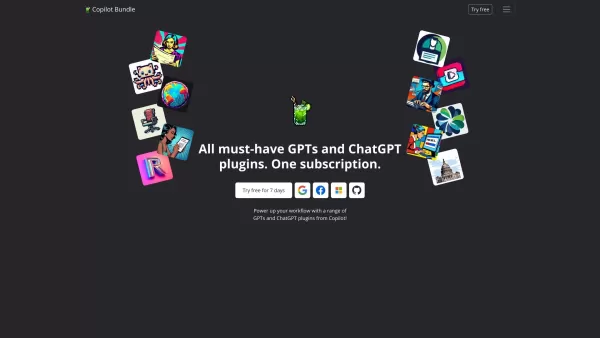
Copilot is an innovative suite of plugins and tools designed to enhance productivity and streamline various tasks within the ChatGPT platform. It's like having a digital assistant that's specialized in boosting your workflow, whether you're summarizing documents, searching the web, or managing job a

UniScribe is more than just a tool—it's a game-changer for anyone dealing with audio and video content. It's the go-to platform for transforming your spoken words into written text, and it does so with incredible efficiency. Whether you're working with audio files or videos, or even just a YouTube U

What is the Cici AI Chrome Extension? Cici is your personal browser AI assistant, powered by GPT technology. It can answer any of your questions, summarize complex webpages, provide fast full-text translation, intelligently organize and summarize sea
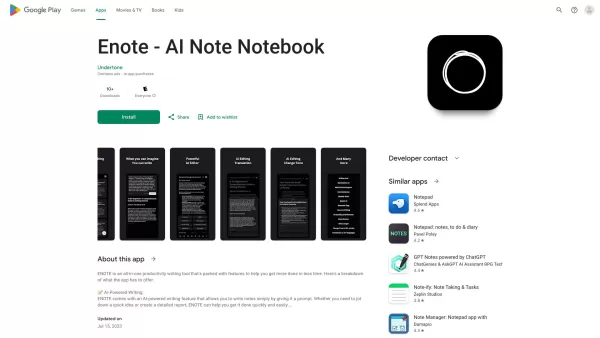
If you've ever found yourself juggling multiple notes and struggling to keep them polished, Enote might just be your new best friend. This isn't your average note-taking app; it's powered by AI to make your life easier. Imagine jotting down notes wit

Datasheet.Chat is your go-to AI assistant designed specifically for component engineers. It's like having a super-smart colleague who's always ready to dive into the nitty-gritty of hardware component datasheets and technical documentation. Whether you're
Mac Translation Product Information
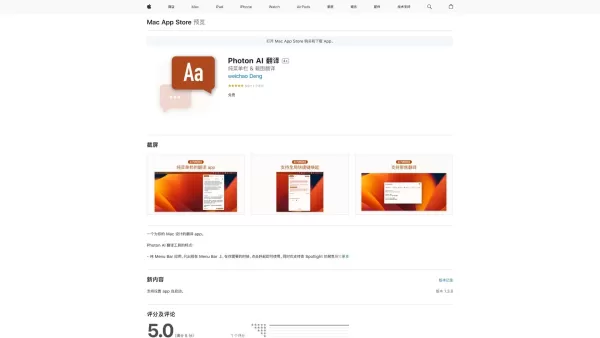
Ever found yourself wishing for a quick and easy way to translate texts on your Mac? Enter Mac Translation, an AI-powered gem designed just for Mac users. It's not just another translation tool; it's your new best friend for breaking language barriers, all from the comfort of your menu bar. Powered by the brains at OpenAI, this app makes translating feel like a breeze.
How to Get Started with Mac Translation?
Getting started with Mac Translation is as easy as pie. Just download and install the app on your Mac. Once it's up and running, you'll spot its icon chilling in your menu bar. A simple click on that icon, and you're ready to translate texts into a whole world of languages. No fuss, no muss—just pure, seamless translation at your fingertips.
What Makes Mac Translation Stand Out?
Menu Bar Convenience
Who needs a cluttered desktop when you can have all the translation power you need right in your menu bar? Mac Translation keeps things tidy and accessible, so you can focus on what matters—communicating across languages.
AI-Powered Magic
Thanks to OpenAI, Mac Translation isn't just translating; it's understanding. This means more accurate translations and a smarter way to connect with the world.
Multilingual Mastery
Whether you're dealing with emails, documents, or just curious about a new language, Mac Translation has you covered with support for multiple languages.
Your Personal Dictionary
Ever stumbled upon a word you don't know? Mac Translation's dictionary feature is there to help you find the definition and expand your vocabulary.
Grammar Guru
Struggling with grammar? No worries. Mac Translation's grammar check support is like having a personal tutor, helping you polish your writing.
Summarize Like a Pro
Got a long text or article to sift through? Let Mac Translation summarize the gist for you, so you can get to the point faster.
Real-World Uses for Mac Translation
- Email and Document Translation: Seamlessly translate emails or documents to communicate effectively with colleagues or friends around the globe.
- Language Learning: Use the dictionary feature to learn new words and their meanings, enhancing your language skills.
- Grammar Improvement: The built-in grammar check helps you refine your writing, making you sound like a native speaker.
- Quick Summaries: Save time by getting the main points of lengthy texts or articles in a snap.
Frequently Asked Questions About Mac Translation
- Is Mac Translation available for other platforms?
- Currently, Mac Translation is designed exclusively for Mac users. Keep an eye out for future updates, though!
- Does Mac Translation require an internet connection?
- Yes, to leverage the power of OpenAI, an internet connection is necessary for real-time translations.
- Can I translate texts in multiple languages at once?
- Mac Translation focuses on translating one text at a time, ensuring accuracy and quality in each translation.
- Does Mac Translation support voice translation?
- At the moment, Mac Translation is text-based. But who knows what the future holds? Stay tuned for potential voice translation features!
Mac Translation Screenshot


2026 Latest Best Top-rated AI Text to Speech Tools for Natural Voiceovers are here on XIX.AI! This curated list features powerful, game-changing options that deliver crystal-clear voices for every use case, backed by real-world tests and weekly updated rankings. Get a free vs paid comparison to find the must-try solution that boosts your productivity instantly. Explore now to Unlock your AI edge!
 11 tools
 xix.ai

2026 Latest Best Manga AI Background Generators Ranked Top-Rated! This curated collection showcases powerful game-changing tools perfect for creating high-quality chapter backgrounds, book covers, and promotional art. Every option has undergone rigorous real-world tests to ensure reliability. Get a free vs paid comparison along with detailed insights. Explore now to discover your perfect tool and unlock your AI edge in manga creation.
6 tools
xix.ai

2026 Latest Best Top-rated AI Object Removal Editors for portraits travel product shots! XIX.AI curates a powerful game-changing collection regularly updated with weekly rankings. These tools offer real-world tests to help you quickly remove unwanted elements, boost content quality, and save tons of time without compromising results. Must-try for anyone aiming to unlock their AI creation edge. Explore now!
10 tools
xix.ai

2026 Latest Best Top-rated AI Text to Speech Tools for Online Courses are curated by XIX.AI based on rigorous real-world tests and weekly updated rankings. These powerful tools help creators deliver crystal-clear audio content effortlessly, boosting writing efficiency and streamlining course production. Check out the free vs paid comparison to find your perfect fit. Explore now to unlock your AI edge in online education.
10 tools
xix.ai

2026 Latest Best Top-Rated AI Blog Title Tools for Higher Click Through Rates! XIX.AI has carefully curated a powerful, game-changing collection of top tools that go through rigorous real-world tests. You’ll find a free vs paid comparison, weekly updated rankings, and detailed insights to help you boost your blog’s traffic efficiently. Must-try options are highlighted to help you unlock your AI edge. Explore now!
10 tools
xix.ai

2026 Latest Best Top-rated AI Task Routing Tools for Support Workflows! XIX.AI has curated a highly powerful game-changing collection of must-try solutions, all undergoing rigorous real-world tests and updated weekly. These tools streamline workflows, boost productivity, and help teams deliver faster, more efficient support. Explore now to discover your perfect tool and unlock your AI edge!
17 tools
xix.ai


Mac Translation is a lifesaver for quick text translations on my Mac! 😍 Super intuitive and fast, it handles everything from emails to PDFs like a pro. Only wish it supported more niche languages. Still, my go-to for breaking language barriers!


