


 Home
HomeLocus - Smart CTRL F
Locus: Smart Web Search with Natural Language



Helps TikTok sellers, brands, MCNs, and TAPs discover winning products and find creators.

HelpLook is an AI-powered all-in-one knowledge base tool that helps businesses quickly build knowledge bases, help centers, and...

Your AI Workspace

302.AI is an enterprise-grade AI resource platform with pay-as-you-go pricing, API access to a full range of AI models, and ready-to-use online applications.

剧火AI — AI Screenwriter + Director, a One-Person Short Drama Studio In one sentence, what is it?

Ever stumbled upon Cherry Studio AI and wondered what it's all about? Well, let me break it down for you. Cherry Studio AI isn't just another run-of-the-mill AI tool; it's a powerhouse desktop client that lets you dive into advanced AI interactions across

Discover Plume AI: Your Ultimate Academic Writing AssistantAre you tired of struggling with your academic writing? Well, say hello to Plume AI, the innovative AI assistant that's here to revolutionize the way you write! Designed with students in mind, Plume AI harnesses the power of cutting-edge art

Ever wondered how to turn your jumbled thoughts and complex queries into something you can actually grasp? Enter The Visualizer, your new best friend in the world of learning and creativity. This nifty tool takes your written queries, URLs, and even PDFs,

Ever wished for a trusty sidekick to help you navigate the digital world with ease? Enter Sider, your personal AI companion designed to seamlessly blend into your daily routine. Starting off as a handy Chrome/Edge extension, Sider transforms your browsing

Ever wondered what Ninja AI is all about? Well, let me tell you, it's like having a Swiss Army knife for your digital needs! Ninja AI isn't just another AI tool; it's a powerhouse that brings together over 24 top-notch Large Language Models (LLMs) to help
Locus - Smart CTRL F Product Information
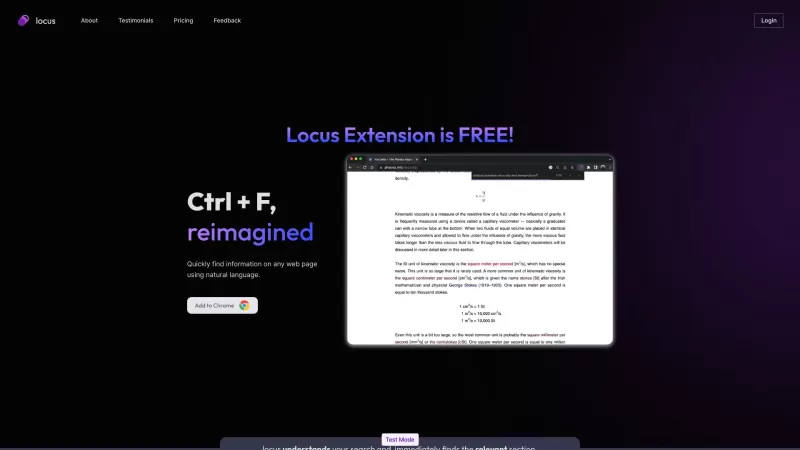
Ever felt overwhelmed trying to sift through endless pages of content online? Enter Locus - Smart CTRL F, a game-changer for anyone who's ever wished they could just talk to their browser and find what they need instantly. This nifty tool transforms the traditional CTRL+F function into a smart, natural language-powered search wizard, making it a breeze to pinpoint the exact information you're looking for on any web page. Whether you're tackling long research papers, dense articles, or just want to quickly jump to a specific section, Locus gets you there faster and with less hassle.
How to Use Locus - Smart CTRL F?
Getting started with Locus is as easy as pie. Just head over to the Chrome Web Store and add the Locus extension to your browser. Once it's installed, you're ready to roll. Simply press Ctrl + F to activate Locus, and instead of wrestling with exact keywords, you can now type in your query in plain English. Locus will understand what you're after and whisk you straight to the relevant part of the page. It's like having a personal assistant for your browsing sessions, making your searches not just quicker, but also way more enjoyable.
Locus - Smart CTRL F's Core Features
- Smart CTRL+F with Natural Language Search: Say goodbye to the days of hunting for the perfect keyword. Locus lets you search the way you think.
- Quickly Find Information on Any Web Page: No matter the length or complexity of the content, Locus helps you find what you need in a snap.
- Refer Back to Sections in Long Documents: Perfect for students and researchers who need to revisit sections without endless scrolling.
- PDF Support Coming Soon: Get ready for even more versatility as Locus plans to support PDF searches in the near future.
- Save Time on Long Content: With Locus, you spend less time searching and more time understanding and using the information you find.
Locus - Smart CTRL F's Use Cases
From busy professionals to dedicated students, Locus has proven to be a lifesaver. Take, for example, an analyst at Goldman Sachs who swears by Locus for quickly navigating through morning news articles. "I read the news every morning before work and I need to do so fast. Locus has helped me figure out what parts of each article I should spend my time on," they rave. Or consider the research assistant at Penn CURF, who finds dense academic papers much more manageable with Locus's help. And let's not forget the student at a University in NJ who praises Locus for making it easy to refer back to sections in their online physics textbook without the hassle of sifting through all the CTRL+F matches.
FAQ from Locus - Smart CTRL F
- What makes Locus different from regular CTRL+F?
- Locus uses natural language processing, allowing you to search using everyday language, making your searches more intuitive and effective.
- Will Locus support PDF search in the future?
- Yes, PDF search support is on the roadmap and will be available soon, expanding Locus's utility even further.
- Is Locus available for browsers other than Chrome?
- Currently, Locus is designed for Chrome, but keep an eye out for future updates as the team considers expanding to other browsers.
- How can I provide feedback to Locus?
- Your feedback is valuable! You can reach out through the Locus Discord community or directly via the support email provided below.
- Locus - Smart CTRL F Discord: Join the Conversation. For more Discord messages, please click [here].
- Locus - Smart CTRL F Support Email & Customer Service Contact & Refund Contact: [email protected].
- Locus - Smart CTRL F Company: Locus AI LLC. More about Locus - Smart CTRL F, please visit the about us page.
- Locus - Smart CTRL F Login: Log in here.
- Locus - Smart CTRL F Sign Up: Sign up here.
- Locus - Smart CTRL F Pricing: Check out the pricing.
- Locus - Smart CTRL F TikTok: Follow us on TikTok.
- Locus - Smart CTRL F LinkedIn: Connect on LinkedIn.
- Locus - Smart CTRL F Instagram: Follow us on Instagram.
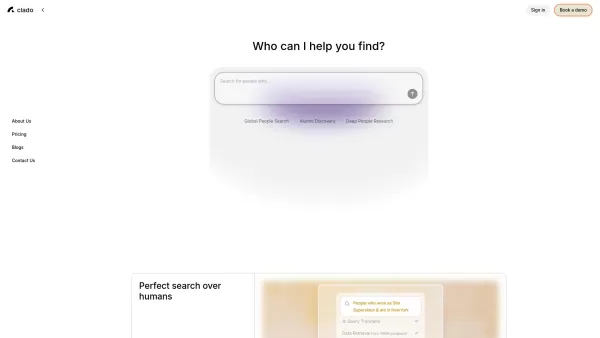
Locus - Smart CTRL F Screenshot

Discover the 2026 lineup of top-rated AI assistant tools curated at XIX.AI. Compare game-changing, powerful solutions for automated customer support and chat. Get weekly updated rankings, free vs. paid comparisons, and real-world tests to boost efficiency and satisfaction. Find your perfect automation partner now.
 10 tools
 xix.ai


