


 Home
HomeLingoCloud - Chrome Extension



Helps TikTok sellers, brands, MCNs, and TAPs discover winning products and find creators.

HelpLook is an AI-powered all-in-one knowledge base tool that helps businesses quickly build knowledge bases, help centers, and...

Your AI Workspace

302.AI is an enterprise-grade AI resource platform with pay-as-you-go pricing, API access to a full range of AI models, and ready-to-use online applications.

剧火AI — AI Screenwriter + Director, a One-Person Short Drama Studio In one sentence, what is it?
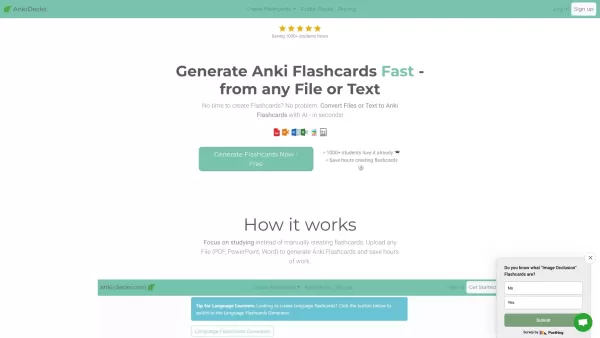
What is anki-decks.com?Anki Decks is an AI-powered platform that creates Anki flashcards from various content sources like YouTube videos, PDFs, and text documents. It saves users considerable time spent on manual flashcard creation. Designed to
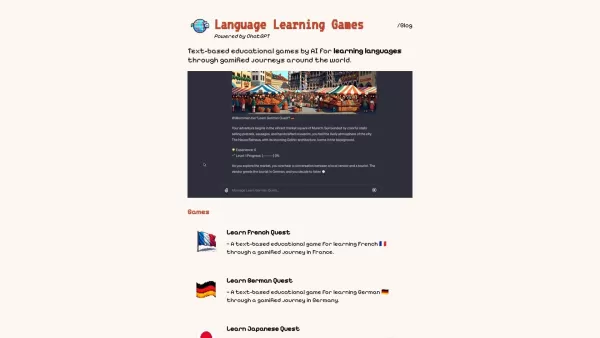
What Are Language Learning Games?LangLearnGames offers a fun and unique approach to language learning by blending educational lessons with interactive gameplay. Users engage with a variety of games designed to build vocabulary, improve grammar, and p

Ever wished you had a language teacher right in your pocket, ready to chat whenever you are? Well, meet Teacher AI—your personal language coach on the go! It's not just about learning; it's about engaging in real conversations in over 25 languages, making your language journey fun and effective, all
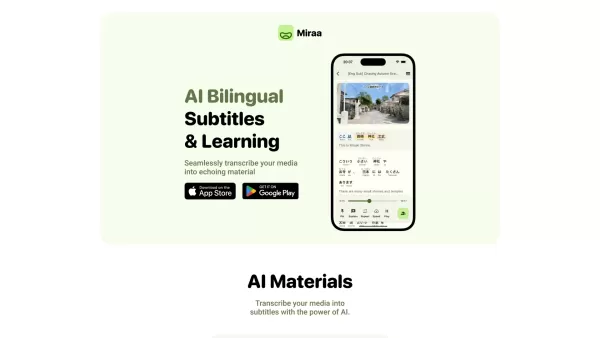
Ever wondered how you could level up your language learning game? Say hello to Miraa AI, brought to you by Myoland! This innovative tool transforms any video into a bilingual learning experience, complete with subtitles, real-time translations, shadowing

Atomic Learning is an innovative online platform that revolutionizes the way people learn languages. It uses AI to generate daily audio challenges, making language acquisition as easy as spending just a minute a day on it. Whether you're a beginner or a native speaker, the platform offers a plethora
LingoCloud - Chrome Extension Product Information
What is the LingoCloud AI Chrome Extension?
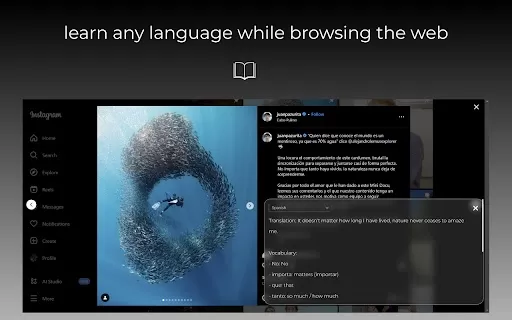
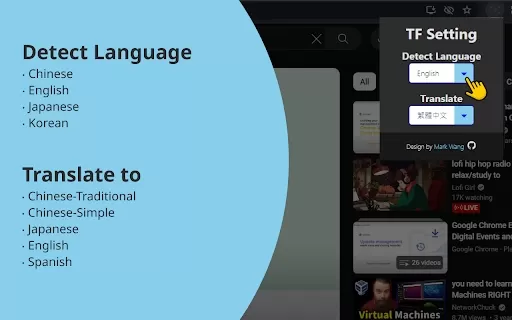
LingoCloud is a powerful tool that helps users break through language barriers as they browse the internet. It enables users to view any website in their preferred language, even if the site was originally in another language. For language learners and proficient speakers, LingoCloud also unlocks a wealth of online reading materials to enrich their study and practice.
How to Use the LingoCloud AI Chrome Extension
1. Click the LingoCloud icon on any English page to activate the Chinese-English side-by-side reading mode. 2. Click on any translated text to review and edit the translation, earning Cloud Points for your contributions. 3. Simply select any text on English or Japanese websites for instant word translation. 4. Activate video translation to get real-time translated subtitles for English videos. 5. Customize all settings for text, page, and video translation on the extension's options page.
LingoCloud AI Chrome Extension's Core Features
Full website translation into your native language
Chinese-English parallel text mode
Editable translations with Cloud Point rewards
Instant word translation on English/Japanese pages
Real-time video subtitle translation
LingoCloud AI Chrome Extension's Use Cases
Browse any foreign website effortlessly in your own language.
Enhance your language skills by reading translations and improving them yourself.
Instantly understand unfamiliar vocabulary on English or Japanese sites.
Watch English-language videos with live-translated subtitles.
Frequently Asked Questions
Which languages does LingoCloud support?
How do I earn Cloud Points?
Where do I adjust the translation settings?
LingoCloud - Chrome Extension Screenshot



2026 Latest Best Top-rated AI Text to Speech Tools for Online Courses are curated by XIX.AI based on rigorous real-world tests and weekly updated rankings. These powerful tools help creators deliver crystal-clear audio content effortlessly, boosting writing efficiency and streamlining course production. Check out the free vs paid comparison to find your perfect fit. Explore now to unlock your AI edge in online education.
 10 tools
 xix.ai

2026 Latest Best Top-Rated AI Blog Title Tools for Higher Click Through Rates! XIX.AI has carefully curated a powerful, game-changing collection of top tools that go through rigorous real-world tests. You’ll find a free vs paid comparison, weekly updated rankings, and detailed insights to help you boost your blog’s traffic efficiently. Must-try options are highlighted to help you unlock your AI edge. Explore now!
10 tools
xix.ai

2026 Latest Best Top-rated AI Task Routing Tools for Support Workflows! XIX.AI has curated a highly powerful game-changing collection of must-try solutions, all undergoing rigorous real-world tests and updated weekly. These tools streamline workflows, boost productivity, and help teams deliver faster, more efficient support. Explore now to discover your perfect tool and unlock your AI edge!
17 tools
xix.ai

2026 Latest Best Top-Rated AI Citation and Paper Summary Tools Curated by XIX.AI. Get powerful game-changing solutions for quick content creation, improved writing efficiency, and boosting productivity. We offer a free vs paid comparison along with real-world tests and weekly updated rankings to help you find the must-try tool that fits your needs perfectly. Explore now to Unlock your AI edge.
10 tools
xix.ai

2026 Latest Best Top-Rated AI Productivity Tools for Daily Work! XIX.AI has curated a powerful, game-changing selection based on rigorous weekly updated rankings and real-world tests. You’ll find must-try options that boost writing efficiency, streamline content creation, and help you overcome daily work challenges. Get a free vs paid comparison to find the perfect fit for your needs. Explore now to unlock your AI edge!
9 tools
xix.ai

2026 Latest Best Top-Rated AI Systematic Review Tools for Research Screening are here on XIX.AI! This curated collection includes powerful, game-changing solutions that go through rigorous real-world tests to deliver accurate results. We also offer a free vs paid comparison along with weekly updated rankings to help you find the must-try option that boosts your research efficiency significantly. Explore now to unlock your AI edge in academic work!
11 tools
xix.ai


