


 Home
HomeKeo Task Management
AI Task Management for Professionals



Helps TikTok sellers, brands, MCNs, and TAPs discover winning products and find creators.

HelpLook is an AI-powered all-in-one knowledge base tool that helps businesses quickly build knowledge bases, help centers, and...

Your AI Workspace

302.AI is an enterprise-grade AI resource platform with pay-as-you-go pricing, API access to a full range of AI models, and ready-to-use online applications.

剧火AI — AI Screenwriter + Director, a One-Person Short Drama Studio In one sentence, what is it?

Ever heard of Grok? It's this nifty AI assistant from xAI that's all about giving you the straight scoop. And the best part? It's totally free! Grok isn't just your average AI; it's packed with cool features like real-time search, image generation, and tr

Ever wondered what Qwen AI is all about? Well, let me introduce you to this gem from Alibaba Cloud. Qwen AI is not your average language model; it's a powerhouse designed to be your go-to buddy for everything from whipping up text to coding, and even reco

Discover Plume AI: Your Ultimate Academic Writing AssistantAre you tired of struggling with your academic writing? Well, say hello to Plume AI, the innovative AI assistant that's here to revolutionize the way you write! Designed with students in mind, Plume AI harnesses the power of cutting-edge art

Ever wished for a trusty sidekick to help you navigate the digital world with ease? Enter Sider, your personal AI companion designed to seamlessly blend into your daily routine. Starting off as a handy Chrome/Edge extension, Sider transforms your browsing

Ever wondered what Ninja AI is all about? Well, let me tell you, it's like having a Swiss Army knife for your digital needs! Ninja AI isn't just another AI tool; it's a powerhouse that brings together over 24 top-notch Large Language Models (LLMs) to help
Keo Task Management Product Information
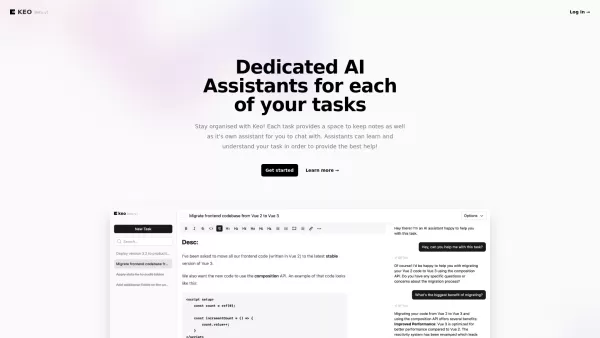
Ever found yourself juggling a million tasks and wishing for a bit of help? That's where Keo Task Management steps in. It's not just another app; it's like having a personal assistant in your pocket. Designed specifically for individual professionals, Keo is all about keeping you organized and laser-focused on your work. With an AI assistant and a notes feature for each task, it's like having a mini command center for your daily grind.
How to Dive into Keo Task Management
Getting started with Keo is a breeze. Just hop onto their site, log in, and start creating tasks. The beauty of Keo? Each task you create comes with its own AI sidekick and a dedicated space for notes. It's like having a personal coach and a notebook rolled into one, helping you navigate through your workday with ease.
What Makes Keo Tick?
Dedicated AI Assistants for Each Task
Imagine having a smart assistant for every single task on your list. That's what Keo offers. These AI buddies are there to help you stay on track, offer suggestions, and keep you motivated.
Notes Space for Each Task
Forget about scattered sticky notes or lost pieces of paper. Keo gives you a dedicated space to jot down everything you need to remember for each task. It's all in one place, so you never miss a beat.
Easy to Use, Modern Interface
Keo's interface isn't just easy on the eyes; it's designed to be user-friendly. No fuss, no muss—just a clean, modern look that makes managing your tasks a pleasure.
When to Reach for Keo
Keep Track of Tasks in a Modern Interface
If you're tired of outdated to-do lists and want something that feels fresh and modern, Keo is your go-to. It's perfect for anyone looking to streamline their task management with a sleek interface.
Stay Organized and Focused with AI Assistants and Notes for Each Task
When your day is packed with tasks and you need a way to stay organized and focused, Keo's AI assistants and notes feature are like having a personal organizer on speed dial. They help you keep everything in order, so you can focus on what really matters.
FAQ from Keo Task Management
- Is Keo free to use?
- Yes, Keo is free to use, making it accessible for everyone looking to get their tasks under control.
- Can I chat with the AI assistant for each task?
- Absolutely! Each task's AI assistant is there to chat with you, offering guidance and support as you work through your to-do list.
Keo Task Management is brought to you by Keo.dev. If you're ready to give it a try, you can log in at Keo Login or sign up at Keo Sign Up.
Keo Task Management Screenshot


2026 Latest Best Top-rated AI Object Removal Editors for portraits travel product shots! XIX.AI curates a powerful game-changing collection regularly updated with weekly rankings. These tools offer real-world tests to help you quickly remove unwanted elements, boost content quality, and save tons of time without compromising results. Must-try for anyone aiming to unlock their AI creation edge. Explore now!
 10 tools
 xix.ai

2026 Latest Best Top-rated AI Text to Speech Tools for Online Courses are curated by XIX.AI based on rigorous real-world tests and weekly updated rankings. These powerful tools help creators deliver crystal-clear audio content effortlessly, boosting writing efficiency and streamlining course production. Check out the free vs paid comparison to find your perfect fit. Explore now to unlock your AI edge in online education.
10 tools
xix.ai

2026 Latest Best Top-Rated AI Blog Title Tools for Higher Click Through Rates! XIX.AI has carefully curated a powerful, game-changing collection of top tools that go through rigorous real-world tests. You’ll find a free vs paid comparison, weekly updated rankings, and detailed insights to help you boost your blog’s traffic efficiently. Must-try options are highlighted to help you unlock your AI edge. Explore now!
10 tools
xix.ai

2026 Latest Best Top-rated AI Task Routing Tools for Support Workflows! XIX.AI has curated a highly powerful game-changing collection of must-try solutions, all undergoing rigorous real-world tests and updated weekly. These tools streamline workflows, boost productivity, and help teams deliver faster, more efficient support. Explore now to discover your perfect tool and unlock your AI edge!
17 tools
xix.ai

2026 Latest Best Top-Rated AI Citation and Paper Summary Tools Curated by XIX.AI. Get powerful game-changing solutions for quick content creation, improved writing efficiency, and boosting productivity. We offer a free vs paid comparison along with real-world tests and weekly updated rankings to help you find the must-try tool that fits your needs perfectly. Explore now to Unlock your AI edge.
10 tools
xix.ai

2026 Latest Best Top-Rated AI Productivity Tools for Daily Work! XIX.AI has curated a powerful, game-changing selection based on rigorous weekly updated rankings and real-world tests. You’ll find must-try options that boost writing efficiency, streamline content creation, and help you overcome daily work challenges. Get a free vs paid comparison to find the perfect fit for your needs. Explore now to unlock your AI edge!
9 tools
xix.ai


Just tried Keo and honestly, it feels like I finally hired that organized assistant I keep dreaming about. The interface is clean and doesn’t overwhelm me like Trello sometimes does. I’m managing my freelance projects way better now, though I do worry about the subscription cost kicking in after the trial 😅. Solid 4.5/5 for now!


