


 Home
HomeJumper
AI Video Search Tool for Editing



Helps TikTok sellers, brands, MCNs, and TAPs discover winning products and find creators.

HelpLook is an AI-powered all-in-one knowledge base tool that helps businesses quickly build knowledge bases, help centers, and...

Your AI Workspace

302.AI is an enterprise-grade AI resource platform with pay-as-you-go pricing, API access to a full range of AI models, and ready-to-use online applications.

剧火AI — AI Screenwriter + Director, a One-Person Short Drama Studio In one sentence, what is it?

Introducing AniEraser: The Ultimate AI Clothes RemoverIf you've ever wanted to edit photos like a pro without the hassle of complicated tools or software installations, AniEraser is here to change the game. This cutting-edge online tool uses advanced AI t

What is Undressbaby AI?Undressbaby is a cutting-edge, AI-driven platform that lets users creatively alter their photos and videos. From swapping faces to trying on virtual outfits, it offers a simple yet powerful solution. Just upload your media, and
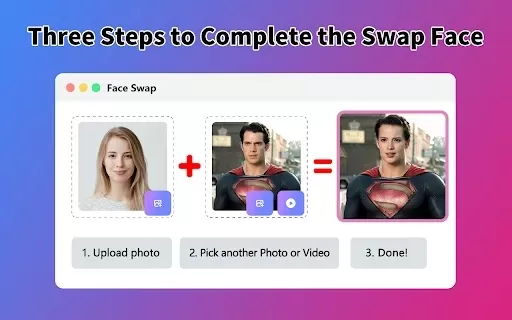
What is Face Swap - AI Face Swapper?Face Swap AI Face Swapper is a cutting-edge online tool that enables effortless face swapping in photos and videos. Powered by sophisticated artificial intelligence, it allows you to seamlessly replace faces, swap

Ever wanted to give your videos a quirky twist or a professional touch? Look no further than KreadoAI Video Face Swap! This nifty tool is a game-changer for anyone looking to seamlessly replace faces in videos. What's even better? It's absolutely free and

What is VideoWatermarkRemover AI? VideoWatermarkRemover is a free, AI-powered online tool that quickly and easily removes watermarks from videos. It supports popular formats like MP4, MOV, and AVI, and can detect and erase both static and moving wate
Jumper Product Information
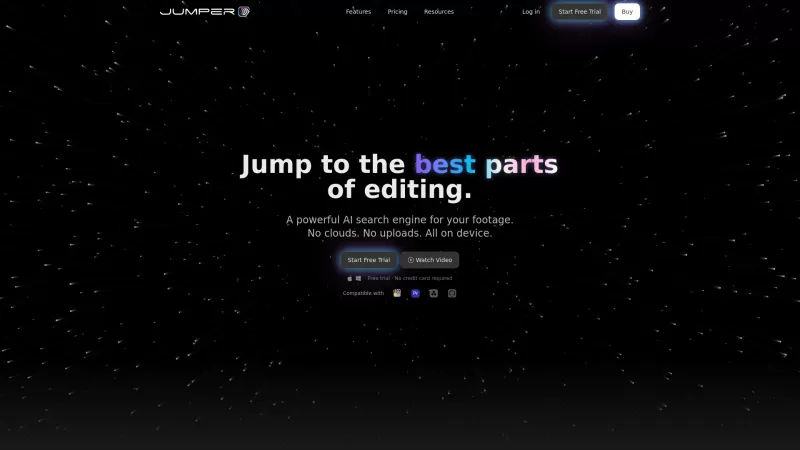
Ever found yourself sifting through hours of footage just to find that one perfect clip? Well, say hello to Jumper, the AI-powered search engine that's here to revolutionize your video editing process. With its ability to pinpoint specific moments in your footage using natural language search and speech recognition, Jumper makes your life as a video editor so much easier. And the best part? It all happens offline, keeping your workflow smooth and uninterrupted.
How to Use Jumper?
Getting started with Jumper is a breeze. Just integrate it into your favorite non-linear editing (NLE) software, and you're good to go. Type in keywords or even speak out phrases, and Jumper will dive into your footage to find the clips you need. It's like having a personal assistant dedicated to your editing needs!
Jumper's Core Features
Natural Language Search for Footage
Forget about scrolling endlessly through your timeline. With Jumper, you can search for footage using everyday language. Want to find that moment where the interviewee said something specific? Just type it in, and Jumper will find it for you.
Instant Speech Search
Ever wished you could search your footage by spoken words? Jumper makes it possible. It listens to your audio and matches it with your search terms, giving you instant results.
Find Similar Clips
Need more of the same type of shot? Jumper can find similar clips in your footage, making your editing process even more efficient.
Integrated into Major NLEs
Whether you're using Adobe Premiere, Final Cut Pro, or another major NLE, Jumper fits right in. It's designed to enhance your existing workflow, not disrupt it.
Works Offline with No Latency
No internet? No problem. Jumper works entirely offline, ensuring that your search results are instantaneous and your editing process remains uninterrupted.
Jumper's Use Cases
Quickly Locate Interview Segments by Searching for Specific Dialogue
Imagine you're working on a documentary and need to find every instance where the interviewee mentions a particular topic. With Jumper, you can search for that dialogue and locate those segments in seconds.
Find Matching Footage for Precise Editing Tasks
Whether you're looking for B-roll that matches a specific scene or need to find footage that complements your narrative, Jumper helps you find the perfect match quickly.
Streamline Video Editing Workflow by Reducing Search Time
By cutting down the time you spend searching for footage, Jumper allows you to focus more on the creative aspects of your editing. It's like having more time to perfect your craft.
FAQ from Jumper
- Does Jumper work offline?
- Yes, Jumper operates entirely offline, ensuring no latency and smooth performance.
- Can I use Jumper with NDA footage?
- Absolutely, Jumper is designed to work with all types of footage, including that under non-disclosure agreements.
- What NLE software does Jumper support?
- Jumper integrates seamlessly with major NLEs like Adobe Premiere, Final Cut Pro, and others.
- Jumper Support Email & Customer Service Contact & Refund Contact etc.
Here is the Jumper support email for customer service:[\[email protected\]](/cdn-cgi/l/email-protection#5d35383131321d3a38293728302d382f733432). For more contact options, visit [the contact us page(mailto:\[email protected\])](/cdn-cgi/l/email-protection#553d3039393a153230213f20382530277b3c3a).
- Jumper Company
Jumper Company name: Witchcraft Software AB.
Jumper Company address: Sweden.
- Jumper Login
Jumper Login Link:
- Jumper Pricing
Jumper Pricing Link:
Jumper Screenshot

2026 Latest Best Manga AI Background Generators Ranked Top-Rated! This curated collection showcases powerful game-changing tools perfect for creating high-quality chapter backgrounds, book covers, and promotional art. Every option has undergone rigorous real-world tests to ensure reliability. Get a free vs paid comparison along with detailed insights. Explore now to discover your perfect tool and unlock your AI edge in manga creation.
 6 tools
 xix.ai

2026 Latest Best Top-rated AI Object Removal Editors for portraits travel product shots! XIX.AI curates a powerful game-changing collection regularly updated with weekly rankings. These tools offer real-world tests to help you quickly remove unwanted elements, boost content quality, and save tons of time without compromising results. Must-try for anyone aiming to unlock their AI creation edge. Explore now!
10 tools
xix.ai

2026 Latest Best Top-rated AI Text to Speech Tools for Online Courses are curated by XIX.AI based on rigorous real-world tests and weekly updated rankings. These powerful tools help creators deliver crystal-clear audio content effortlessly, boosting writing efficiency and streamlining course production. Check out the free vs paid comparison to find your perfect fit. Explore now to unlock your AI edge in online education.
10 tools
xix.ai

2026 Latest Best Top-Rated AI Blog Title Tools for Higher Click Through Rates! XIX.AI has carefully curated a powerful, game-changing collection of top tools that go through rigorous real-world tests. You’ll find a free vs paid comparison, weekly updated rankings, and detailed insights to help you boost your blog’s traffic efficiently. Must-try options are highlighted to help you unlock your AI edge. Explore now!
10 tools
xix.ai

2026 Latest Best Top-rated AI Task Routing Tools for Support Workflows! XIX.AI has curated a highly powerful game-changing collection of must-try solutions, all undergoing rigorous real-world tests and updated weekly. These tools streamline workflows, boost productivity, and help teams deliver faster, more efficient support. Explore now to discover your perfect tool and unlock your AI edge!
17 tools
xix.ai

2026 Latest Best Top-Rated AI Citation and Paper Summary Tools Curated by XIX.AI. Get powerful game-changing solutions for quick content creation, improved writing efficiency, and boosting productivity. We offer a free vs paid comparison along with real-world tests and weekly updated rankings to help you find the must-try tool that fits your needs perfectly. Explore now to Unlock your AI edge.
10 tools
xix.ai


This Jumper tool is a total game-changer for my video editing workflow! 🎥⚡ No more endless scrubbing through footage to find that golden moment. The AI's accuracy in pinpointing exact scenes is almost magical. Saves me hours on every project. Only wish it had better support for older file formats. 5/5 would recommend to any editor!


