


 Home
HomeJulius AI - Analyze Google Sheets with ChatGPT
Julius AI: Advanced Google Sheets AI Analytics



Helps TikTok sellers, brands, MCNs, and TAPs discover winning products and find creators.

HelpLook is an AI-powered all-in-one knowledge base tool that helps businesses quickly build knowledge bases, help centers, and...

Your AI Workspace

302.AI is an enterprise-grade AI resource platform with pay-as-you-go pricing, API access to a full range of AI models, and ready-to-use online applications.

剧火AI — AI Screenwriter + Director, a One-Person Short Drama Studio In one sentence, what is it?

What is Originality?Originality.AI is an advanced AI-powered platform built to identify AI-generated text and detect plagiarism. It serves writers, publishers, and educators by verifying the authenticity and originality of content. The tool utilizes

What is Altsite?Altsite is a browser extension that helps users find websites similar to the one they're currently visiting. Using advanced AI technology, it analyzes website content and instantly generates a list of related sites. This tool is ideal

What is Hive AI Detector?Hive AI Detector uses advanced machine learning to analyze various types of media and determine whether they were generated or altered by artificial intelligence. This tool is ideal for journalists, educators, marketers, and

What is Lilybank AI? Lilybank AI is a game-changer in the world of content creation. It's like having a team of AI wizards at your fingertips, ready to churn out high-quality content faster than you can say "publish." From crafting compelling blog posts t

What is Rosebud?Rosebud.ai is a cutting-edge platform that uses generative AI to streamline the game development workflow. It offers a suite of tools to produce game assets—including characters, environments, and textures—and to animate avatars using
Julius AI - Analyze Google Sheets with ChatGPT Product Information
What is Julius AI and How Does It Work with Google Sheets?
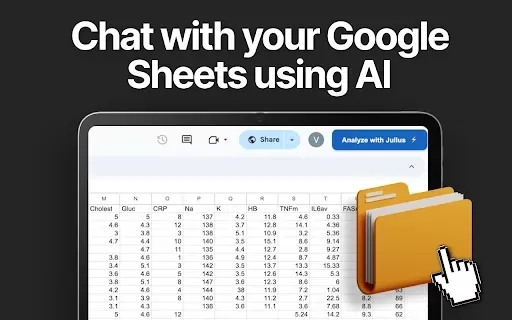
Julius AI is a Chrome extension that integrates AI-powered analytics directly into Google Sheets. It empowers users to engage with their data through real-time analysis, automated reporting, and dynamic visualizations. By leveraging ChatGPT, the tool simplifies intricate data tasks and supports better decision-making with its accessible features. Ideal for both business and academic contexts, it provides an intuitive solution for unlocking the full value of your data.
Who is Julius AI Designed For?
- Business Professionals
- Students and Academics
- Data Analysts
- Educators
- Researchers
How to Get Started with Julius AI
- Step 1: Install the Julius AI extension from the Chrome Web Store.
- Step 2: Launch Google Sheets and open your spreadsheet.
- Step 3: Click the Julius AI icon in your browser to activate it.
- Step 4: Start analyzing by asking questions or requesting insights.
- Step 5: Apply the generated charts and reports to your work.
Platform Availability
- Web
- Chrome Browser
Julius AI - Analyze Google Sheets with ChatGPT's Core Features & Benefits
The Core Features
- Interactive Data Visualization
- Automated Report Generation
- AI-Driven Data Analysis
- Custom Graph Creation
The Benefits
- Significant Time Savings
- Deeper Data Understanding
- Informed Decision Support
- Simple, Intuitive Interface
Julius AI - Analyze Google Sheets with ChatGPT's Main Use Cases & Applications
- Generating Business Intelligence
- Supporting Educational Data Projects
- Analyzing Research Datasets
FAQs of Julius AI - Analyze Google Sheets with ChatGPT
What is Julius AI?
Julius AI is a Chrome extension that supercharges Google Sheets with advanced AI analytics.
How does Julius AI work?
The extension employs AI to analyze spreadsheet data, produce reports, and build visual charts.
Can I use Julius AI for free?
A free version is available, with enhanced features accessible through a premium plan.
Is Julius AI easy to use?
Yes, its interface is straightforward and welcoming for users of all experience levels.
What types of data can I analyze?
You can analyze any dataset that can be imported into Google Sheets.
Does Julius AI integrate with other tools?
Its primary integration is with Google Sheets, with potential for more connections later.
Is my data secure with Julius AI?
Data security and user privacy are fundamental priorities for Julius AI.
Can Julius AI generate graphs?
Yes, it automatically creates a variety of graphs from your data.
Do I need coding skills to use Julius AI?
No coding knowledge is necessary to operate the extension.
What if I encounter issues using Julius AI?
Contact the customer support team for prompt help and troubleshooting.
Julius AI - Analyze Google Sheets with ChatGPT Company Information
- Julius AI
- https://julius.ai/
Julius AI - Analyze Google Sheets with ChatGPT Screenshot




2026 Latest Best Top-rated AI SERP Analysis Tools for Search Strategy are curated by XIX.AI through rigorous real-world tests and weekly updated rankings. These powerful tools help you unlock hidden optimization opportunities, boost content performance, and gain a competitive edge in search. Discover your perfect tool to elevate your search strategy today. Explore now!
 13 tools
 xix.ai

2026 Latest Best Top-rated AI Anomaly Detection Tools for KPI Monitoring in SaaS and Ecommerce teams! XIX.AI has curated a powerful, game-changing collection based on rigorous real-world tests and weekly updated rankings. You’ll find detailed free vs paid comparison insights to help you identify the must-try solution that boosts productivity and unlocks your AI edge. Explore now!
10 tools
xix.ai

2026 Latest Best Top-Rated AI Outline Generators for Long-Form SEO Articles, meticulously curated by XIX.AI. These powerful tools offer game-changing assistance in creating high-quality content quickly, boosting writing efficiency significantly. Get a free vs paid comparison along with real-world tests and detailed rankings to help you find the must-try option that suits your needs. Explore now to unlock your AI edge.
8 tools
xix.ai

2026 Latest Best AI Study Tools for Homework and Exam Prep! XIX.AI curates a top-rated list of powerful, game-changing tools that help students boost productivity, streamline homework completion, and ace exams through real-world tests. Get a free vs paid comparison, detailed rankings, and must-try options to unlock your AI edge. Explore now!
10 tools
xix.ai

2026 Latest Best AI Vocal Demo Tools for Songwriters, Hook Creators, and Multi-Language Content Teams! XIX.AI has curated a top-rated list of powerful game-changing tools that go through rigorous real-world tests. You’ll find detailed free vs paid comparison data, comprehensive rankings, and must-try options to help you boost writing efficiency and unlock your creative potential. Explore now to discover your perfect tool for all your content needs!
9 tools
xix.ai

2026 Latest Best Top-rated AI Competitive Research Tools for Small Businesses! XIX.AI has curated a highly powerful game-changing collection, updated weekly with rigorous real-world tests and detailed rankings. You can find a comprehensive free vs paid comparison to help you identify the must-try tools that boost your productivity and give you a competitive edge. Explore now to discover your perfect tool!
9 tools
xix.ai


Just tried Julius AI in Sheets and it's a game-changer! No more manual pivot tables, just ask questions in plain English and get instant insights. The automated reporting feature saved me hours on my monthly sales dashboard. Only wish it had more visualization options. Definitely recommend for anyone drowning in spreadsheet data! 📊✨


