


 Home
HomeImage To Video
Image to Video AI: Create Videos Fast



Helps TikTok sellers, brands, MCNs, and TAPs discover winning products and find creators.

HelpLook is an AI-powered all-in-one knowledge base tool that helps businesses quickly build knowledge bases, help centers, and...

Your AI Workspace

302.AI is an enterprise-grade AI resource platform with pay-as-you-go pricing, API access to a full range of AI models, and ready-to-use online applications.

剧火AI — AI Screenwriter + Director, a One-Person Short Drama Studio In one sentence, what is it?

What is Banana AI - Free AI Photo Editor?Banana AI is a free, AI-driven photo editor that uses Google's Nano Banana technology (Gemini 2.5 Flash Image) to transform your pictures with simple text commands. Easily remove unwanted objects, swap backgro

What is Deepfake Maker Nano Banana AI? Nano Banana AI is an advanced artificial intelligence platform that generates stunning images from text descriptions and facilitates seamless image-to-image transformations. This cutting-edge AI model revolution

What is Line Art Maker?Line Art Maker is an intuitive application that effortlessly transforms your photos into stunning line drawings. Powered by sophisticated algorithms, it precisely identifies outlines and turns your images into detailed sketches

What is TranslateImages?AI Image Translator is an advanced tool that precisely translates text embedded in images, keeping the original layout and format intact. It supports over a dozen languages, such as English, Hindi, Arabic, Chinese, Japanese, K

What is Nano Banana | Nanana AI? Nanana AI is the leading AI image generator and AI image editor on the market. It taps into the full potential of Google's revolutionary Nano Banana model to offer unmatched image creation and editing power. As an ear
Image To Video Product Information
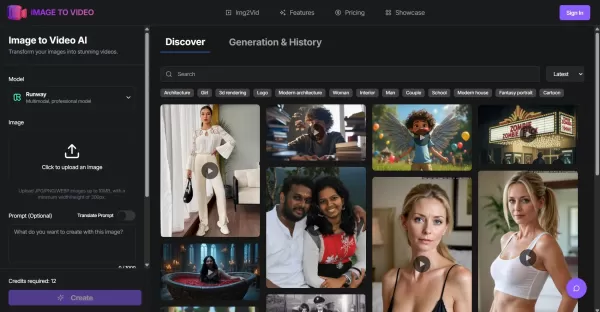
What is Image to Video AI?
Image to Video AI is a cutting-edge application that utilizes advanced artificial intelligence to convert static photographs into fluid, realistic videos. It enables you to upload your images, personalize animation effects, length, and quality, and rapidly produce videos of professional caliber. This tool is perfect for content producers, marketing professionals, teachers, and companies, as it elevates visual narratives without the need for prior video editing knowledge.
Who is Image To Video designed for?
- Content Creators
- Digital Marketers
- Educators and Trainers
- E-commerce Businesses
- Social Media Managers
How does Image To Video work?
- Step 1: Upload your image in JPG, PNG, or WEBP format.
- Step 2: Select your preferred video length, style, and motion effects.
- Step 3: Allow the AI to create your video in just a few minutes.
- Step 4: Download and distribute your high-definition video.
Platform Availability
- Web
Core Features & Benefits of Image To Video
Key Features
- Sophisticated AI technology for seamless video production
- A variety of animation styles and customizable effects
- High-definition video output, supporting up to 4K resolution
- Batch processing capability for handling numerous images
- Adjustable video length and playback speed
Key Benefits
- Create videos quickly and effortlessly, no technical expertise required
- Boost audience engagement and improve visual communication
- Reduce both production time and associated expenses
- Adaptable for use across different sectors and purposes
- Simple, easy-to-navigate user interface
Primary Use Cases & Applications
- Crafting and promoting content for social media platforms
- Developing product showcases and videos for online stores
- Creating instructional and training materials
- Producing preview videos for real estate listings
- Building creative narratives and professional presentations
Advantages & Limitations of Image To Video
Advantages
Produces high-quality videos powered by AI
Rapid processing with an intuitive user experience
Includes support for batch processing tasks
Offers numerous personalization settings
Limitations
Exclusive to the web platform
Mobile applications are not offered
The software is not open source
Image To Video Pricing Information
Offers a free plan | No |
|---|---|
Free trial information | |
Pricing structure | Paid Subscription |
Is a credit card needed? | No |
Plans start from | $9.90 USD |
Offers a lifetime plan | No |
Billing cycle | Monthly |
Pricing Plan Details
Starter Plan
$9.90 USD
- 200 credits
- Generate 16 AI videos monthly
- Video Duration: 5s & 10s
- Accelerated processing speed
- Videos without watermarks
- Assistance via Email Support
Standard Plan
$32.90 USD
- 1,000 credits each month
- Generate 100 AI videos monthly
- Video Duration: 5s & 10s
- Accelerated processing speed
- Videos without watermarks
- Assistance via Email Support
Premium Plan
$49.90 USD
- 2,000 credits each month
- Generate 200 AI videos monthly
- Video Duration: 5s & 10s
- Accelerated processing speed
- Videos without watermarks
- Assistance via Email Support
Current Discounts:
The Standard and Premium plans are now available with 35% and 50% discounts respectively.
For the most up-to-date pricing, please check: https://image-to-video-ai.org/pricing
Frequently Asked Questions
What image file types can I use?
The tool accepts JPG, PNG, and WEBP files. For optimal video quality, please use high-resolution source images.
What is the average video creation time?
Generation usually takes between 2 to 3 minutes, though this can vary based on the project's complexity and chosen video length.
Is it possible to adjust the video's style and length?
Absolutely, you have control over animation styles, total video duration, and specific motion effects.
What levels of video quality are available?
Video output can reach up to 4K resolution, contingent on your subscription level and the source image quality.
Are there restrictions on image dimensions?
Images should be a minimum of 1080p; the maximum allowable file size is determined by your selected plan.
Does the tool support processing several images together?
Yes, batch processing of multiple images is a supported feature.
Can I use the platform for free?
There are complimentary options, but access to certain advanced features or higher resolutions might necessitate a paid subscription.
Is a mobile application offered?
No, the service is presently accessible solely through the web platform.
Which video file formats are available for download?
Specific details regarding supported video output formats are not fully outlined.
How can I reach customer support?
You can contact the support team through the email address or Discord server listed on the official website.
About Image To Video
- Image to Video AI
- https://image-to-video-ai.org

How do I install the badge?
Image To Video Screenshot

2026 Latest Best Top-rated AI Text to Speech Tools for Natural Voiceovers are here on XIX.AI! This curated list features powerful, game-changing options that deliver crystal-clear voices for every use case, backed by real-world tests and weekly updated rankings. Get a free vs paid comparison to find the must-try solution that boosts your productivity instantly. Explore now to Unlock your AI edge!
 11 tools
 xix.ai

2026 Latest Best Manga AI Background Generators Ranked Top-Rated! This curated collection showcases powerful game-changing tools perfect for creating high-quality chapter backgrounds, book covers, and promotional art. Every option has undergone rigorous real-world tests to ensure reliability. Get a free vs paid comparison along with detailed insights. Explore now to discover your perfect tool and unlock your AI edge in manga creation.
6 tools
xix.ai

2026 Latest Best Top-rated AI Object Removal Editors for portraits travel product shots! XIX.AI curates a powerful game-changing collection regularly updated with weekly rankings. These tools offer real-world tests to help you quickly remove unwanted elements, boost content quality, and save tons of time without compromising results. Must-try for anyone aiming to unlock their AI creation edge. Explore now!
10 tools
xix.ai

2026 Latest Best Top-rated AI Text to Speech Tools for Online Courses are curated by XIX.AI based on rigorous real-world tests and weekly updated rankings. These powerful tools help creators deliver crystal-clear audio content effortlessly, boosting writing efficiency and streamlining course production. Check out the free vs paid comparison to find your perfect fit. Explore now to unlock your AI edge in online education.
10 tools
xix.ai

2026 Latest Best Top-Rated AI Blog Title Tools for Higher Click Through Rates! XIX.AI has carefully curated a powerful, game-changing collection of top tools that go through rigorous real-world tests. You’ll find a free vs paid comparison, weekly updated rankings, and detailed insights to help you boost your blog’s traffic efficiently. Must-try options are highlighted to help you unlock your AI edge. Explore now!
10 tools
xix.ai

2026 Latest Best Top-rated AI Task Routing Tools for Support Workflows! XIX.AI has curated a highly powerful game-changing collection of must-try solutions, all undergoing rigorous real-world tests and updated weekly. These tools streamline workflows, boost productivity, and help teams deliver faster, more efficient support. Explore now to discover your perfect tool and unlock your AI edge!
17 tools
xix.ai


