


 Home
HomeHyperMink
AI Assistant for Mac and Windows



Helps TikTok sellers, brands, MCNs, and TAPs discover winning products and find creators.

HelpLook is an AI-powered all-in-one knowledge base tool that helps businesses quickly build knowledge bases, help centers, and...

Your AI Workspace

302.AI is an enterprise-grade AI resource platform with pay-as-you-go pricing, API access to a full range of AI models, and ready-to-use online applications.

剧火AI — AI Screenwriter + Director, a One-Person Short Drama Studio In one sentence, what is it?

Ever wondered how to make your internet browsing not just functional, but downright smarter? Let me introduce you to SigmaOS Airis, a tool designed to elevate your online experience to a whole new level. It's not just another browser; it's a smarter way t

Ever wondered what Magic Book is all about? Well, let me spill the beans! Magic Book is this cool AI-powered app that lets you whip up endless stories, complete with custom illustrations, all based on your own inputs. Whether you're on your iPhone, iPad, or Mac, you can dive into this creative world
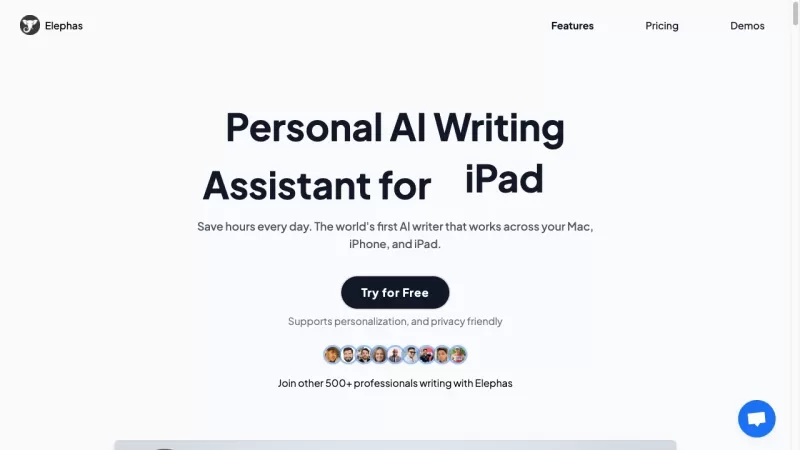
What is Elephas?Elephas is your go-to personal AI writing assistant for Mac, designed to help you save time and make your writing tasks a breeze. It's the first AI writer that seamlessly integrates across Mac, iPhone, and iPad, offering a versatile toolset for all your writing needs.How to Use Eleph
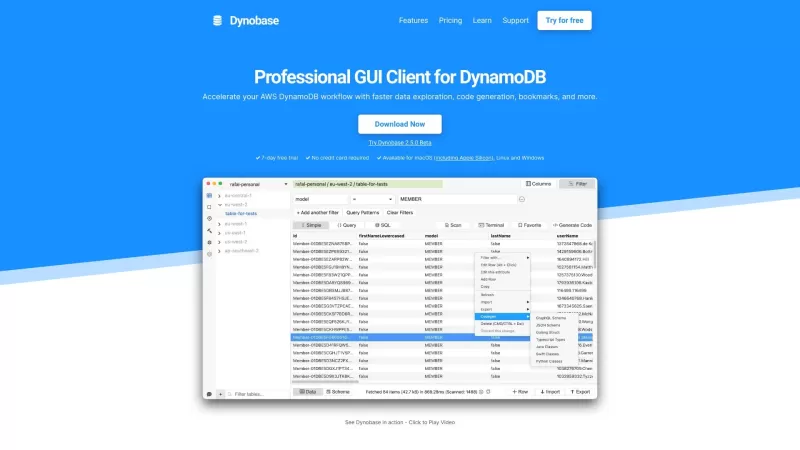
Dynobase is a professional GUI client designed to streamline your work with DynamoDB. It's like having a Swiss Army knife for your database management—packed with features that make your life easier and your workflow smoother.How to Use Dynobase?Using Dyn

If you're drowning in a sea of photos and need a lifeline, let me introduce you to FilterPixel. It's not just another piece of software; it's your personal AI-powered photo sorting wizard for both Windows and Mac. Ever spent hours sifting through thousand
HyperMink Product Information
Introducing HyperMink: Your Personal AI Companion
Ever wondered what it would feel like to have a personal assistant that runs exclusively on your device? Meet HyperMink—a revolutionary AI tool designed to keep your data private while delivering lightning-fast results. Unlike other cloud-based AIs, HyperMink works locally on your computer, ensuring your privacy stays intact.How Does HyperMink Work?
Getting started with HyperMink is simple. If you're on macOS, just download the app. For maximum flexibility, grab the Universal Device and plug it into any machine—Windows, Linux, or even older hardware. Once connected, you’ll unlock HyperMink’s full potential right at your fingertips.What Can HyperMink Do?
HyperMink isn’t just another AI—it’s a powerhouse packed with features tailored for productivity junkies and curious minds alike:- Fast, Local Conversations: Engage in long-form dialogues without waiting for uploads or downloads.
- Data Inference: Analyze PDFs, CSV files, and Excel sheets effortlessly.
- Vision Capabilities: Snap a picture or upload an image, and HyperMink will interpret it for you.
- Lifetime Updates: Stay ahead of the curve with continuous improvements delivered straight to your device.
Real-World Applications
Whether you’re deep-diving into research papers, answering client queries, or summarizing reports, HyperMink has got you covered. Its ability to master web reading, answer complex questions, and generate summaries makes it indispensable for professionals and students alike.Frequently Asked Questions
- Is a GPU Required for HyperMink?
- Nope! While GPUs enhance performance, HyperMink doesn’t require one to function effectively. It’s optimized for efficiency, so even low-end machines can handle it smoothly.
Get Started Today
Ready to dive in? Head over to the sign-up page to create your account, or log in via this link. To learn more about HyperMink and its mission, visit the about us page. With HyperMink, the future of personal computing is here—and it’s running on your terms.HyperMink Screenshot




2026 Latest Best Top-rated AI Object Removal Editors for portraits travel product shots! XIX.AI curates a powerful game-changing collection regularly updated with weekly rankings. These tools offer real-world tests to help you quickly remove unwanted elements, boost content quality, and save tons of time without compromising results. Must-try for anyone aiming to unlock their AI creation edge. Explore now!
 10 tools
 xix.ai

2026 Latest Best Top-rated AI Text to Speech Tools for Online Courses are curated by XIX.AI based on rigorous real-world tests and weekly updated rankings. These powerful tools help creators deliver crystal-clear audio content effortlessly, boosting writing efficiency and streamlining course production. Check out the free vs paid comparison to find your perfect fit. Explore now to unlock your AI edge in online education.
10 tools
xix.ai

2026 Latest Best Top-Rated AI Blog Title Tools for Higher Click Through Rates! XIX.AI has carefully curated a powerful, game-changing collection of top tools that go through rigorous real-world tests. You’ll find a free vs paid comparison, weekly updated rankings, and detailed insights to help you boost your blog’s traffic efficiently. Must-try options are highlighted to help you unlock your AI edge. Explore now!
10 tools
xix.ai

2026 Latest Best Top-rated AI Task Routing Tools for Support Workflows! XIX.AI has curated a highly powerful game-changing collection of must-try solutions, all undergoing rigorous real-world tests and updated weekly. These tools streamline workflows, boost productivity, and help teams deliver faster, more efficient support. Explore now to discover your perfect tool and unlock your AI edge!
17 tools
xix.ai

2026 Latest Best Top-Rated AI Citation and Paper Summary Tools Curated by XIX.AI. Get powerful game-changing solutions for quick content creation, improved writing efficiency, and boosting productivity. We offer a free vs paid comparison along with real-world tests and weekly updated rankings to help you find the must-try tool that fits your needs perfectly. Explore now to Unlock your AI edge.
10 tools
xix.ai

2026 Latest Best Top-Rated AI Productivity Tools for Daily Work! XIX.AI has curated a powerful, game-changing selection based on rigorous weekly updated rankings and real-world tests. You’ll find must-try options that boost writing efficiency, streamline content creation, and help you overcome daily work challenges. Get a free vs paid comparison to find the perfect fit for your needs. Explore now to unlock your AI edge!
9 tools
xix.ai


