


 Home
HomeHyperBrowser
HyperBrowser AI: Summarize, Extract Data, Generate Content



Helps TikTok sellers, brands, MCNs, and TAPs discover winning products and find creators.

HelpLook is an AI-powered all-in-one knowledge base tool that helps businesses quickly build knowledge bases, help centers, and...

Your AI Workspace

302.AI is an enterprise-grade AI resource platform with pay-as-you-go pricing, API access to a full range of AI models, and ready-to-use online applications.

剧火AI — AI Screenwriter + Director, a One-Person Short Drama Studio In one sentence, what is it?

Ever wondered what makes DeepSeek AI stand out in the crowded world of AI tech? Well, let me tell you, DeepSeek AI isn't just another player in the game; it's the leading provider of advanced AI language models and enterprise solutions. What sets them apa

Ever wondered what Qwen AI is all about? Well, let me introduce you to this gem from Alibaba Cloud. Qwen AI is not your average language model; it's a powerhouse designed to be your go-to buddy for everything from whipping up text to coding, and even reco

Tencent Hunyuan-Large, huh? It's like the Swiss Army knife of AI models developed by the tech giants at Tencent. This beast of an open-source MoE model doesn't just do one thing; it's got a transformer architecture that's been juiced up to handle everythi
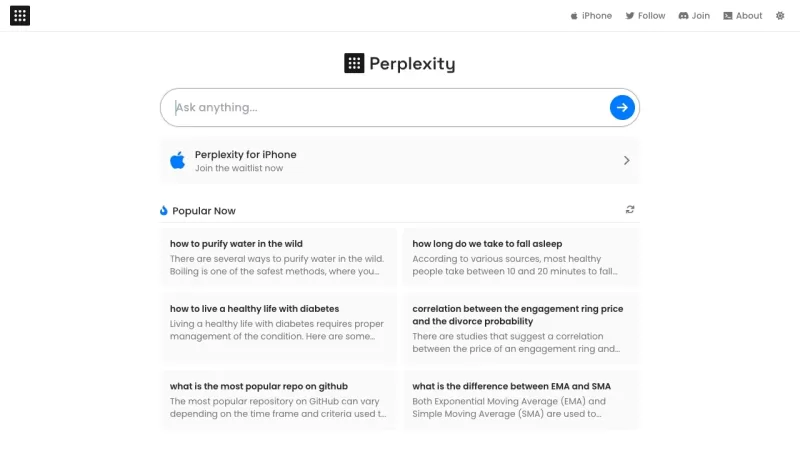
Ever stumbled upon Perplexity AI and wondered what it's all about? Well, let me break it down for you. Perplexity AI isn't just another search engine; it's a smart AI-powered tool that taps into the power of large language models and traditional search en

What is AI Excel Bot?AI Excel Bot uses advanced AI algorithms to help you build complex Excel and Google Sheets formulas in seconds. By leveraging natural language processing, it makes writing, editing, and understanding formulas much easier. Whether
HyperBrowser Product Information
What is HyperBrowser?
HyperBrowser revolutionizes your web browsing by embedding advanced AI directly into your browser. Simply select text on any webpage to instantly receive summaries or deep-dive explanations. Ask questions in plain English and get precise answers. Effortlessly extract data from tables, generate reports or content drafts, and get expert coding assistance with snippet generation and debugging. The extension also powers chatbot dialogues, summarizes PDFs, and lets you build custom workflows to automate tasks like form completion or social media tracking. By combining multiple AI tools into one seamless interface, HyperBrowser supercharges your research, analysis, and creative work, making you smarter and more efficient online.
Who will use HyperBrowser?
- Students, researchers, and academics
- Bloggers, writers, and content creators
- Marketing and social media specialists
- Software developers and engineers
- Business analysts and data professionals
- Business executives and consultants
- Lifelong learners
How to use the HyperBrowser?
- Step 1: Add the HyperBrowser extension from the Chrome, Edge, or Firefox store.
- Step 2: Sign up or log in using your email address.
- Step 3: Go to any website and click the HyperBrowser icon in your browser toolbar.
- Step 4: Highlight text or open the chat panel to ask questions or get summaries.
- Step 5: Utilize the data extraction tools to capture structured information from tables.
- Step 6: Set up personalized automation for routines like PDF summarization or monitoring social feeds.
Platform
- Web
- Chrome
HyperBrowser's Core Features & Benefits
The Core Features
- Instant Page Summarization
- Natural Language Question & Answer
- Smart Data & Table Extraction
- AI-Powered Content Generation
- Developer Code Assistance
- PDF & Document Summarization
- Interactive Chatbot Conversations
- Customizable Task Automation
- Integrated Multi-Source Search
The Benefits
- Dramatically boosts productivity
- Accelerates research and data analysis
- Automates manual data collection
- Elevates content quality and consistency
- Minimizes repetitive manual work
- Centralizes AI tools in your browser
- Saves significant time
- Creates a seamless, integrated workflow
HyperBrowser's Main Use Cases & Applications
- Conducting academic research and literature reviews
- Performing market and competitive analysis
- Drafting articles, blogs, and marketing copy
- Getting coding help and debugging assistance
- Extracting data from web tables and reports
- Summarizing customer feedback and support tickets
- Monitoring brand mentions on social media
- Analyzing and summarizing PDF documents
HyperBrowser's Pros & Cons
The Pros
Handles massive scale with support for 1000+ concurrent browser sessions
Delivers enterprise-grade reliability with a 99.9% uptime SLA
Launches browsers in under a second for instant, on-demand scaling
Includes advanced capabilities like captcha solving, stealth mode, and robust session management
Developer-first design with multi-language SDKs and seamless AI tool integration
The Cons
The software is not open source
Costs can increase at higher usage levels based on credit and browser-hour consumption
HyperBrowser's Pricing
Free plan available | YES |
|---|---|
Free trial details | |
Pricing model | Freemium |
Credit card required | No |
Paid plans start from | 30 USD |
Lifetime plan available | No |
Billing frequency | Monthly |
Details of Pricing Plan
Free
0 USD / month
- Includes 1,000 Credits
- 1 Concurrent Browser
- 7 Days of Data Retention
- Basic Stealth Mode
Startup
30 USD / month
- Includes 30,000 Credits
- 25 Concurrent Browsers
- 30 Days of Data Retention
- Auto Captcha Solving
- Basic Stealth Mode
Scale
100 USD / month
- Includes 100,000 Credits
- 100 Concurrent Browsers
- 30 Days of Data Retention
- Auto Captcha Solving
- Advanced Stealth Mode
Enterprise
Custom Pricing
- Premium Support & SLAs
- HIPAA / SOC 2 Compliance
- 250+ Concurrent Browsers
- 180+ Days Data Retention
- Auto Captcha Solving
- Advanced Stealth Mode
For the latest prices, please visit: https://www.hyperbrowser.ai/#pricing
FAQs of HyperBrowser
What is HyperBrowser?
HyperBrowser is an AI-enhanced browser extension that brings generative AI capabilities to every website, enabling instant summarization, Q&A, and data extraction.
Which browsers support HyperBrowser?
You can get the HyperBrowser extension for Google Chrome, Microsoft Edge, and Mozilla Firefox. It functions across all major web platforms.
Is HyperBrowser free to use?
Yes, a free tier is available with essential features. Professional plans provide more advanced functions and higher usage allowances.
How do I install HyperBrowser?
Open the extension store for your browser (Chrome Web Store, Edge Add-ons, or Firefox Add-ons), search for "HyperBrowser", and click "Add to Browser".
Does HyperBrowser store my browsing data?
HyperBrowser employs encryption and stores minimal data. Your personal browsing history is not retained on our servers after processing your requests.
Can HyperBrowser summarize PDFs?
Absolutely. You can upload PDF files directly within the extension to generate concise summaries.
How do I ask questions in HyperBrowser?
Select relevant text on a page, click the HyperBrowser icon, and type your question into the chat window that pops up.
Does HyperBrowser support code generation?
Yes. It can generate code snippets, help debug issues, and explain programming concepts through its chat feature.
Are there API integrations?
Public APIs are not currently available, but integrations with other services are on the roadmap for future updates.
Where can I get support?
Contact our support team via email at [email protected].
HyperBrowser Company Information
- HyperBrowser
- https://www.hyperbrowser.ai
HyperBrowser Screenshot




2026 Latest Best Top-rated AI Object Removal Editors for portraits travel product shots! XIX.AI curates a powerful game-changing collection regularly updated with weekly rankings. These tools offer real-world tests to help you quickly remove unwanted elements, boost content quality, and save tons of time without compromising results. Must-try for anyone aiming to unlock their AI creation edge. Explore now!
 10 tools
 xix.ai

2026 Latest Best Top-rated AI Text to Speech Tools for Online Courses are curated by XIX.AI based on rigorous real-world tests and weekly updated rankings. These powerful tools help creators deliver crystal-clear audio content effortlessly, boosting writing efficiency and streamlining course production. Check out the free vs paid comparison to find your perfect fit. Explore now to unlock your AI edge in online education.
10 tools
xix.ai

2026 Latest Best Top-Rated AI Blog Title Tools for Higher Click Through Rates! XIX.AI has carefully curated a powerful, game-changing collection of top tools that go through rigorous real-world tests. You’ll find a free vs paid comparison, weekly updated rankings, and detailed insights to help you boost your blog’s traffic efficiently. Must-try options are highlighted to help you unlock your AI edge. Explore now!
10 tools
xix.ai

2026 Latest Best Top-rated AI Task Routing Tools for Support Workflows! XIX.AI has curated a highly powerful game-changing collection of must-try solutions, all undergoing rigorous real-world tests and updated weekly. These tools streamline workflows, boost productivity, and help teams deliver faster, more efficient support. Explore now to discover your perfect tool and unlock your AI edge!
17 tools
xix.ai

2026 Latest Best Top-Rated AI Citation and Paper Summary Tools Curated by XIX.AI. Get powerful game-changing solutions for quick content creation, improved writing efficiency, and boosting productivity. We offer a free vs paid comparison along with real-world tests and weekly updated rankings to help you find the must-try tool that fits your needs perfectly. Explore now to Unlock your AI edge.
10 tools
xix.ai

2026 Latest Best Top-Rated AI Productivity Tools for Daily Work! XIX.AI has curated a powerful, game-changing selection based on rigorous weekly updated rankings and real-world tests. You’ll find must-try options that boost writing efficiency, streamline content creation, and help you overcome daily work challenges. Get a free vs paid comparison to find the perfect fit for your needs. Explore now to unlock your AI edge!
9 tools
xix.ai


