


 Home
HomeGPT Image 1.5
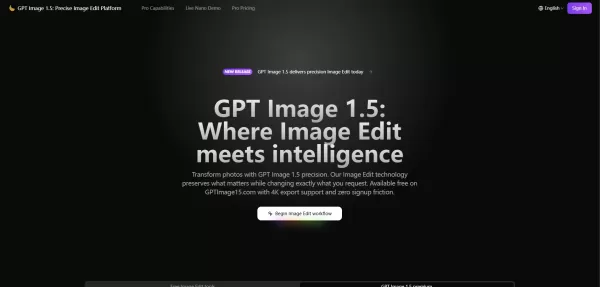
GPT Image 1.5: AI Image Editing Platform



Helps TikTok sellers, brands, MCNs, and TAPs discover winning products and find creators.

HelpLook is an AI-powered all-in-one knowledge base tool that helps businesses quickly build knowledge bases, help centers, and...

Your AI Workspace

302.AI is an enterprise-grade AI resource platform with pay-as-you-go pricing, API access to a full range of AI models, and ready-to-use online applications.

剧火AI — AI Screenwriter + Director, a One-Person Short Drama Studio In one sentence, what is it?

What is Banana AI - Free AI Photo Editor?Banana AI is a free, AI-driven photo editor that uses Google's Nano Banana technology (Gemini 2.5 Flash Image) to transform your pictures with simple text commands. Easily remove unwanted objects, swap backgro

What is Deepfake Maker Nano Banana AI? Nano Banana AI is an advanced artificial intelligence platform that generates stunning images from text descriptions and facilitates seamless image-to-image transformations. This cutting-edge AI model revolution

What is Line Art Maker?Line Art Maker is an intuitive application that effortlessly transforms your photos into stunning line drawings. Powered by sophisticated algorithms, it precisely identifies outlines and turns your images into detailed sketches

What is TranslateImages?AI Image Translator is an advanced tool that precisely translates text embedded in images, keeping the original layout and format intact. It supports over a dozen languages, such as English, Hindi, Arabic, Chinese, Japanese, K

What is Nano Banana | Nanana AI? Nanana AI is the leading AI image generator and AI image editor on the market. It taps into the full potential of Google's revolutionary Nano Banana model to offer unmatched image creation and editing power. As an ear
GPT Image 1.5 Product Information
What is GPT Image 1.5?
GPT Image 1.5 is an AI-driven image editing tool that accurately transforms photos based on detailed user instructions. It ensures identity consistency, faithful lighting, and context preservation while enabling the addition or removal of elements. The tool supports multi-language text rendering, offers artistic style transformations, and delivers high-quality results with fast processing and export options up to 4K resolution. It is designed primarily for image editing (not video), catering to professionals who require efficient, consistent, high-quality visuals.
Who will use GPT Image 1.5?
- Graphic designers
- Marketing professionals
- E-commerce retailers
- Content creators
- Photographers
- Product designers
How to use the GPT Image 1.5?
- Step 1: Upload an image to the GPTImage15.com platform.
- Step 2: Enter a detailed prompt describing your desired changes (e.g., clothing, makeup, background).
- Step 3: Choose your model and output settings like resolution and aspect ratio.
- Step 4: Generate the edited image using the AI-powered engine.
- Step 5: Review and refine the results if needed.
- Step 6: Export the final image in your preferred format and resolution (up to 4K).
Platform
- Web
GPT Image 1.5's Core Features & Benefits
The Core Features
- Precise AI image editing with context and identity preservation
- Multi-language text rendering on images
- Artistic style transformations and preset galleries
- Multi-frame consistency for characters and environments
- Addition and removal of image elements with natural blending
- Rapid processing with real-time progress previews
- High-resolution export up to 4K with transparency support
The Benefits
- Saves time on image editing with automated detail retention
- Improves consistency across multiple related images
- Supports complex instructions and spatial relationships
- Enables professional-quality outputs without extensive manual work
- No signup friction for easy access and use
- Supports global languages for diverse user needs
GPT Image 1.5's Main Use Cases & Applications
- E-commerce product image optimization and variation generation
- Marketing campaign asset creation from stock photos
- Visual prototyping and concept exploration for design teams
- Localization of visual content for international markets
- Photo retouching and enhancement for portfolios
- Graphic design including text rendering and artistic effects
GPT Image 1.5's Pros & Cons
The Pros
High precision with facial and lighting consistency
Supports multi-frame and multi-element editing
Fast generation speed with concurrent processing
No signup required to start using
Flexible export formats including 4K resolution
The Cons
Currently focuses on still image editing, with limited video support
No openly available GitHub repository (closed source)
Only available as a web platform; no native mobile or desktop apps
FAQs of GPT Image 1.5
How to use Image Edit in GPT Image 1.5?
Upload your image, describe the desired changes in natural language, and GPT Image 1.5 applies the edits instantly.
Can GPT Image 1.5 maintain consistency across multiple images?
Yes, you can upload reference images to memorize characters or objects and reproduce them consistently.
Does GPT Image 1.5 support text rendering in images?
Yes, it creates readable, well-placed text that respects perspective and lighting.
What makes GPT Image 1.5 different from other tools?
It excels at preserving identity and context, understands nuanced instructions, and requires minimal corrections.
How to achieve best results with GPT Image 1.5?
Be specific about the changes you want and the conditions to preserve; use detailed prompts.
Does GPT Image 1.5 support video editing?
Currently, it focuses on still images; video editing capability is under exploration.
How to export high-resolution files?
You can export edited images upscaled to 4K in various formats like PNG, JPEG, or WebP.
Is a user account required to use GPT Image 1.5?
No signup is required to start editing images on the platform.
What platforms is GPT Image 1.5 available on?
It is available as a web platform accessible from any browser.
How does pricing work for GPT Image 1.5?
Multiple subscription plans are available based on image edit volume, all with full feature access.
GPT Image 1.5 Company Information
- gptimage15.com
- https://gptimage15.com

How to install?
GPT Image 1.5 Screenshot

2026 Latest Best Top-rated AI Text to Speech Tools for Natural Voiceovers are here on XIX.AI! This curated list features powerful, game-changing options that deliver crystal-clear voices for every use case, backed by real-world tests and weekly updated rankings. Get a free vs paid comparison to find the must-try solution that boosts your productivity instantly. Explore now to Unlock your AI edge!
 11 tools
 xix.ai

2026 Latest Best Manga AI Background Generators Ranked Top-Rated! This curated collection showcases powerful game-changing tools perfect for creating high-quality chapter backgrounds, book covers, and promotional art. Every option has undergone rigorous real-world tests to ensure reliability. Get a free vs paid comparison along with detailed insights. Explore now to discover your perfect tool and unlock your AI edge in manga creation.
6 tools
xix.ai

2026 Latest Best Top-rated AI Object Removal Editors for portraits travel product shots! XIX.AI curates a powerful game-changing collection regularly updated with weekly rankings. These tools offer real-world tests to help you quickly remove unwanted elements, boost content quality, and save tons of time without compromising results. Must-try for anyone aiming to unlock their AI creation edge. Explore now!
10 tools
xix.ai

2026 Latest Best Top-rated AI Text to Speech Tools for Online Courses are curated by XIX.AI based on rigorous real-world tests and weekly updated rankings. These powerful tools help creators deliver crystal-clear audio content effortlessly, boosting writing efficiency and streamlining course production. Check out the free vs paid comparison to find your perfect fit. Explore now to unlock your AI edge in online education.
10 tools
xix.ai

2026 Latest Best Top-Rated AI Blog Title Tools for Higher Click Through Rates! XIX.AI has carefully curated a powerful, game-changing collection of top tools that go through rigorous real-world tests. You’ll find a free vs paid comparison, weekly updated rankings, and detailed insights to help you boost your blog’s traffic efficiently. Must-try options are highlighted to help you unlock your AI edge. Explore now!
10 tools
xix.ai

2026 Latest Best Top-rated AI Task Routing Tools for Support Workflows! XIX.AI has curated a highly powerful game-changing collection of must-try solutions, all undergoing rigorous real-world tests and updated weekly. These tools streamline workflows, boost productivity, and help teams deliver faster, more efficient support. Explore now to discover your perfect tool and unlock your AI edge!
17 tools
xix.ai


Just tried GPT Image 1.5 and it's pretty solid! The lighting and context preservation works as advertised. I was able to add a hat to my profile pic without it looking weird. Still, makes me wonder about the future of photo evidence if edits get this good. 😅


