


 Home
HomeGetBotler
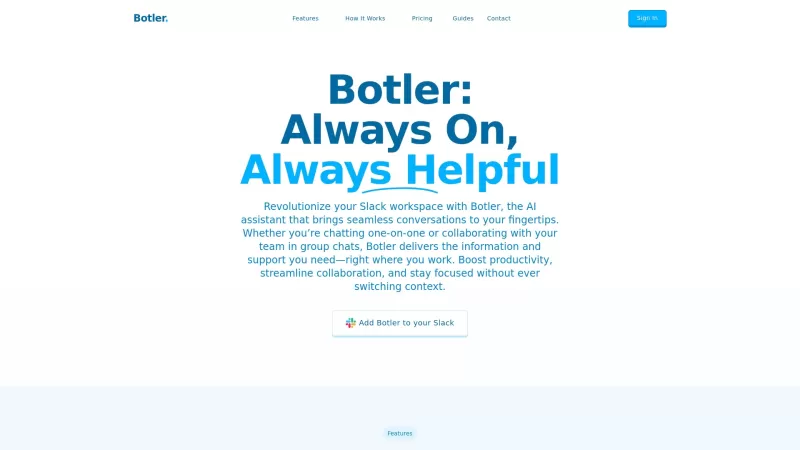
AI Assistant Boosts Slack Productivity



Helps TikTok sellers, brands, MCNs, and TAPs discover winning products and find creators.

HelpLook is an AI-powered all-in-one knowledge base tool that helps businesses quickly build knowledge bases, help centers, and...

Your AI Workspace

302.AI is an enterprise-grade AI resource platform with pay-as-you-go pricing, API access to a full range of AI models, and ready-to-use online applications.

剧火AI — AI Screenwriter + Director, a One-Person Short Drama Studio In one sentence, what is it?

Ever stumbled upon Cherry Studio AI and wondered what it's all about? Well, let me break it down for you. Cherry Studio AI isn't just another run-of-the-mill AI tool; it's a powerhouse desktop client that lets you dive into advanced AI interactions across

Discover Plume AI: Your Ultimate Academic Writing AssistantAre you tired of struggling with your academic writing? Well, say hello to Plume AI, the innovative AI assistant that's here to revolutionize the way you write! Designed with students in mind, Plume AI harnesses the power of cutting-edge art

Ever wondered how to turn your jumbled thoughts and complex queries into something you can actually grasp? Enter The Visualizer, your new best friend in the world of learning and creativity. This nifty tool takes your written queries, URLs, and even PDFs,

Ever wished for a trusty sidekick to help you navigate the digital world with ease? Enter Sider, your personal AI companion designed to seamlessly blend into your daily routine. Starting off as a handy Chrome/Edge extension, Sider transforms your browsing

Ever wondered what Ninja AI is all about? Well, let me tell you, it's like having a Swiss Army knife for your digital needs! Ninja AI isn't just another AI tool; it's a powerhouse that brings together over 24 top-notch Large Language Models (LLMs) to help
GetBotler Product Information
If you're looking to boost your team's productivity on Slack, you've got to check out GetBotler. This AI-powered assistant is like having a super-smart intern who never sleeps, designed to streamline your workflows and make your life easier. From chatting and file searching to extracting info from documents, web searches, and even generating images, GetBotler does it all within the comfort of Slack. And if you're juggling Jira tasks or need to send an email without leaving your chat, GetBotler has got your back.
So, how do you get started with this game-changer? It's pretty straightforward. First, head over to the Slack App Directory and install GetBotler. Once it's set up, just send a message to Botler to snag your login link. After that, you're all set to start collaborating in channels or direct messages. It's that simple!
GetBotler's Core Features
Let's dive into what makes GetBotler tick:
Smart Conversations
Ever wish you had a smarter way to chat? GetBotler's got you covered with intelligent, context-aware conversations that make teamwork a breeze.
RAG for Insights Extraction
Need to pull insights from a sea of documents? GetBotler uses RAG (Retrieval-Augmented Generation) to sift through and extract the gold nuggets of information you need.
Advanced Jira Management
Managing Jira tasks can be a headache, but not with GetBotler. Create, track, and update your tasks without ever leaving Slack. It's like magic!
Web Search
Quickly find what you need online without opening another tab. GetBotler's web search feature keeps you focused and in the flow.
Emailing
Need to send an email but don't want to switch apps? No problem. GetBotler lets you send emails right from Slack.
File Search
Lost a file in the chaos of your Slack workspace? GetBotler's file search makes it easy to find what you're looking for in no time.
PDF Generation
Need to whip up a report? GetBotler can generate PDFs for you directly from your conversations, saving you time and hassle.
Image Generation
Want to add some visual flair to your chats? GetBotler can generate images on the fly, making your communications more engaging and fun.
GetBotler's Use Cases
Imagine you're in a meeting and need to pull up some info from a document. Just chat with Botler, and it'll extract the details you need. Or maybe you're finishing up a project and need to generate a PDF report. GetBotler can do that for you without breaking your workflow. And if you're managing Jira tasks, you can create and update them without ever leaving Slack. It's all about making your workday smoother and more efficient.
FAQ from GetBotler
- How do I install GetBotler?
- To install GetBotler, go to the Slack App Directory, find GetBotler, and follow the installation steps. Once installed, message Botler to receive your login link.
- What functionalities does GetBotler provide?
- GetBotler offers a range of functionalities including smart conversations, document info extraction, Jira task management, web search, emailing, file search, PDF generation, and image generation, all within Slack.
Need more help or have questions? Reach out to GetBotler's support team at their contact us page. Want to learn more about the company behind this awesome tool? Check out their about us page. And if you're ready to dive in, log in at GetBotler's login page. Curious about pricing? Head over to their pricing page to find out more.
GetBotler Screenshot


2026 Latest Best AI Vocal Demo Tools for Songwriters, Hook Creators, and Multi-Language Content Teams! XIX.AI has curated a top-rated list of powerful game-changing tools that go through rigorous real-world tests. You’ll find detailed free vs paid comparison data, comprehensive rankings, and must-try options to help you boost writing efficiency and unlock your creative potential. Explore now to discover your perfect tool for all your content needs!
 9 tools
 xix.ai

2026 Latest Best Top-rated AI Competitive Research Tools for Small Businesses! XIX.AI has curated a highly powerful game-changing collection, updated weekly with rigorous real-world tests and detailed rankings. You can find a comprehensive free vs paid comparison to help you identify the must-try tools that boost your productivity and give you a competitive edge. Explore now to discover your perfect tool!
9 tools
xix.ai

2026 Latest Best Photoshop AI retouch tools for ecommerce apparel, skin cleanup, and color consistency! This top-rated curated list features powerful game-changing solutions that help you boost writing efficiency, streamline content creation, and achieve perfect visual results effortlessly. Each tool has undergone real-world tests through weekly updated rankings, complete with free vs paid comparison details. Backed by XIX.AI, it’s the must-try guide for anyone aiming to unlock your AI edge. Explore now!
10 tools
xix.ai

2026 Latest Best Top-Rated AI Prompt Libraries for optimizing all types of ChatGPT workflows. XIX.AI has curated a powerful, game-changing collection that goes through rigorous real-world tests to ensure top performance. You can find detailed free vs paid comparisons and expert rankings to help you choose the must-try tools that boost your productivity and unlock your AI edge. Explore now!
11 tools
xix.ai

2026 Latest Best AI Quiz Builder Platforms for Teachers, Tutors, and Cohort-Based Learning Programs! XIX.AI has curated a top-rated list of powerful game-changing tools that go through real-world tests to deliver accurate rankings. These must-try platforms help boost writing efficiency, streamline content creation, and simplify quiz design across all learning scenarios. Explore now to discover your perfect tool for unlocking your AI edge in teaching!
13 tools
xix.ai

2026 Latest Best AI Pull Request Review Tools for GitHub Teams are here on XIX.AI! This top-rated curated list showcases powerful game-changing solutions that streamline refactoring, bug fixing, and security gap detection across all team workflows. Enjoy a free vs paid comparison along with real-world tests and detailed rankings to help you find the perfect tool that boosts productivity significantly. Explore now to unlock your AI edge!
12 tools
xix.ai


Esse GetBotler é realmente um mão na roda! Minha equipe no Slack já melhorou muito desde que a IA começou a ajudar a otimizar os fluxos de trabalho. É como ter um assistente que nunca cansa 😄 Claro, fico pensando se a automação vai tirar empregos... mas até agora só vejo produtividade subindo. Recomendo testar!
GetBotler has been a lifesaver for our Slack team! 🤖 The AI assistant handles mundane tasks seamlessly, freeing us up for real work. Only downside is it sometimes misunderstands complex requests - but hey, that's what teammates are for! 9/10 would recommend.
SlackでGetBotlerを使うと、天才インターンを持っているみたいです!チームのワークフローがずっとスムーズになりました。唯一の問題は時々コマンドを誤解することですが、全体的に見て命の恩人です。試してみてください!🤓
GetBotler en Slack es como tener un becario genio siempre trabajando! Ha hecho que el flujo de trabajo de nuestro equipo sea mucho más fluido. El único problema es que a veces malinterpreta los comandos, pero en general, es un salvavidas. ¡Pruébalo! 🤓
GetBotler no Slack é como ter um estagiário gênio sempre trabalhando! Tornou o fluxo de trabalho da nossa equipe muito mais suave. O único problema é que às vezes ele entende mal os comandos, mas no geral, é um salva-vidas. Experimente! 🤓


