


 Home
HomeGenji - AI Browser Assistant
Chrome AI Task Ninja



Helps TikTok sellers, brands, MCNs, and TAPs discover winning products and find creators.

HelpLook is an AI-powered all-in-one knowledge base tool that helps businesses quickly build knowledge bases, help centers, and...

Your AI Workspace

302.AI is an enterprise-grade AI resource platform with pay-as-you-go pricing, API access to a full range of AI models, and ready-to-use online applications.

剧火AI — AI Screenwriter + Director, a One-Person Short Drama Studio In one sentence, what is it?

Ever wondered how to get a leg up in *Call of Duty: Mobile*? Well, redeem codes are your golden ticket to a whole bunch of in-game goodies. These codes can give you a sweet boost to your Weapon XP or Battle Pass XP, making it a breeze to level up your arsenal and unlock those coveted new weapons, at
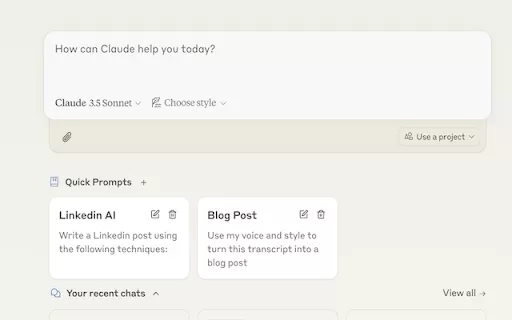
Ever find yourself stuck in a loop, typing the same prompts over and over? Enter Claude, the AI-powered Chrome extension that's here to save your sanity. This nifty tool is all about managing and saving your prompts, so you can keep your creative juices flowing without the frustration of repetition.

If you're looking to level up your typing game, the AI Typing Assistant is your go-to tool. It's like having a personal coach that tailors its advice just for you, based on how you type. Ever wish you could type faster and with fewer mistakes? This a

Pixelcode is a revolutionary tool that transforms screenshots of code into editable text, saving you from the tedious task of typing out code manually. Imagine snapping a picture of a code snippet and instantly having it ready to edit in your preferred co

What is Giststack? Giststack is an AI-driven platform that assists users, especially solopreneurs and marketers, in tackling the hurdles of social media content creation. It gathers content from your preferred websites and newsletters, spots trending
Genji - AI Browser Assistant Product Information
Ever wished you had a trusty sidekick to handle all those pesky online tasks for you? Meet Genji, the AI browser assistant that's like having a personal assistant right in your Chrome browser. Whether you need to snag a dinner reservation or scout for potential leads on LinkedIn, Genji's got your back. And the best part? It's completely free, and you don't even need to sign up!
How to Get Started with Genji - AI Browser Assistant
Getting started with Genji is a breeze. Just download our Chrome extension and keep an eye out for the icon that pops up at the bottom right of your screen (it won't show on the New Tab page, though). A quick click on that icon opens up a chat interface where you can type in your command and watch Genji spring into action.
Genji - AI Browser Assistant's Core Features
Automate Browser Tasks with a Visual AI Assistant
Genji isn't just any assistant; it's a visual one that can take care of your browser tasks with ease.
Free to Use, No Sign-Up Required
No strings attached—Genji is free to use and doesn't require any sign-up. It's that simple!
Handle Personal and Professional Tasks
From personal errands like making reservations to professional tasks like lead generation, Genji can handle it all.
Multiple Task Delegation
Why stop at one task when you can delegate multiple? Genji can juggle several tasks at once.
Self-Correction When Making Mistakes
Even AI assistants can make mistakes, but Genji is smart enough to correct itself and keep going.
Genji - AI Browser Assistant's Use Cases
- Buying Products Online: Let Genji handle your online shopping so you can focus on other things.
- Making Reservations: Need a table at your favorite restaurant? Genji can book it for you.
- Finding Leads on LinkedIn: Genji can sift through LinkedIn to find those valuable leads.
- Creating Playlists: Let Genji curate your next playlist based on your music taste.
- Managing Financial Transactions: Keep your finances in check with Genji's help.
- Sending Messages: Whether it's a quick text or an email, Genji can send it for you.
- Competitor Analysis: Stay ahead of the game with Genji's competitor analysis.
- Research and Documentation: Genji can help you gather information and document it efficiently.
- Automating UI Testing: Let Genji take the hassle out of UI testing.
- Monitoring Signups: Keep track of new signups with Genji's monitoring capabilities.
- Recruiting: Genji can streamline your recruiting process, making it easier to find the right talent.
FAQ from Genji - AI Browser Assistant
- How do I get started with Genji?
- Download the Chrome extension and click the icon at the bottom right of your screen to start using Genji.
- How does Genji keep my data secure?
- Genji takes data security seriously, ensuring your information is protected at all times.
- What is the vision for Genji moving forward?
- The vision for Genji is to continue evolving as a versatile AI assistant, making your online life even easier.
- Is Genji for me?
- If you're looking for an AI assistant to handle your online tasks, Genji is definitely for you!
- What limits does Genji have?
- While Genji is incredibly versatile, it's always good to check the latest updates for any specific limitations.
Want to join the Genji community? Check out our Discord server for more discussions and updates. For more detailed Discord messages, click here.
Need help or have questions? Reach out to our support team at [email protected].
Curious about pricing? Check out our pricing page for all the details.
Stay updated with Genji on Twitter and explore our open-source contributions on GitHub.
Genji - AI Browser Assistant Screenshot






2026 Latest Best Top-Rated AI Prompt Libraries for optimizing all types of ChatGPT workflows. XIX.AI has curated a powerful, game-changing collection that goes through rigorous real-world tests to ensure top performance. You can find detailed free vs paid comparisons and expert rankings to help you choose the must-try tools that boost your productivity and unlock your AI edge. Explore now!
 11 tools
 xix.ai

2026 Latest Best AI Quiz Builder Platforms for Teachers, Tutors, and Cohort-Based Learning Programs! XIX.AI has curated a top-rated list of powerful game-changing tools that go through real-world tests to deliver accurate rankings. These must-try platforms help boost writing efficiency, streamline content creation, and simplify quiz design across all learning scenarios. Explore now to discover your perfect tool for unlocking your AI edge in teaching!
13 tools
xix.ai

2026 Latest Best AI Pull Request Review Tools for GitHub Teams are here on XIX.AI! This top-rated curated list showcases powerful game-changing solutions that streamline refactoring, bug fixing, and security gap detection across all team workflows. Enjoy a free vs paid comparison along with real-world tests and detailed rankings to help you find the perfect tool that boosts productivity significantly. Explore now to unlock your AI edge!
12 tools
xix.ai

2026 Latest Best Top-rated AI Text to Speech Tools for Natural Voiceovers are here on XIX.AI! This curated list features powerful, game-changing options that deliver crystal-clear voices for every use case, backed by real-world tests and weekly updated rankings. Get a free vs paid comparison to find the must-try solution that boosts your productivity instantly. Explore now to Unlock your AI edge!
11 tools
xix.ai

2026 Latest Best Manga AI Background Generators Ranked Top-Rated! This curated collection showcases powerful game-changing tools perfect for creating high-quality chapter backgrounds, book covers, and promotional art. Every option has undergone rigorous real-world tests to ensure reliability. Get a free vs paid comparison along with detailed insights. Explore now to discover your perfect tool and unlock your AI edge in manga creation.
6 tools
xix.ai

2026 Latest Best Top-rated AI Object Removal Editors for portraits travel product shots! XIX.AI curates a powerful game-changing collection regularly updated with weekly rankings. These tools offer real-world tests to help you quickly remove unwanted elements, boost content quality, and save tons of time without compromising results. Must-try for anyone aiming to unlock their AI creation edge. Explore now!
10 tools
xix.ai


Genji sounds like the ultimate browser buddy! I've been drowning in online chores, and this AI assistant could be a game-changer. Snagging dinner reservations without the hassle? Count me in! Just hope it doesn't book me a table for one too many times. 😂 Super excited to try it out in Chrome. 🚀


