


 Home
HomeGAudio
Gaudio: Browser Audio Controls Chrome Extension



Helps TikTok sellers, brands, MCNs, and TAPs discover winning products and find creators.

HelpLook is an AI-powered all-in-one knowledge base tool that helps businesses quickly build knowledge bases, help centers, and...

Your AI Workspace

302.AI is an enterprise-grade AI resource platform with pay-as-you-go pricing, API access to a full range of AI models, and ready-to-use online applications.

剧火AI — AI Screenwriter + Director, a One-Person Short Drama Studio In one sentence, what is it?

If you're diving into the world of AI and need a tool to streamline your interactions with models like ChatGPT, Claude, and Gemini, let me introduce you to TaoPrompt. This isn't just another AI tool; it's a professional prompt generator that's designed to

Ever felt like your YouTube videos could use a bit of a speed boost? Enter Speedtube AI Chrome Extension, a game-changer for those who want to optimize their viewing experience. It uses AI to smartly adjust the playback speed according to the type of cont

If you're looking to level up your typing game, the AI Typing Assistant is your go-to tool. It's like having a personal coach that tailors its advice just for you, based on how you type. Ever wish you could type faster and with fewer mistakes? This a
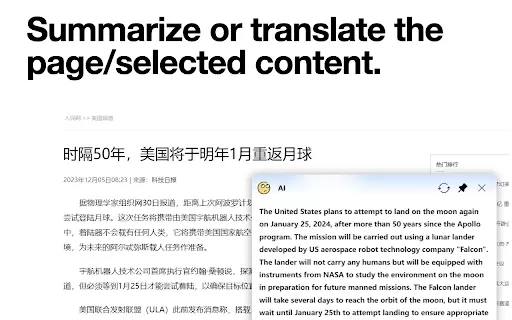
What is the AI小窗 Chrome Extension? AI小窗 is an intelligent browsing assistant compatible with ERNIE Bot, Tongyi Qianwen, and OpenAI. It delivers a smarter and more efficient browsing experience, offering features such as customizable small windows, in

What is the Cici AI Chrome Extension? Cici is your personal browser AI assistant, powered by GPT technology. It can answer any of your questions, summarize complex webpages, provide fast full-text translation, intelligently organize and summarize sea
GAudio Product Information
What is Gaudio?
Gaudio is an innovative Chrome extension that enhances your audio management. It lets you easily control the volume of individual tabs, mute specific tabs, and improve audio quality. Perfect for users who want more control over their audio settings without leaving the browser, Gaudio provides the tools you need directly within the browser interface—whether muting annoying ads or boosting the volume of quiet videos.
Who uses Gaudio?
- Browser users
- Music enthusiasts
- Video viewers
- Online meeting participants
- Multitaskers
How to use Gaudio?
- Step 1: Install Gaudio from the Chrome Web Store.
- Step 2: Click the Gaudio icon in your browser toolbar.
- Step 3: Adjust the volume for different tabs.
- Step 4: Mute or unmute individual tabs as needed.
- Step 5: Enjoy enhanced audio control directly from your browser.
Platforms
- Web
- Chrome
Gaudio's Core Features and Benefits
Core Features
- Per-tab volume control
- Individual tab muting
- Audio quality enhancement
Benefits
- Better audio management
- Customizable audio settings
- Improved browsing experience
Gaudio's Main Use Cases and Applications
- Audio control for online meetings
- Sound management during video playback
- Muting unwanted ads and background noise
Frequently Asked Questions about Gaudio
How do I install Gaudio?
To install Gaudio, visit the Chrome Web Store, search for it, and click 'Add to Chrome'.
Can I control the volume of individual tabs with Gaudio?
Yes, Gaudio allows you to adjust the volume for each tab separately.
Is Gaudio free to use?
Yes, Gaudio is free to download and use.
Does Gaudio support other browsers?
No, Gaudio is currently only available for Chrome.
How do I mute a tab using Gaudio?
Click the Gaudio icon, find the tab you want to mute, and click the mute button.
Will Gaudio affect my browser's performance?
Gaudio is designed to be lightweight and should not significantly impact your browser's performance.
How do I uninstall Gaudio?
Go to Chrome settings, locate Gaudio in your extensions, and click 'Remove'.
Is Gaudio safe to use?
Yes, Gaudio is safe and does not collect personal data.
Can I use Gaudio with streaming services?
Yes, Gaudio can control audio on streaming services like YouTube and Spotify.
What should I do if Gaudio is not working properly?
Try reinstalling the extension or contact our support for assistance.
Gaudio Company Information

2026 Latest Best Top-rated AI Object Removal Editors for portraits travel product shots! XIX.AI curates a powerful game-changing collection regularly updated with weekly rankings. These tools offer real-world tests to help you quickly remove unwanted elements, boost content quality, and save tons of time without compromising results. Must-try for anyone aiming to unlock their AI creation edge. Explore now!
 10 tools
 xix.ai

2026 Latest Best Top-rated AI Text to Speech Tools for Online Courses are curated by XIX.AI based on rigorous real-world tests and weekly updated rankings. These powerful tools help creators deliver crystal-clear audio content effortlessly, boosting writing efficiency and streamlining course production. Check out the free vs paid comparison to find your perfect fit. Explore now to unlock your AI edge in online education.
10 tools
xix.ai

2026 Latest Best Top-Rated AI Blog Title Tools for Higher Click Through Rates! XIX.AI has carefully curated a powerful, game-changing collection of top tools that go through rigorous real-world tests. You’ll find a free vs paid comparison, weekly updated rankings, and detailed insights to help you boost your blog’s traffic efficiently. Must-try options are highlighted to help you unlock your AI edge. Explore now!
10 tools
xix.ai

2026 Latest Best Top-rated AI Task Routing Tools for Support Workflows! XIX.AI has curated a highly powerful game-changing collection of must-try solutions, all undergoing rigorous real-world tests and updated weekly. These tools streamline workflows, boost productivity, and help teams deliver faster, more efficient support. Explore now to discover your perfect tool and unlock your AI edge!
17 tools
xix.ai

2026 Latest Best Top-Rated AI Citation and Paper Summary Tools Curated by XIX.AI. Get powerful game-changing solutions for quick content creation, improved writing efficiency, and boosting productivity. We offer a free vs paid comparison along with real-world tests and weekly updated rankings to help you find the must-try tool that fits your needs perfectly. Explore now to Unlock your AI edge.
10 tools
xix.ai

2026 Latest Best Top-Rated AI Productivity Tools for Daily Work! XIX.AI has curated a powerful, game-changing selection based on rigorous weekly updated rankings and real-world tests. You’ll find must-try options that boost writing efficiency, streamline content creation, and help you overcome daily work challenges. Get a free vs paid comparison to find the perfect fit for your needs. Explore now to unlock your AI edge!
9 tools
xix.ai


