


 Home
HomeFocuSee
Automatic Screen Recording with Zoom Effects



Helps TikTok sellers, brands, MCNs, and TAPs discover winning products and find creators.

HelpLook is an AI-powered all-in-one knowledge base tool that helps businesses quickly build knowledge bases, help centers, and...

Your AI Workspace

302.AI is an enterprise-grade AI resource platform with pay-as-you-go pricing, API access to a full range of AI models, and ready-to-use online applications.

剧火AI — AI Screenwriter + Director, a One-Person Short Drama Studio In one sentence, what is it?

Introducing AniEraser: The Ultimate AI Clothes RemoverIf you've ever wanted to edit photos like a pro without the hassle of complicated tools or software installations, AniEraser is here to change the game. This cutting-edge online tool uses advanced AI t

What is Undressbaby AI?Undressbaby is a cutting-edge, AI-driven platform that lets users creatively alter their photos and videos. From swapping faces to trying on virtual outfits, it offers a simple yet powerful solution. Just upload your media, and
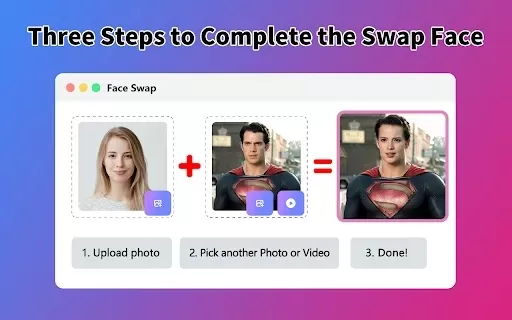
What is Face Swap - AI Face Swapper?Face Swap AI Face Swapper is a cutting-edge online tool that enables effortless face swapping in photos and videos. Powered by sophisticated artificial intelligence, it allows you to seamlessly replace faces, swap

Ever wanted to give your videos a quirky twist or a professional touch? Look no further than KreadoAI Video Face Swap! This nifty tool is a game-changer for anyone looking to seamlessly replace faces in videos. What's even better? It's absolutely free and

What is VideoWatermarkRemover AI? VideoWatermarkRemover is a free, AI-powered online tool that quickly and easily removes watermarks from videos. It supports popular formats like MP4, MOV, and AVI, and can detect and erase both static and moving wate
FocuSee Product Information
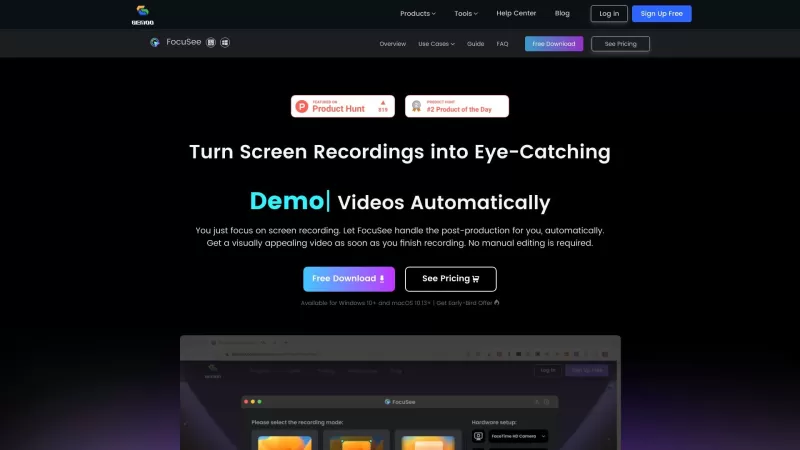
Ever stumbled upon a tool that just makes your life easier? Well, let me introduce you to FocuSee, a game-changer in the world of screen recording. This nifty tool automatically jazzes up your videos with zoom-in effects, tracks your cursor movement, and even adds a nice background—all without you lifting a finger for manual edits. It's like having a personal video editor that works while you sit back and relax!
How to Use FocuSee?
Using FocuSee is as easy as pie. Just record your screen, maybe throw in a selfie and a voiceover if you're feeling fancy, and let FocuSee do its magic. It'll follow your cursor like a loyal pet, apply those dynamic zoom effects that make your video pop, slap on a cool background, and—voilà!—you've got yourself a slick, professional-looking video ready to roll. No editing skills required, which is a huge win if you're like me and can barely manage a basic cut!
FocuSee's Core Features
Automatic Zoom-in Effects
Ever wanted to highlight something important in your video without fussing over it? FocuSee's got you covered with its automatic zoom-ins, making sure your audience doesn't miss a beat.
Cursor Movement Tracking
Your cursor is the star of the show, and FocuSee knows it. It tracks every move, ensuring your viewers can follow along effortlessly.
Nice Background
Forget about those boring, plain backgrounds. FocuSee adds a touch of class with its nice backgrounds, making your videos look polished and professional.
No Manual Editing Required
The best part? You don't need to be a video editing guru. FocuSee takes care of everything, so you can focus on what you do best—creating great content.
FocuSee's Use Cases
Demos & Tutorials
Perfect for those how-to videos where you need to show every click and drag. FocuSee makes your demos and tutorials engaging and easy to follow.
Promo & Launch Videos
Launching a new product or service? FocuSee can help you create eye-catching promo videos that grab attention and keep it.
Pitch & Sales Videos
Need to convince someone to buy what you're selling? A well-made pitch video with FocuSee's enhancements can make all the difference.
FAQ from FocuSee
- What does FocuSee do?
- FocuSee automatically enhances your screen recordings with zoom-in effects, cursor tracking, and nice backgrounds, all without manual editing.
- How does FocuSee work?
- Just record your screen, selfie, and voiceover. FocuSee takes over from there, applying its features to create a professional video.
- What are the core features of FocuSee?
- Automatic zoom-in effects, cursor movement tracking, nice backgrounds, and no manual editing required.
- What are the pricing options for FocuSee?
- For detailed pricing options, you'll need to check directly on the FocuSee website as they might offer different plans to suit various needs.
FocuSee Screenshot
Discover the 2026 best AI shading & screen tone generators for manga art. XIX.AI's curated list features top-rated, powerful tools to instantly add realistic shadows and textures. Compare free vs paid options with weekly updated rankings. Unlock your creative edge and elevate your artwork today!
 10 tools
 xix.ai


