


 Home
HomeFlomo Quick Save - Chrome Extension
Browser extension for quick web content saving.



Helps TikTok sellers, brands, MCNs, and TAPs discover winning products and find creators.

HelpLook is an AI-powered all-in-one knowledge base tool that helps businesses quickly build knowledge bases, help centers, and...

Your AI Workspace

302.AI is an enterprise-grade AI resource platform with pay-as-you-go pricing, API access to a full range of AI models, and ready-to-use online applications.

剧火AI — AI Screenwriter + Director, a One-Person Short Drama Studio In one sentence, what is it?

Ever wondered how to get a leg up in *Call of Duty: Mobile*? Well, redeem codes are your golden ticket to a whole bunch of in-game goodies. These codes can give you a sweet boost to your Weapon XP or Battle Pass XP, making it a breeze to level up your arsenal and unlock those coveted new weapons, at
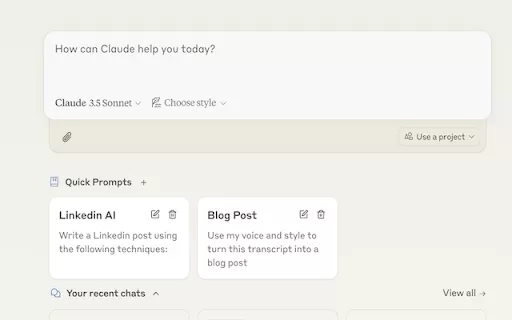
Ever find yourself stuck in a loop, typing the same prompts over and over? Enter Claude, the AI-powered Chrome extension that's here to save your sanity. This nifty tool is all about managing and saving your prompts, so you can keep your creative juices flowing without the frustration of repetition.

If you're looking to level up your typing game, the AI Typing Assistant is your go-to tool. It's like having a personal coach that tailors its advice just for you, based on how you type. Ever wish you could type faster and with fewer mistakes? This a

Pixelcode is a revolutionary tool that transforms screenshots of code into editable text, saving you from the tedious task of typing out code manually. Imagine snapping a picture of a code snippet and instantly having it ready to edit in your preferred co

What is Giststack? Giststack is an AI-driven platform that assists users, especially solopreneurs and marketers, in tackling the hurdles of social media content creation. It gathers content from your preferred websites and newsletters, spots trending
Flomo Quick Save - Chrome Extension Product Information
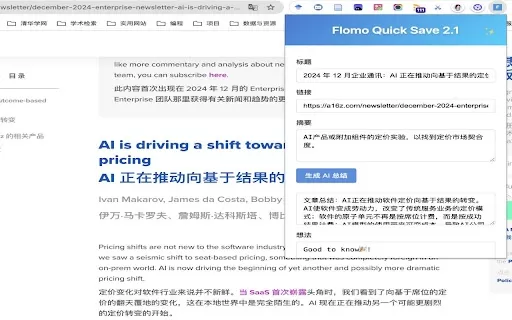
Ever stumbled upon a gem of an article while browsing and wished you could save it to your Flomo notebook with a snap of your fingers? Well, the Flomo Quick Save AI Chrome extension is here to make that dream a reality! This nifty tool is all about streamlining your note-taking process right from your browser. It's like having a personal assistant who's always ready to jot down whatever catches your eye on the web.
How to Use Flomo Quick Save AI Chrome Extension?
Once you've got the extension installed, it's time to get it set up. Dive into the settings and configure your Flomo API along with your AI preferences. Now, whenever you come across something worth saving, just hit that extension icon. You can tweak the content, let the AI whip up a summary for you, sprinkle in some tags, and voila—your note is saved in Flomo, ready for whenever you need it.
Flomo Quick Save AI Chrome Extension's Core Features
This extension is packed with features that make note-taking a breeze:
- One-click Save to Flomo: With a single click, your content is safely stored in Flomo. It's like magic!
- AI-Generated Article Summaries: Let the AI do the heavy lifting by summarizing articles for you. It's like having a mini-research assistant in your browser.
- Intelligent Tag Recommendation: The extension smartly suggests tags, making your notes more organized than ever.
- Support for Personal Notes and Ideas: Whether it's a fleeting thought or a detailed note, Flomo Quick Save has got you covered.
- Modern UI Design: The interface is sleek and user-friendly, making your experience smooth and enjoyable.
- Elegant Sound Effects: Who said note-taking can't be fun? Enjoy subtle sound effects that make every save feel satisfying.
- Auto-Save Drafts: No more losing your thoughts mid-sentence. The extension automatically saves your drafts.
- Support for Custom AI API Configuration: Tailor the AI to your needs with custom API settings. It's all about making it work for you.
Flomo Quick Save AI Chrome Extension's Use Cases
Wondering how you can put this extension to good use? Here are some scenarios:
- Quickly Save Online Articles and Generate Summaries: Found an interesting article? Save it and let the AI summarize it for you. Perfect for those busy days when you can't read everything right away.
- Capture Important Web Information While Browsing: Whether it's a recipe, a quote, or a piece of information you want to revisit, Flomo Quick Save makes it easy to capture and organize.
FAQ from Flomo Quick Save
- What should I do if I encounter issues while using Flomo Quick Save?
- If you run into any hiccups, start by checking the extension settings. Ensure your API keys are correctly entered and that your AI settings are properly configured. If problems persist, reach out to Flomo support for help.
- Does Flomo Quick Save require any API setup?
- Yes, to fully leverage the AI features, you'll need to set up your Flomo API in the extension settings. Don't worry, it's a straightforward process that'll unlock a world of possibilities for your note-taking.
Flomo Quick Save - Chrome Extension Screenshot





2026 Latest Best Top-rated AI Text to Speech Tools for Natural Voiceovers are here on XIX.AI! This curated list features powerful, game-changing options that deliver crystal-clear voices for every use case, backed by real-world tests and weekly updated rankings. Get a free vs paid comparison to find the must-try solution that boosts your productivity instantly. Explore now to Unlock your AI edge!
 11 tools
 xix.ai

2026 Latest Best Manga AI Background Generators Ranked Top-Rated! This curated collection showcases powerful game-changing tools perfect for creating high-quality chapter backgrounds, book covers, and promotional art. Every option has undergone rigorous real-world tests to ensure reliability. Get a free vs paid comparison along with detailed insights. Explore now to discover your perfect tool and unlock your AI edge in manga creation.
6 tools
xix.ai

2026 Latest Best Top-rated AI Object Removal Editors for portraits travel product shots! XIX.AI curates a powerful game-changing collection regularly updated with weekly rankings. These tools offer real-world tests to help you quickly remove unwanted elements, boost content quality, and save tons of time without compromising results. Must-try for anyone aiming to unlock their AI creation edge. Explore now!
10 tools
xix.ai

2026 Latest Best Top-rated AI Text to Speech Tools for Online Courses are curated by XIX.AI based on rigorous real-world tests and weekly updated rankings. These powerful tools help creators deliver crystal-clear audio content effortlessly, boosting writing efficiency and streamlining course production. Check out the free vs paid comparison to find your perfect fit. Explore now to unlock your AI edge in online education.
10 tools
xix.ai

2026 Latest Best Top-Rated AI Blog Title Tools for Higher Click Through Rates! XIX.AI has carefully curated a powerful, game-changing collection of top tools that go through rigorous real-world tests. You’ll find a free vs paid comparison, weekly updated rankings, and detailed insights to help you boost your blog’s traffic efficiently. Must-try options are highlighted to help you unlock your AI edge. Explore now!
10 tools
xix.ai

2026 Latest Best Top-rated AI Task Routing Tools for Support Workflows! XIX.AI has curated a highly powerful game-changing collection of must-try solutions, all undergoing rigorous real-world tests and updated weekly. These tools streamline workflows, boost productivity, and help teams deliver faster, more efficient support. Explore now to discover your perfect tool and unlock your AI edge!
17 tools
xix.ai


Flomo Quick Save 정말 좋아요! 이제 기사를 바로 Flomo 노트북에 저장할 수 있어서 너무 편해요. 다만 자동으로 카테고리 분류해주면 더 좋겠어요. 그럼 완벽할 것 같아요! 😊
Flomo Quick Saveは本当に便利です!記事をすぐにFlomoノートブックに保存できるので、時間の節約になります。ただ、自動的にカテゴリ分けしてくれるとさらに良いと思います。ぜひ検討してほしいですね!😊
Flomo Quick Save is a lifesaver for me! I can now save articles to my Flomo notebook in a snap. It's super convenient and works like magic. Just wish it could categorize them automatically too, that would be the cherry on top! 😊
¡Flomo Quick Save es genial! Ahora puedo guardar artículos en mi cuaderno de Flomo en un abrir y cerrar de ojos. Es súper cómodo y funciona como por arte de magia. Ojalá pudiera clasificarlos automáticamente, ¡sería la guinda del pastel! 😊
Flomo Quick Save é incrível! Agora posso salvar artigos no meu Flomo notebook num piscar de olhos. É super prático e funciona como mágica. Só gostaria que classificasse automaticamente, seria o ponto final perfeito! 😊


