


 Home
HomeFig
Fig: Manage Team Secrets, Scripts, SSH



Helps TikTok sellers, brands, MCNs, and TAPs discover winning products and find creators.

HelpLook is an AI-powered all-in-one knowledge base tool that helps businesses quickly build knowledge bases, help centers, and...

Your AI Workspace

302.AI is an enterprise-grade AI resource platform with pay-as-you-go pricing, API access to a full range of AI models, and ready-to-use online applications.

剧火AI — AI Screenwriter + Director, a One-Person Short Drama Studio In one sentence, what is it?

Ever stumbled upon Cherry Studio AI and wondered what it's all about? Well, let me break it down for you. Cherry Studio AI isn't just another run-of-the-mill AI tool; it's a powerhouse desktop client that lets you dive into advanced AI interactions across

Discover Plume AI: Your Ultimate Academic Writing AssistantAre you tired of struggling with your academic writing? Well, say hello to Plume AI, the innovative AI assistant that's here to revolutionize the way you write! Designed with students in mind, Plume AI harnesses the power of cutting-edge art

Ever wondered how to turn your jumbled thoughts and complex queries into something you can actually grasp? Enter The Visualizer, your new best friend in the world of learning and creativity. This nifty tool takes your written queries, URLs, and even PDFs,

Ever wished for a trusty sidekick to help you navigate the digital world with ease? Enter Sider, your personal AI companion designed to seamlessly blend into your daily routine. Starting off as a handy Chrome/Edge extension, Sider transforms your browsing

Ever wondered what Ninja AI is all about? Well, let me tell you, it's like having a Swiss Army knife for your digital needs! Ninja AI isn't just another AI tool; it's a powerhouse that brings together over 24 top-notch Large Language Models (LLMs) to help
Fig Product Information
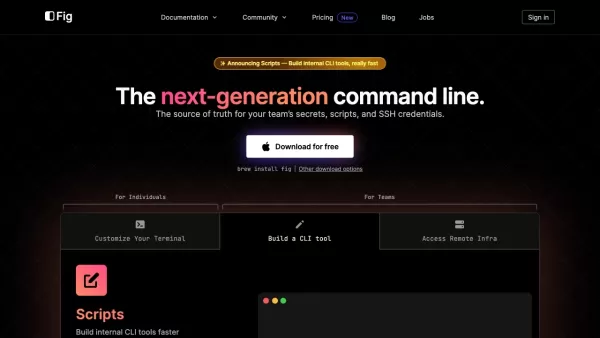
Ever wondered what makes the command line experience smoother and more efficient for developers? Enter Fig, a cutting-edge tool that's transforming the way teams handle their secrets, scripts, and SSH credentials. It's like having a Swiss Army knife for your terminal, packed with features that cater to your every command line need.
Getting Started with Fig
Ready to give Fig a spin? It's as easy as pie! If you're on a Mac, just fire up your terminal and type brew install fig. For those on other platforms, no worries—Fig offers alternative download methods to suit your setup. Once installed, Fig seamlessly integrates with your existing terminal, supercharging it with autocomplete for over 500 popular CLI tools, interactive UIs for crafting internal CLI tools, secure SSH access, and the ability to edit, sync, and share your dotfiles and shell plugins.
Exploring Fig's Core Features
Autocomplete for Your Terminal
Imagine typing a command and having Fig suggest the next steps, covering over 500 CLI tools. It's like having a personal assistant right in your terminal, making your workflow smoother and faster.
Interactive Terminal UIs
Need to build internal CLI tools? Fig's got you covered with interactive terminal UIs that make the process intuitive and engaging. It's like turning your command line into a playground for productivity.
Secure SSH Access
Managing SSH servers can be a hassle, but not with Fig. It offers secure access to your SSH servers, either through a GUI or CLI, ensuring your connections are safe and sound.
Dotfiles Management
Your dotfiles are precious, and Fig understands that. It lets you edit, sync, and share them across multiple devices, keeping your settings consistent wherever you go.
Shell Plugins
Whether you're using zsh, bash, or fish, Fig helps you manage and sync your shell plugins, ensuring your shell is always decked out with the latest and greatest tools.
Fig in Action: Real-World Use Cases
Boosting Command Line Efficiency
Fig isn't just about features; it's about making your command line work more efficient and productive. From autocomplete to secure SSH access, every aspect is designed to streamline your workflow.
Collaborative Sharing
Working in a team? Fig makes it easy to share shell aliases and environment variables, fostering a collaborative environment where everyone can benefit from shared knowledge.
Internal CLI Tool Development
Creating internal CLI tools for your engineering team? Fig's interactive UIs make the process a breeze, allowing you to distribute these tools within your team effortlessly.
Secure SSH Management
Managing SSH servers securely has never been easier. With Fig, you can access your servers with confidence, whether through a GUI or CLI, ensuring your data is always protected.
Dotfiles Across Devices
Switching between devices? No problem. Fig keeps your dotfiles in sync, so your settings are always at your fingertips, no matter where you are.
Shell Plugins for Everyone
Keep your shell plugins up to date and synced across different shells with Fig. It's like having a personal plugin manager that works tirelessly for you.
Frequently Asked Questions about Fig
- Is Fig free to use?
- Absolutely! Fig is free to download and use, enhancing your command line experience without breaking the bank.
- Can Fig be integrated with different terminals and shells?
- Yes, Fig is designed to work seamlessly with various terminals and shells, ensuring you get the most out of your setup.
- Is Fig secure and private?
- Security and privacy are at the heart of Fig. Your data is encrypted and protected, giving you peace of mind as you work.
- How can Fig benefit my team?
- Fig boosts team productivity by streamlining command line workflows, facilitating collaboration, and enhancing security for SSH access and data management.
- Can I contribute to Fig?
- Of course! Fig welcomes contributions from the community. Check out their GitHub page to get involved and make a difference.
For any support or inquiries, feel free to reach out to Fig's support team. You can find more contact details on their contact us page.
Fig, the company behind this innovative tool, is committed to enhancing the command line experience for developers worldwide. Dive deeper into their work and community on Fig's GitHub page.
Fig Screenshot



2026 Latest Best Top-rated AI Text to Speech Tools for Natural Voiceovers are here on XIX.AI! This curated list features powerful, game-changing options that deliver crystal-clear voices for every use case, backed by real-world tests and weekly updated rankings. Get a free vs paid comparison to find the must-try solution that boosts your productivity instantly. Explore now to Unlock your AI edge!
 11 tools
 xix.ai

2026 Latest Best Manga AI Background Generators Ranked Top-Rated! This curated collection showcases powerful game-changing tools perfect for creating high-quality chapter backgrounds, book covers, and promotional art. Every option has undergone rigorous real-world tests to ensure reliability. Get a free vs paid comparison along with detailed insights. Explore now to discover your perfect tool and unlock your AI edge in manga creation.
6 tools
xix.ai

2026 Latest Best Top-rated AI Object Removal Editors for portraits travel product shots! XIX.AI curates a powerful game-changing collection regularly updated with weekly rankings. These tools offer real-world tests to help you quickly remove unwanted elements, boost content quality, and save tons of time without compromising results. Must-try for anyone aiming to unlock their AI creation edge. Explore now!
10 tools
xix.ai

2026 Latest Best Top-rated AI Text to Speech Tools for Online Courses are curated by XIX.AI based on rigorous real-world tests and weekly updated rankings. These powerful tools help creators deliver crystal-clear audio content effortlessly, boosting writing efficiency and streamlining course production. Check out the free vs paid comparison to find your perfect fit. Explore now to unlock your AI edge in online education.
10 tools
xix.ai

2026 Latest Best Top-Rated AI Blog Title Tools for Higher Click Through Rates! XIX.AI has carefully curated a powerful, game-changing collection of top tools that go through rigorous real-world tests. You’ll find a free vs paid comparison, weekly updated rankings, and detailed insights to help you boost your blog’s traffic efficiently. Must-try options are highlighted to help you unlock your AI edge. Explore now!
10 tools
xix.ai

2026 Latest Best Top-rated AI Task Routing Tools for Support Workflows! XIX.AI has curated a highly powerful game-changing collection of must-try solutions, all undergoing rigorous real-world tests and updated weekly. These tools streamline workflows, boost productivity, and help teams deliver faster, more efficient support. Explore now to discover your perfect tool and unlock your AI edge!
17 tools
xix.ai


Fig has been a lifesaver for my CLI workflow! 🚀 Autocomplete suggestions are spot-on, and the secret management keeps everything secure yet accessible. My only gripe is the occasional lag when loading complex directory trees, but overall it's revolutionized my terminal game. #DevToolsFTW


