


 Home
HomeEyeTracking Interfaces
Eyetracking Accessibility Interfaces



Helps TikTok sellers, brands, MCNs, and TAPs discover winning products and find creators.

HelpLook is an AI-powered all-in-one knowledge base tool that helps businesses quickly build knowledge bases, help centers, and...

Your AI Workspace

302.AI is an enterprise-grade AI resource platform with pay-as-you-go pricing, API access to a full range of AI models, and ready-to-use online applications.

剧火AI — AI Screenwriter + Director, a One-Person Short Drama Studio In one sentence, what is it?

Ever wondered what it's like to give your written words a voice? Well, let me introduce you to F5 TTS—a nifty, AI-powered text-to-speech tool that's changing the game. It's not just any text-to-speech service; this one brings your text to life with natura

What is Revoldiv AI Chrome Extension? Revoldiv is a Chrome browser extension that instantly transcribes audio and video directly in your browser. It lets users follow along by reading live transcriptions and search for specific spoken words within po

What is the Readify AI Chrome Extension? Readify is a Chrome extension that elevates your online reading experience with tools for productivity and accessibility. It enables you to personalize web pages and content through features such as Bionic Rea

Voicefy isn't just another tool; it's a game-changer for anyone looking to bring their text to life. Imagine having the power to turn your written words into a symphony of realistic speech, with options in multiple languages and voices that sound so natur

What is the Dubabase AI Chrome Extension? Dubabase is a Chrome extension that instantly dubs videos across the web, removing language barriers so you can enjoy any content in your preferred language, no matter its original language.How to Use the Dub
EyeTracking Interfaces Product Information
Ever wondered how you can interact with your devices using just your eyes? Welcome to the world of EyeTracking Interfaces, where we harness the power of your device's native sensors—like webcams and phonecams—to create interactive experiences. It's all about making technology more accessible and adding a unique twist to how you navigate your digital world. And the best part? It's open to everyone, breaking down barriers to accessibility!
How to Dive into EyeTracking Interfaces
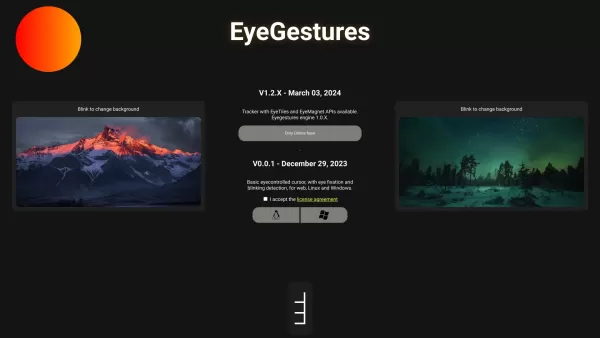
Ready to give it a try? It's as simple as blinking! Use your blinks to navigate through interface elements and even switch up your background. It's intuitive, fun, and surprisingly effective.
Core Features That Make EyeTracking Interfaces Stand Out
EyeGestures
Imagine controlling your device with just a flick of your eye. That's what EyeGestures are all about—enabling you to interact with your tech in a whole new way.
Blink to Change Background
Feeling like a change of scenery? Just blink, and watch your background transform. It's a neat trick that adds a personal touch to your digital space.
Tracker with EyeTiles and EyeMagnet APIs
With our advanced tracking technology and APIs like EyeTiles and EyeMagnet, you can create interfaces that respond to your gaze with incredible precision. It's like magic, but it's all science!
Real-World Applications of EyeTracking Interfaces
Basic Eye-Controlled Cursor
Need a hands-free way to navigate your screen? Our eye-controlled cursor makes it possible, turning your eyes into your mouse.
Ordering Food with Blink Gestures
Imagine ordering your favorite meal with just a few blinks. It's not just convenient; it's downright futuristic!
Playing Games with Eye Movements
Who said you need a controller to game? With EyeTracking Interfaces, you can dive into games using nothing but your eyes. It's a game-changer, literally!
FAQ from EyeTracking Interfaces
- What sensors are required to use the eyetracking features?
- All you need are the native sensors on your device, like webcams or phonecams. No extra hardware required!
- What can I control with EyeGestures?
- With EyeGestures, you can navigate menus, select options, and interact with your device in a way that's both intuitive and engaging.
- Is the eyetracking technology compatible with Linux and Windows?
- Absolutely! Our eyetracking technology works seamlessly with both Linux and Windows, ensuring you can use it no matter your operating system.
EyeTracking Interfaces Screenshot



2026 Latest Best Top-rated AI Text to Speech Tools for Natural Voiceovers are here on XIX.AI! This curated list features powerful, game-changing options that deliver crystal-clear voices for every use case, backed by real-world tests and weekly updated rankings. Get a free vs paid comparison to find the must-try solution that boosts your productivity instantly. Explore now to Unlock your AI edge!
 11 tools
 xix.ai

2026 Latest Best Manga AI Background Generators Ranked Top-Rated! This curated collection showcases powerful game-changing tools perfect for creating high-quality chapter backgrounds, book covers, and promotional art. Every option has undergone rigorous real-world tests to ensure reliability. Get a free vs paid comparison along with detailed insights. Explore now to discover your perfect tool and unlock your AI edge in manga creation.
6 tools
xix.ai

2026 Latest Best Top-rated AI Object Removal Editors for portraits travel product shots! XIX.AI curates a powerful game-changing collection regularly updated with weekly rankings. These tools offer real-world tests to help you quickly remove unwanted elements, boost content quality, and save tons of time without compromising results. Must-try for anyone aiming to unlock their AI creation edge. Explore now!
10 tools
xix.ai

2026 Latest Best Top-rated AI Text to Speech Tools for Online Courses are curated by XIX.AI based on rigorous real-world tests and weekly updated rankings. These powerful tools help creators deliver crystal-clear audio content effortlessly, boosting writing efficiency and streamlining course production. Check out the free vs paid comparison to find your perfect fit. Explore now to unlock your AI edge in online education.
10 tools
xix.ai

2026 Latest Best Top-Rated AI Blog Title Tools for Higher Click Through Rates! XIX.AI has carefully curated a powerful, game-changing collection of top tools that go through rigorous real-world tests. You’ll find a free vs paid comparison, weekly updated rankings, and detailed insights to help you boost your blog’s traffic efficiently. Must-try options are highlighted to help you unlock your AI edge. Explore now!
10 tools
xix.ai

2026 Latest Best Top-rated AI Task Routing Tools for Support Workflows! XIX.AI has curated a highly powerful game-changing collection of must-try solutions, all undergoing rigorous real-world tests and updated weekly. These tools streamline workflows, boost productivity, and help teams deliver faster, more efficient support. Explore now to discover your perfect tool and unlock your AI edge!
17 tools
xix.ai


Wow, das ist faszinierend! Ganz ohne zusätzliche Hardware nur mit der Kamera. Ich kann mir das gut für Gaming oder einfach ein müdes Nickerchen beim Surfen vorstellen. Hoffentlich lässt sich die Präzision verbessern, bei schnellen Augenbewegungen war es bei mir manchmal etwas hakelig. Aber die Idee ist mega! 😄👁️
Super cool tool! EyeTracking Interfaces makes my webcam feel like a sci-fi gadget. Navigating with just my eyes is smooth, but sometimes it’s a bit too sensitive—had me accidentally clicking stuff! 😅 Still, it’s a game-changer for accessibility. Love the innovation!


