


 Home
HomeExcelmatic
Excelmatic: Analyze Data in Natural Language



Helps TikTok sellers, brands, MCNs, and TAPs discover winning products and find creators.

HelpLook is an AI-powered all-in-one knowledge base tool that helps businesses quickly build knowledge bases, help centers, and...

Your AI Workspace

302.AI is an enterprise-grade AI resource platform with pay-as-you-go pricing, API access to a full range of AI models, and ready-to-use online applications.

剧火AI — AI Screenwriter + Director, a One-Person Short Drama Studio In one sentence, what is it?
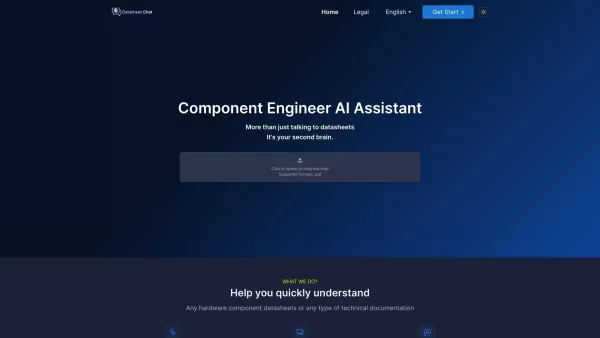
Datasheet.Chat is your go-to AI assistant designed specifically for component engineers. It's like having a super-smart colleague who's always ready to dive into the nitty-gritty of hardware component datasheets and technical documentation. Whether you're

What is Foqus Live?Foqus Live is a cloud-native AI video analytics platform that transforms standard IP cameras into intelligent business tools. It delivers real-time video analysis, enabling companies to interpret live streaming data and act on it i

What is Gainify?Gainify is an AI-powered marketing assistant designed to optimize your digital advertising efforts. It analyzes campaign performance data, delivers actionable insights, and recommends strategies to boost results across major advertisi

What is NextAtlas Generate?NextAtlas Generate is a next-generation AI-powered trend forecasting platform. It leverages sophisticated natural language processing (NLP) and machine learning to sift through immense amounts of social media and diverse da

What is MagicProspect?MagicProspect is an innovative AI-powered tool designed to revolutionize sales prospecting. It utilizes advanced algorithms to convert raw public data into actionable insights and detailed prospect dossiers. This empowers sales
Excelmatic Product Information
What is Excelmatic?
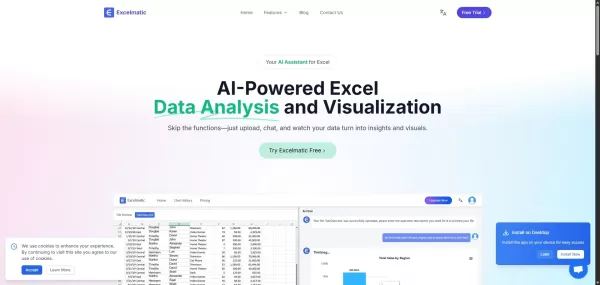
Excelmatic is an advanced AI-powered tool that enables effortless interaction with Excel spreadsheets. It uses natural language processing to let users ask complex questions, get immediate answers, and create charts and visualizations automatically. This approach streamlines data analysis, lowers the requirement for advanced Excel expertise, and boosts efficiency in tasks like data cleaning, formula creation, and trend analysis. Excelmatic suits both experienced professionals and beginners in data analysis, helping everyone make data-informed decisions quickly and effectively.
Who will use Excelmatic?
- Data analysts
- Business professionals
- Accountants
- Students
- Researchers
How to use Excelmatic?
- Step 1: Go to the Excelmatic website.
- Step 2: Upload your Excel file.
- Step 3: Ask your questions using everyday language.
- Step 4: Evaluate the automatically created charts and insights.
- Step 5: Download your results or share them instantly.
Platform
- Web
Excelmatic's Core Features & Benefits
The Core Features
- Natural language processing
- Automatic chart generation
- Instant insights
- Data cleaning tools
- Formula automation
The Benefits
- Reduces time spent on data analysis
- Makes Excel accessible to non-experts
- Improves accuracy in data handling
- Enhances productivity through automation
Excelmatic's Main Use Cases & Applications
- Quick data analysis for business reports
- Educational tool for learning Excel
- Data visualization for presentations
- Market research analysis
Excelmatic's Pros & Cons
The Pros
Automates repetitive Excel data cleaning tasks to save valuable time.
Enables natural language questioning for instant data responses and insights.
Creates professional charts with one click and allows style customization.
Offers real-time updates to data visualizations for timely business choices.
Features a smart formula assistant that generates formulas automatically and fixes errors.
Supports batch processing and multi-dimensional data analysis for better efficiency.
Accessible to both technical and non-technical users.
The Cons
No information on whether it is open source or available on GitHub.
No mobile app or browser extensions currently offered.
Limited details about customer support responsiveness and live help availability.
Excelmatic's Pricing
Has free plan | No |
|---|---|
Free trial details | |
Pricing model | |
Is credit card required | No |
Paid from | 0 |
Has lifetime plan | No |
Billing frequency |
For the latest pricing, please visit: https://dash.excelmatic.ai
FAQs about Excelmatic
Can I use Excelmatic for free?
Yes, Excelmatic provides free access to its features.
Do I need advanced Excel skills to use Excelmatic?
No, Excelmatic makes the process straightforward for users without advanced skills.
What types of Excel files are supported?
Excelmatic supports .xlsx and .xls file formats.
Can I export the results?
Yes, you can easily download or export your results.
Is my data secure with Excelmatic?
Yes, Excelmatic emphasizes data security and privacy.
Can I integrate Excelmatic with other tools?
Excelmatic is built to function independently, though it can be used alongside other software.
Is there customer support available?
Yes, Excelmatic offers customer support for user assistance.
What functions can I automate?
You can automate formula creation and data cleaning operations.
How does natural language processing work in Excelmatic?
Excelmatic interprets your input and turns it into data queries.
Can I use Excelmatic on mobile devices?
Currently, Excelmatic is only accessible via web platforms.
Excelmatic Company Information
- Excelmatic
- https://excelmatic.ai
Excelmatic Screenshot



2026 Latest Best Manga AI Background Generators Ranked Top-Rated! This curated collection showcases powerful game-changing tools perfect for creating high-quality chapter backgrounds, book covers, and promotional art. Every option has undergone rigorous real-world tests to ensure reliability. Get a free vs paid comparison along with detailed insights. Explore now to discover your perfect tool and unlock your AI edge in manga creation.
 6 tools
 xix.ai

2026 Latest Best Top-rated AI Object Removal Editors for portraits travel product shots! XIX.AI curates a powerful game-changing collection regularly updated with weekly rankings. These tools offer real-world tests to help you quickly remove unwanted elements, boost content quality, and save tons of time without compromising results. Must-try for anyone aiming to unlock their AI creation edge. Explore now!
10 tools
xix.ai

2026 Latest Best Top-rated AI Text to Speech Tools for Online Courses are curated by XIX.AI based on rigorous real-world tests and weekly updated rankings. These powerful tools help creators deliver crystal-clear audio content effortlessly, boosting writing efficiency and streamlining course production. Check out the free vs paid comparison to find your perfect fit. Explore now to unlock your AI edge in online education.
10 tools
xix.ai

2026 Latest Best Top-Rated AI Blog Title Tools for Higher Click Through Rates! XIX.AI has carefully curated a powerful, game-changing collection of top tools that go through rigorous real-world tests. You’ll find a free vs paid comparison, weekly updated rankings, and detailed insights to help you boost your blog’s traffic efficiently. Must-try options are highlighted to help you unlock your AI edge. Explore now!
10 tools
xix.ai

2026 Latest Best Top-rated AI Task Routing Tools for Support Workflows! XIX.AI has curated a highly powerful game-changing collection of must-try solutions, all undergoing rigorous real-world tests and updated weekly. These tools streamline workflows, boost productivity, and help teams deliver faster, more efficient support. Explore now to discover your perfect tool and unlock your AI edge!
17 tools
xix.ai

2026 Latest Best Top-Rated AI Citation and Paper Summary Tools Curated by XIX.AI. Get powerful game-changing solutions for quick content creation, improved writing efficiency, and boosting productivity. We offer a free vs paid comparison along with real-world tests and weekly updated rankings to help you find the must-try tool that fits your needs perfectly. Explore now to Unlock your AI edge.
10 tools
xix.ai


Excelmatic выглядит очень перспективно! Автоматизация работы с Excel через ИИ — это именно то, что нужно для экономии времени. Интересно, насколько хорошо он справляется с нестандартными запросами на русском? Хотелось бы попробовать с нашими финансовыми отчётами. 🤔


