


 Home
HomeExamize
AI Quiz Generator for Google Workspace



Helps TikTok sellers, brands, MCNs, and TAPs discover winning products and find creators.

HelpLook is an AI-powered all-in-one knowledge base tool that helps businesses quickly build knowledge bases, help centers, and...

Your AI Workspace

302.AI is an enterprise-grade AI resource platform with pay-as-you-go pricing, API access to a full range of AI models, and ready-to-use online applications.

剧火AI — AI Screenwriter + Director, a One-Person Short Drama Studio In one sentence, what is it?

What is Quin AI?Quin merges traditional tarot wisdom with artificial intelligence to deliver personalized, on-demand readings. Users can choose from a variety of card spreads and get insights specifically crafted for their questions and circumstances

What is AGM: AI Game Maker?AGM: AI Game Maker is a cutting-edge platform built for aspiring game developers. It leverages AI technology to simplify the game creation workflow, providing tools for character and environment design, as well as game logi

What is Visual Quiz Builder?Visual Quiz Builder is a Shopify app that creates personalized product recommendation quizzes. It helps brands engage customers and boost sales with intuitive, AI-powered creation tools, branching logic, and seamless marke
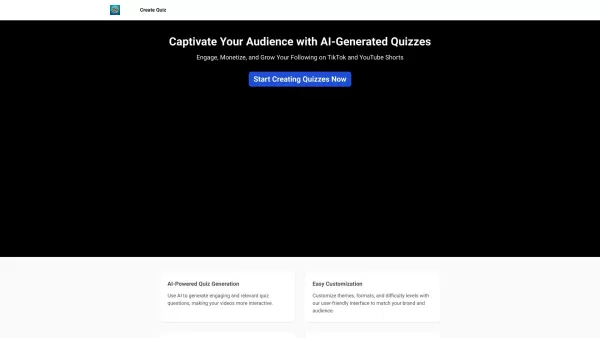
What is QuizTok?QuizTok is an innovative platform that enables you to create, share, and participate in engaging quizzes across a wide variety of topics. It's the perfect tool for challenging yourself with trivia, acquiring new knowledge, or simply e

What is wizenoze.com?Wizenoze integrates educational expertise, artificial intelligence, and data science to power a sophisticated platform for delivering learning materials. It gives students access to a curated library of high-quality content tailo
Examize Product Information
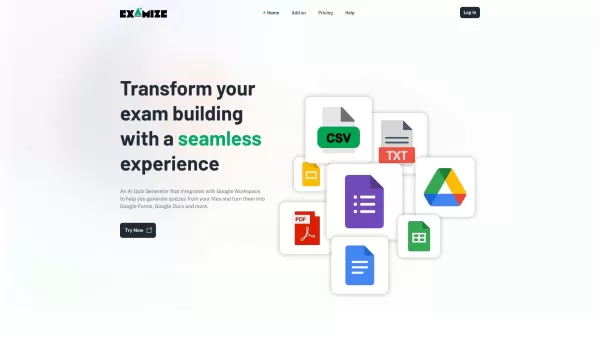
Ever found yourself buried under a mountain of files, wishing there was an easier way to turn them into engaging quizzes? Enter Examize, the AI-powered quiz generator that seamlessly integrates with Google Workspace. It's like having a personal quiz-making assistant that transforms your documents into interactive Google Forms and Google Docs, making the process of creating quizzes as smooth as butter.
How to Get Started with Examize
Getting started with Examize is a breeze. Just head over to the Google Workspace Marketplace and install the add-on. Once it's set up, pick the file you want to quizify, and let Examize work its magic. It'll automatically generate a quiz for you, saving you hours of manual work. It's that simple!
What Makes Examize Stand Out?
Seamless Integration with Google Workspace
Examize isn't just another tool; it's designed to fit perfectly into your Google Workspace ecosystem. Whether you're using Google Drive, Docs, or Forms, Examize plays nice with all of them.
Automatic Quiz Generation from Files
Forget about spending hours crafting questions. With Examize, your files are the starting point. It scans through your documents and generates quizzes that are both relevant and engaging.
Conversion into Google Forms and Google Docs
Once your quiz is ready, Examize can convert it into a Google Form for easy distribution or a Google Doc for further customization. It's all about giving you the flexibility to use your quizzes the way you want.
Dynamic and Creative Questions
Examize doesn't just churn out boring multiple-choice questions. It aims to create dynamic and creative questions that keep learners on their toes and engaged throughout the quiz.
Who Can Benefit from Examize?
Whether you're an educator looking to whip up quizzes from your lesson plans in no time, or an organization needing fresh, engaging questions for training sessions, Examize has got you covered. It's perfect for anyone who wants to make learning fun and interactive without the hassle.
Frequently Asked Questions
- What are credits used for?
- Credits in Examize are used to generate quizzes. Each quiz generation consumes a certain number of credits, depending on the complexity and length of the quiz.
- Can I upgrade my plan?
- Absolutely! You can upgrade your Examize plan at any time to get more credits and access additional features. Just head over to the pricing page to see your options.
For any questions or issues, you can reach out to Examize's support team at [email protected]. For more contact options, visit their support page.
Curious about the cost? Check out Examize's pricing details at their pricing page. It's all about finding the plan that fits your needs and budget.
Examize Screenshot

2026 Latest Best Top-rated AI Object Removal Editors for portraits travel product shots! XIX.AI curates a powerful game-changing collection regularly updated with weekly rankings. These tools offer real-world tests to help you quickly remove unwanted elements, boost content quality, and save tons of time without compromising results. Must-try for anyone aiming to unlock their AI creation edge. Explore now!
 10 tools
 xix.ai

2026 Latest Best Top-rated AI Text to Speech Tools for Online Courses are curated by XIX.AI based on rigorous real-world tests and weekly updated rankings. These powerful tools help creators deliver crystal-clear audio content effortlessly, boosting writing efficiency and streamlining course production. Check out the free vs paid comparison to find your perfect fit. Explore now to unlock your AI edge in online education.
10 tools
xix.ai

2026 Latest Best Top-Rated AI Blog Title Tools for Higher Click Through Rates! XIX.AI has carefully curated a powerful, game-changing collection of top tools that go through rigorous real-world tests. You’ll find a free vs paid comparison, weekly updated rankings, and detailed insights to help you boost your blog’s traffic efficiently. Must-try options are highlighted to help you unlock your AI edge. Explore now!
10 tools
xix.ai

2026 Latest Best Top-rated AI Task Routing Tools for Support Workflows! XIX.AI has curated a highly powerful game-changing collection of must-try solutions, all undergoing rigorous real-world tests and updated weekly. These tools streamline workflows, boost productivity, and help teams deliver faster, more efficient support. Explore now to discover your perfect tool and unlock your AI edge!
17 tools
xix.ai

2026 Latest Best Top-Rated AI Citation and Paper Summary Tools Curated by XIX.AI. Get powerful game-changing solutions for quick content creation, improved writing efficiency, and boosting productivity. We offer a free vs paid comparison along with real-world tests and weekly updated rankings to help you find the must-try tool that fits your needs perfectly. Explore now to Unlock your AI edge.
10 tools
xix.ai

2026 Latest Best Top-Rated AI Productivity Tools for Daily Work! XIX.AI has curated a powerful, game-changing selection based on rigorous weekly updated rankings and real-world tests. You’ll find must-try options that boost writing efficiency, streamline content creation, and help you overcome daily work challenges. Get a free vs paid comparison to find the perfect fit for your needs. Explore now to unlock your AI edge!
9 tools
xix.ai


