


 Home
HomeDocswrite
Streamline content publishing process & save time with Docswrite.



Helps TikTok sellers, brands, MCNs, and TAPs discover winning products and find creators.

HelpLook is an AI-powered all-in-one knowledge base tool that helps businesses quickly build knowledge bases, help centers, and...

Your AI Workspace

302.AI is an enterprise-grade AI resource platform with pay-as-you-go pricing, API access to a full range of AI models, and ready-to-use online applications.

剧火AI — AI Screenwriter + Director, a One-Person Short Drama Studio In one sentence, what is it?
Copilot is an innovative suite of plugins and tools designed to enhance productivity and streamline various tasks within the ChatGPT platform. It's like having a digital assistant that's specialized in boosting your workflow, whether you're summarizing documents, searching the web, or managing job a

Ever found yourself juggling different AI models to get the perfect response? Enter MultipleChat, a game-changer in the world of AI interaction. This platform lets you chat with big names like ChatGPT, Claude, and Gemini all at once, right from one s

Mavis AI is a game-changer for anyone in the content creation game—think publishers, affiliates, and marketing gurus. It's an AI-powered platform that churns out SEO-friendly articles, blogs, and newsletters like nobody's business. If you're looking to bo

Ever heard of SnackContent? It's a game-changer for anyone looking to whip up content without breaking a sweat. This AI-powered platform takes the hassle out of content creation, letting you produce SEO-optimized articles and transform them into bite-size

Ever found yourself staring at a blank screen, struggling to churn out content for your blog, ads, or emails? Enter Word Spinner, your new best friend in the world of content creation. This isn't just any tool; it's an all-in-one AI writing platform desig
Docswrite Product Information
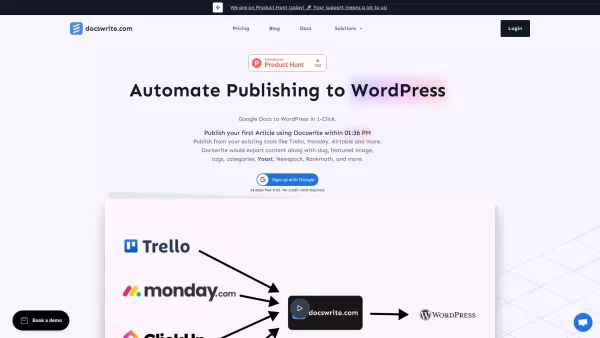
Ever felt bogged down by the tedious process of moving your brilliant articles from Google Docs to WordPress? Enter Docswrite, your new best friend in the world of content management. This nifty tool is designed to streamline your publishing journey, not just from Google Docs, but also from platforms like Trello, Monday, Airtable, and Google Sheets. Imagine cutting down the hassle and getting your content live faster—that's what Docswrite promises.
How to Harness the Power of Docswrite?
There are two slick ways to leverage Docswrite. First off, if you're already using tools like Trello, you can directly publish your content using the Zapier App. It's like magic! Alternatively, you can take the dashboard route. Simply craft your masterpiece in Google Docs, jot down all the essentials—title, slug, tags, categories, that eye-catching featured image, and don't forget those SEO settings. Once you're set, Docswrite takes the wheel, publishing your content to WordPress in a snap.
What Makes Docswrite Stand Out?
One-Click Publishing Magic
With just one click, your content leaps from Google Docs to WordPress. It's that simple.
Seamless Integration
Docswrite plays nice with your existing workflow tools, be it Trello, Monday, Airtable, Jira, or others. No need to overhaul your system; just plug in Docswrite and keep rolling.
Comprehensive Export Options
Not only does it publish your content, but it also exports all the crucial details—slug, featured image, tags, categories, and SEO settings for Yoast, Rankmath, and Newspack. Everything you need, all in one go.
No Plugins? No Problem!
Forget about cluttering your WordPress with more plugins. Docswrite works its charm without any additional software.
SEO-Friendly Content
Your content isn't just published; it's optimized for search engines right out of the gate.
Customization at Your Fingertips
Want to add custom styles or use shortcodes? Docswrite has you covered, allowing you to tailor your content to your heart's content.
Manage Multiple Blogs with Ease
Whether you're juggling one blog or several, Docswrite lets you manage them all from a single dashboard.
Programmatic Publishing from CSV
Got a bunch of data in Google Sheets? Docswrite can turn that into published posts automatically.
Image Compression on the Fly
It even compresses images to WEBP format, ensuring your site loads faster without you lifting a finger.
No More Copy-Pasting
Say goodbye to the tedious task of manually transferring content. Docswrite does it all for you, swiftly and efficiently.
Real-World Applications of Docswrite
- From Trello to WordPress: Seamlessly publish your articles directly from your Trello boards.
- From Monday.com to WordPress: Keep your workflow smooth by publishing from Monday.com.
- From Airtable to WordPress: Turn your Airtable data into published content with ease.
- From Google Sheets to WordPress: Automate your publishing process using data from Google Sheets.
- From Other Project Management Tools: Whether it's Jira, Linear, or another tool, Docswrite integrates effortlessly.
- Automated Posts from CSV: Let Docswrite handle the heavy lifting by publishing posts from CSV data in Google Sheets.
Frequently Asked Questions About Docswrite
- How do I use Docswrite?
- Using Docswrite is straightforward. You can either publish directly from tools like Trello using Zapier or use the Docswrite dashboard to publish from Google Docs.
- Is Docswrite SEO optimized?
- Absolutely! Docswrite ensures your content is SEO-friendly, supporting settings for Yoast, Rankmath, and Newspack.
- What is Docswrite?
- Docswrite is a productivity tool that simplifies publishing content from Google Docs and other platforms to WordPress.
- Do I need to pay for the trial?
- No, you can try Docswrite for free without any payment required during the trial period.
- Can I set the featured image in Docswrite?
- Yes, you can specify the featured image directly in your Google Docs, and Docswrite will handle the rest.
- How do I set tags, categories, slug, title, and SEO?
- Just include these details in your Google Docs, and Docswrite will automatically apply them when publishing to WordPress.
- Do I need any additional WordPress plugins to use Docswrite?
- No additional plugins are needed. Docswrite works seamlessly with your existing WordPress setup.
- Can Docswrite compress images?
- Yes, Docswrite automatically compresses images to WEBP format for faster loading times.
- Can I use Docswrite with my existing WordPress site?
- Definitely! Docswrite is designed to integrate with your current WordPress site without any fuss.
For more information or support, feel free to reach out via the contact us page. To learn more about the company behind Docswrite, visit the about us page. If you're ready to dive in, you can log in or sign up. Curious about the pricing? Check out the pricing page. And don't forget to follow us on Twitter for the latest updates!
Docswrite Screenshot



2026 Latest Best Top-rated AI Object Removal Editors for portraits travel product shots! XIX.AI curates a powerful game-changing collection regularly updated with weekly rankings. These tools offer real-world tests to help you quickly remove unwanted elements, boost content quality, and save tons of time without compromising results. Must-try for anyone aiming to unlock their AI creation edge. Explore now!
 10 tools
 xix.ai

2026 Latest Best Top-rated AI Text to Speech Tools for Online Courses are curated by XIX.AI based on rigorous real-world tests and weekly updated rankings. These powerful tools help creators deliver crystal-clear audio content effortlessly, boosting writing efficiency and streamlining course production. Check out the free vs paid comparison to find your perfect fit. Explore now to unlock your AI edge in online education.
10 tools
xix.ai

2026 Latest Best Top-Rated AI Blog Title Tools for Higher Click Through Rates! XIX.AI has carefully curated a powerful, game-changing collection of top tools that go through rigorous real-world tests. You’ll find a free vs paid comparison, weekly updated rankings, and detailed insights to help you boost your blog’s traffic efficiently. Must-try options are highlighted to help you unlock your AI edge. Explore now!
10 tools
xix.ai

2026 Latest Best Top-rated AI Task Routing Tools for Support Workflows! XIX.AI has curated a highly powerful game-changing collection of must-try solutions, all undergoing rigorous real-world tests and updated weekly. These tools streamline workflows, boost productivity, and help teams deliver faster, more efficient support. Explore now to discover your perfect tool and unlock your AI edge!
17 tools
xix.ai

2026 Latest Best Top-Rated AI Citation and Paper Summary Tools Curated by XIX.AI. Get powerful game-changing solutions for quick content creation, improved writing efficiency, and boosting productivity. We offer a free vs paid comparison along with real-world tests and weekly updated rankings to help you find the must-try tool that fits your needs perfectly. Explore now to Unlock your AI edge.
10 tools
xix.ai

2026 Latest Best Top-Rated AI Productivity Tools for Daily Work! XIX.AI has curated a powerful, game-changing selection based on rigorous weekly updated rankings and real-world tests. You’ll find must-try options that boost writing efficiency, streamline content creation, and help you overcome daily work challenges. Get a free vs paid comparison to find the perfect fit for your needs. Explore now to unlock your AI edge!
9 tools
xix.ai


Docswrite is a lifesaver for bloggers like me who constantly switch between Google Docs and WordPress! 🎉 No more formatting nightmares. Just one-click publishing with all images intact. Though I wish it had more customization options for the final post layout. Still, 9/10 would recommend to anyone writing online content regularly.


