


 Home
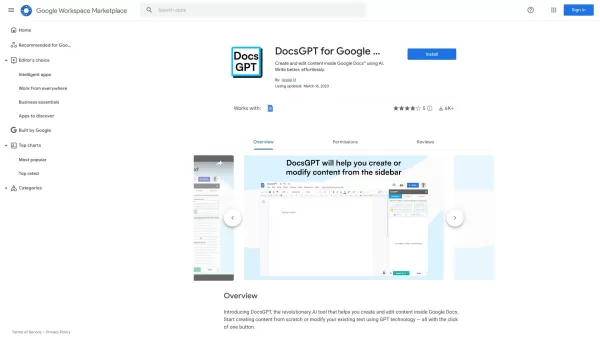
HomeDocsGPT
DocsGPT: Effortless Content Creation in Google Docs



Helps TikTok sellers, brands, MCNs, and TAPs discover winning products and find creators.

HelpLook is an AI-powered all-in-one knowledge base tool that helps businesses quickly build knowledge bases, help centers, and...

Your AI Workspace

302.AI is an enterprise-grade AI resource platform with pay-as-you-go pricing, API access to a full range of AI models, and ready-to-use online applications.

剧火AI — AI Screenwriter + Director, a One-Person Short Drama Studio In one sentence, what is it?

What is Makefilm?Makefilm revolutionizes video creation as a comprehensive AI-powered platform that streamlines professional-quality video production. This innovative solution combines multiple smart tools into one seamless workflow - transforming te

What is AIShowX?AIShowX represents the next generation of creative tools - a comprehensive online platform powered by artificial intelligence that empowers anyone to produce professional-quality videos, images, and audio content with remarkable ease.

What is Grok Video AI? Grok Video AI revolutionizes content creation by transforming simple inputs into professional-quality videos. This cutting-edge platform leverages artificial intelligence to convert text descriptions and static images into dyn
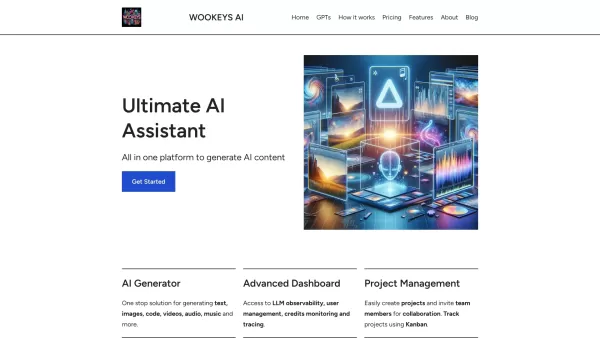
Ever wondered what the buzz around Ultimate AI Assistant is all about? Well, let me introduce you to WooKeys AI, a powerhouse platform designed to revolutionize your content creation game. It's not just another tool; it's your new best friend in the

Ever wondered what Amaro is all about? Well, let me fill you in on this gem of a platform. Amaro isn't just another tool; it's your go-to spot for generating and tweaking AI images, audio, and video, all on what they call an "infinite canvas." And the bes
DocsGPT Product Information
Imagine you're knee-deep in a project on Google Docs, and you need a quick boost to your writing or editing process. Enter DocsGPT, a game-changer in the world of content creation. This AI-powered tool is like having a super-smart assistant right inside your Google Docs, ready to create or tweak your content with just one click. It's not just about speed; it's about transforming your writing experience into something seamless and almost magical.
How to Use DocsGPT?
Getting started with DocsGPT is a breeze. First, you'll need to install the DocsGPT extension for Google Docs. Once it's set up, you're just a click away from harnessing its power. Spot the "Create" or "Modify" button? That's your ticket to instant content generation or editing. Click it, and watch as DocsGPT weaves its magic, transforming your document in real-time. It's that simple!
DocsGPT's Core Features
Effortless Content Creation and Modification
With DocsGPT, crafting or refining your content feels effortless. Whether you're starting from scratch or polishing an existing piece, this tool does the heavy lifting, leaving you more time to focus on the big picture.
Seamless Integration with Google Docs
DocsGPT doesn't just work alongside Google Docs; it feels like it was born there. The integration is so smooth, you'll forget you're using a separate tool. It's like having a writing partner who's always on the same page.
One-Click Functionality
The beauty of DocsGPT lies in its simplicity. With one click, you can generate new content or modify what you've got. It's writing, but faster and smarter.
Support for All Languages
No matter what language you're working in, DocsGPT has got you covered. Its multilingual support means you can create and edit content in any language, breaking down barriers and opening up a world of possibilities.
DocsGPT's Use Cases
Content Creation and Editing for Professional Writers
Professional writers, take note: DocsGPT can be your secret weapon. From drafting to refining, this tool helps you craft content that stands out, all while saving you time.
Generating Text for Blog Posts and Articles
Staring at a blank page? DocsGPT can help you kickstart your blog posts or articles with ease. Let the AI generate a starting point, and you'll be off to the races in no time.
Improving Productivity and Efficiency in Content Creation
In the fast-paced world of content creation, every second counts. DocsGPT boosts your productivity, making the writing process more efficient so you can produce more, faster.
Collaborative Writing and Editing in Google Docs
Working with a team? DocsGPT shines in collaborative environments. It's perfect for group projects, where multiple hands are shaping a single document, making the process smoother and more cohesive.
FAQ from DocsGPT
- What is DocsGPT?
- DocsGPT is an AI tool designed to enhance your writing and editing experience within Google Docs, offering one-click content creation and modification.
- How does DocsGPT work?
- After installing the DocsGPT extension, you can click "Create" or "Modify" to let the AI instantly generate or edit your content within Google Docs.
- Is DocsGPT compatible with all languages?
- Yes, DocsGPT supports content creation and editing in all languages, making it a versatile tool for global users.
- Can DocsGPT be used for collaborative writing and editing?
- Absolutely, DocsGPT is ideal for collaborative projects, enhancing the writing and editing process in Google Docs environments.
- Is there a free trial available?
- Yes, you can try DocsGPT for free to experience its capabilities before deciding to fully integrate it into your workflow.
DocsGPT Screenshot


2026 Latest Best Top-rated AI Object Removal Editors for portraits travel product shots! XIX.AI curates a powerful game-changing collection regularly updated with weekly rankings. These tools offer real-world tests to help you quickly remove unwanted elements, boost content quality, and save tons of time without compromising results. Must-try for anyone aiming to unlock their AI creation edge. Explore now!
 10 tools
 xix.ai

2026 Latest Best Top-rated AI Text to Speech Tools for Online Courses are curated by XIX.AI based on rigorous real-world tests and weekly updated rankings. These powerful tools help creators deliver crystal-clear audio content effortlessly, boosting writing efficiency and streamlining course production. Check out the free vs paid comparison to find your perfect fit. Explore now to unlock your AI edge in online education.
10 tools
xix.ai

2026 Latest Best Top-Rated AI Blog Title Tools for Higher Click Through Rates! XIX.AI has carefully curated a powerful, game-changing collection of top tools that go through rigorous real-world tests. You’ll find a free vs paid comparison, weekly updated rankings, and detailed insights to help you boost your blog’s traffic efficiently. Must-try options are highlighted to help you unlock your AI edge. Explore now!
10 tools
xix.ai

2026 Latest Best Top-rated AI Task Routing Tools for Support Workflows! XIX.AI has curated a highly powerful game-changing collection of must-try solutions, all undergoing rigorous real-world tests and updated weekly. These tools streamline workflows, boost productivity, and help teams deliver faster, more efficient support. Explore now to discover your perfect tool and unlock your AI edge!
17 tools
xix.ai

2026 Latest Best Top-Rated AI Citation and Paper Summary Tools Curated by XIX.AI. Get powerful game-changing solutions for quick content creation, improved writing efficiency, and boosting productivity. We offer a free vs paid comparison along with real-world tests and weekly updated rankings to help you find the must-try tool that fits your needs perfectly. Explore now to Unlock your AI edge.
10 tools
xix.ai

2026 Latest Best Top-Rated AI Productivity Tools for Daily Work! XIX.AI has curated a powerful, game-changing selection based on rigorous weekly updated rankings and real-world tests. You’ll find must-try options that boost writing efficiency, streamline content creation, and help you overcome daily work challenges. Get a free vs paid comparison to find the perfect fit for your needs. Explore now to unlock your AI edge!
9 tools
xix.ai


DocsGPT、Google Docsの中で使えるなんて最高!🤩 文章の推敲やアイデア出しが格段に楽になるのは間違いない。特に日本語のニュアンスも自然に処理してくれるのが嬉しいですね。もっと早く出会いたかったかも。✨
DocsGPT klingt nach meiner Rettung! Ewig schreibe ich in Google Docs und das mit ständigen Zweifeln. Endlich mal ein direkt integrierter KI-Assistent, der in Echtzeit hilft – sehr praktisch! Hoffentlich wird es keine endlose Abogeschichte… 🙏


