


 Home
HomeDoco
AI Writing Assistant for Microsoft Word Optimization



Helps TikTok sellers, brands, MCNs, and TAPs discover winning products and find creators.

HelpLook is an AI-powered all-in-one knowledge base tool that helps businesses quickly build knowledge bases, help centers, and...

Your AI Workspace

302.AI is an enterprise-grade AI resource platform with pay-as-you-go pricing, API access to a full range of AI models, and ready-to-use online applications.

剧火AI — AI Screenwriter + Director, a One-Person Short Drama Studio In one sentence, what is it?

What is Originality?Originality.AI is an advanced AI-powered platform built to identify AI-generated text and detect plagiarism. It serves writers, publishers, and educators by verifying the authenticity and originality of content. The tool utilizes

What is PaperRed? PaperRed is a game-changer in the world of academic tools. It’s a free online plagiarism checker powered by AI technology, designed to help students, writers, and researchers ensure their work is original and polished. Think of it as you
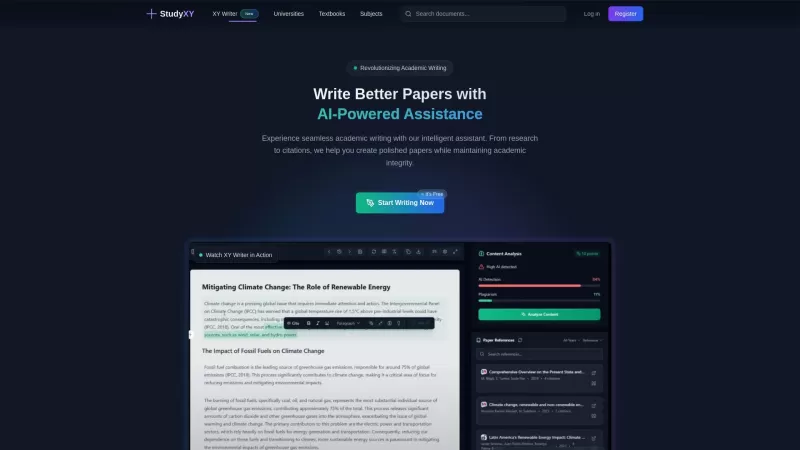
What is XYWriter?XYWriter is your go-to AI-powered academic writing assistant. It's designed to make life easier for students and researchers by helping with everything from managing citations to checking for plagiarism. Plus, it's all about keeping things honest and academically sound.How to Use XY
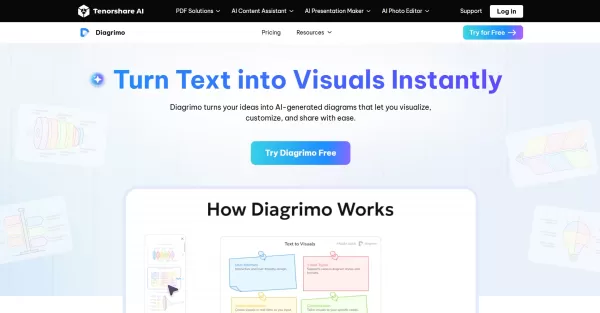
What is Diagrimo?Diagrimo is an AI-powered text-to-visual tool that helps users transform text or concepts into structured diagrams like flowcharts, SWOT analyses, pyramids, and infographics. It supports users in organizing ideas, planning projects,

What is Giststack? Giststack is an AI-driven platform that assists users, especially solopreneurs and marketers, in tackling the hurdles of social media content creation. It gathers content from your preferred websites and newsletters, spots trending
Doco Product Information
What is Doco?
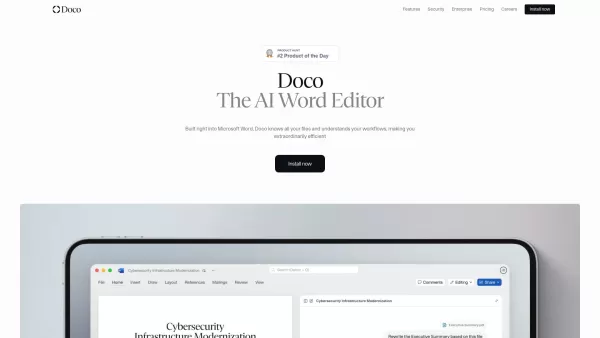
Doco represents a breakthrough in document productivity - an intelligent writing assistant seamlessly embedded within Microsoft Word. This powerful tool merges the best features of grammar correction, AI-assisted coding, and automated content creation specifically designed for organized document processes. Rather than switching between multiple applications, users can manage references, establish tailored projects and workflows, and accomplish complex tasks all within the familiar Word environment. Doco's mission is to transform ordinary document creation into an extraordinarily efficient experience.
How to use Doco?
Doco operates effortlessly within your existing Microsoft Word interface. Imagine composing complete documents by simply describing what you need, or refining entire sections with conversational commands. The assistant adapts to your individual work patterns while accessing information from both SharePoint repositories and local files. Beyond content creation, Doco handles precise formatting according to Word's native styles and generates properly sourced citations with remarkable accuracy.
Doco's Core Features
Native integration with Microsoft Word
Contextual understanding of all files (SharePoint, local files) with cited answers
Natural language editing for writing and modifying documents
Workflow personalization based on user habits
Native Word formatting capabilities (Fonts, Styles, Tables, Bullets, Numbers)
One-click accurate citations with auto-linking to source files
Enterprise-grade security (SOC 2 Type II, encrypted data, no training on proprietary data, FedRAMP compliant infra)
Seamless integrations with trusted tools
Integrated AI Assistant for delegating repetitive tasks, with GovCon expertise
Doco's Use Cases
- Enhancing workflows for enterprises by connecting Doco AI to existing tools
- Delegating repetitive tasks to a personal AI assistant across web apps and Word
- Editing documents, updating content, and sharing progress directly within Microsoft Word
- Generating full documents or editing pages using simple natural language prompts
- Referencing specific files and getting cited answers from company data
FAQ from Doco
- What is Doco?
- How does Doco ensure data security?
- Can Doco integrate with my existing company tools?
- Is there a free version of Doco available?
Doco Support & Contact Information
For customer support inquiries including refund requests, please email: [email protected]. Additional contact options are available on our contact page: Contact Us
About Doco Company
Company Name: Doco
Doco Login
Access your account at: Doco Login
Doco LinkedIn
Connect with us professionally: Doco LinkedIn Profile
Doco Screenshot

2026 Latest Best Top-rated AI Object Removal Editors for portraits travel product shots! XIX.AI curates a powerful game-changing collection regularly updated with weekly rankings. These tools offer real-world tests to help you quickly remove unwanted elements, boost content quality, and save tons of time without compromising results. Must-try for anyone aiming to unlock their AI creation edge. Explore now!
 10 tools
 xix.ai

2026 Latest Best Top-rated AI Text to Speech Tools for Online Courses are curated by XIX.AI based on rigorous real-world tests and weekly updated rankings. These powerful tools help creators deliver crystal-clear audio content effortlessly, boosting writing efficiency and streamlining course production. Check out the free vs paid comparison to find your perfect fit. Explore now to unlock your AI edge in online education.
10 tools
xix.ai

2026 Latest Best Top-Rated AI Blog Title Tools for Higher Click Through Rates! XIX.AI has carefully curated a powerful, game-changing collection of top tools that go through rigorous real-world tests. You’ll find a free vs paid comparison, weekly updated rankings, and detailed insights to help you boost your blog’s traffic efficiently. Must-try options are highlighted to help you unlock your AI edge. Explore now!
10 tools
xix.ai

2026 Latest Best Top-rated AI Task Routing Tools for Support Workflows! XIX.AI has curated a highly powerful game-changing collection of must-try solutions, all undergoing rigorous real-world tests and updated weekly. These tools streamline workflows, boost productivity, and help teams deliver faster, more efficient support. Explore now to discover your perfect tool and unlock your AI edge!
17 tools
xix.ai

2026 Latest Best Top-Rated AI Citation and Paper Summary Tools Curated by XIX.AI. Get powerful game-changing solutions for quick content creation, improved writing efficiency, and boosting productivity. We offer a free vs paid comparison along with real-world tests and weekly updated rankings to help you find the must-try tool that fits your needs perfectly. Explore now to Unlock your AI edge.
10 tools
xix.ai

2026 Latest Best Top-Rated AI Productivity Tools for Daily Work! XIX.AI has curated a powerful, game-changing selection based on rigorous weekly updated rankings and real-world tests. You’ll find must-try options that boost writing efficiency, streamline content creation, and help you overcome daily work challenges. Get a free vs paid comparison to find the perfect fit for your needs. Explore now to unlock your AI edge!
9 tools
xix.ai


Just tried Doco in Word and it's a game-changer for my reports! The grammar fixes are spot-on, and the AI coding hints saved me hours on formatting tables. Feels like having a co-pilot that actually gets my workflow. Only worry is getting too dependent on it 😅 but for now, it's my secret weapon!


