


 Home
HomeDiDi's Prompts



Helps TikTok sellers, brands, MCNs, and TAPs discover winning products and find creators.

HelpLook is an AI-powered all-in-one knowledge base tool that helps businesses quickly build knowledge bases, help centers, and...

Your AI Workspace

302.AI is an enterprise-grade AI resource platform with pay-as-you-go pricing, API access to a full range of AI models, and ready-to-use online applications.

剧火AI — AI Screenwriter + Director, a One-Person Short Drama Studio In one sentence, what is it?

What is AI Excel Bot?AI Excel Bot uses advanced AI algorithms to help you build complex Excel and Google Sheets formulas in seconds. By leveraging natural language processing, it makes writing, editing, and understanding formulas much easier. Whether

What is GPT2Markdown?GPT2Markdown is a Chrome extension that streamlines the process of exporting your ChatGPT conversations into Markdown format. With a single click, it allows you to download your chat history as a Markdown (.md) file directly to y

AI Chatbot Hub is your go-to no-code platform for crafting and deploying AI chatbots that streamline customer interactions and boost internal operations. No need to be a coding whiz—just dive in and start creating chatbots that can capture leads, schedule

What is Sakura AI?Sakura AI harnesses cutting-edge artificial intelligence to provide a conversational interface that helps with a wide range of tasks, from managing schedules to answering questions. It uses advanced voice recognition and understandi

Ever wished for a trusty sidekick to boost your productivity while you surf the web? Well, say hello to the MaxAI AI Chrome extension! This little gem is your go-to for real-time suggestions and a whole suite of AI tools that can transform your online exp
DiDi's Prompts Product Information
What is DiDi's Prompts?
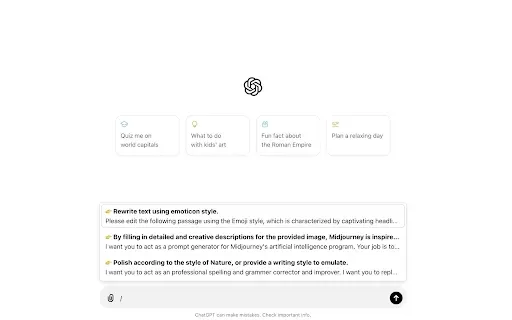
DiDi's Prompts is a Chrome extension that supercharges your ChatGPT workflow. It provides instant access to a library of saved prompts, inserts them directly into the chat, and lets you personalize your collection with ease. Just type a '/' in ChatGPT's input field to bring up your prompt menu, choose what you need, and manage your library from the extension's settings. It's entirely free, ad-free, and requires site data permissions to operate.
Who is DiDi's Prompts for?
- ChatGPT users
- AI researchers
- Content creators
- Educators
- Students
How to Use DiDi's Prompts
- Step 1: Install the DiDi's Prompts extension from the Chrome Web Store.
- Step 2: Navigate to chatgpt.com.
- Step 3: Type '/' in ChatGPT's message box to open the prompt list.
- Step 4: Select and insert your preferred prompt from the menu.
- Step 5: Add, edit, or remove prompts in the extension settings to build your personal library.
Platform
- Web
- Chrome
DiDi's Prompts Core Features & Advantages
Core Features
- Fast access to saved prompts
- One-click insertion into ChatGPT
- Fully customizable prompt library
- Simple and intuitive prompt management
Key Benefits
- Boost your productivity
- Eliminate repetitive typing
- Get more from your ChatGPT conversations
- Completely free with no advertisements
Primary Use Cases & Applications
- Streamlining prompt-based work with ChatGPT
- Building tailored prompt libraries for specific tasks
- Organizing and accessing multiple prompts efficiently
DiDi's Prompts FAQs
How do I install DiDi's Prompts?
Install it directly from the Chrome Web Store by adding the extension to your browser.
Is DiDi's Prompts free to use?
Yes, it is completely free and contains no advertisements.
How do I activate the prompt list in ChatGPT?
Simply type the '/' character into ChatGPT's input box to trigger the prompt list.
Can I customize my prompt library?
Absolutely. You can fully customize your library through the extension's settings panel.
Why does the extension need to read and change data on the websites I visit?
This permission is necessary for the extension to display the prompt list and insert your chosen text into ChatGPT's input field.
Is my data safe with DiDi's Prompts?
Yes. The developer states that no user data is collected or utilized by the extension.
Can I use DiDi's Prompts on browsers other than Chrome?
Currently, DiDi's Prompts is designed exclusively for the Chrome browser.
How do I update the extension?
Updates are managed automatically by the Chrome Web Store.
What should I do if the extension is not working?
First, verify you have the latest version installed and all permissions are enabled. If problems continue, please reach out to the developer.
How can I contact the support team?
You can contact support via email at [email protected].
DiDi's Prompts Company Information
DiDi's Prompts Screenshot


2026 Latest Best AI Quiz Builder Platforms for Teachers, Tutors, and Cohort-Based Learning Programs! XIX.AI has curated a top-rated list of powerful game-changing tools that go through real-world tests to deliver accurate rankings. These must-try platforms help boost writing efficiency, streamline content creation, and simplify quiz design across all learning scenarios. Explore now to discover your perfect tool for unlocking your AI edge in teaching!
 13 tools
 xix.ai

2026 Latest Best AI Pull Request Review Tools for GitHub Teams are here on XIX.AI! This top-rated curated list showcases powerful game-changing solutions that streamline refactoring, bug fixing, and security gap detection across all team workflows. Enjoy a free vs paid comparison along with real-world tests and detailed rankings to help you find the perfect tool that boosts productivity significantly. Explore now to unlock your AI edge!
12 tools
xix.ai

2026 Latest Best Top-rated AI Text to Speech Tools for Natural Voiceovers are here on XIX.AI! This curated list features powerful, game-changing options that deliver crystal-clear voices for every use case, backed by real-world tests and weekly updated rankings. Get a free vs paid comparison to find the must-try solution that boosts your productivity instantly. Explore now to Unlock your AI edge!
11 tools
xix.ai

2026 Latest Best Manga AI Background Generators Ranked Top-Rated! This curated collection showcases powerful game-changing tools perfect for creating high-quality chapter backgrounds, book covers, and promotional art. Every option has undergone rigorous real-world tests to ensure reliability. Get a free vs paid comparison along with detailed insights. Explore now to discover your perfect tool and unlock your AI edge in manga creation.
6 tools
xix.ai

2026 Latest Best Top-rated AI Object Removal Editors for portraits travel product shots! XIX.AI curates a powerful game-changing collection regularly updated with weekly rankings. These tools offer real-world tests to help you quickly remove unwanted elements, boost content quality, and save tons of time without compromising results. Must-try for anyone aiming to unlock their AI creation edge. Explore now!
10 tools
xix.ai

2026 Latest Best Top-rated AI Text to Speech Tools for Online Courses are curated by XIX.AI based on rigorous real-world tests and weekly updated rankings. These powerful tools help creators deliver crystal-clear audio content effortlessly, boosting writing efficiency and streamlining course production. Check out the free vs paid comparison to find your perfect fit. Explore now to unlock your AI edge in online education.
10 tools
xix.ai


This extension is a game changer! I love how I can save and organize my prompts. Made my ChatGPT workflow so much smoother. The only thing I wish is a dark mode. But overall, awesome! 🚀


