


 Home
HomeDictaphone
AI Audio Transcription Tool



Helps TikTok sellers, brands, MCNs, and TAPs discover winning products and find creators.

HelpLook is an AI-powered all-in-one knowledge base tool that helps businesses quickly build knowledge bases, help centers, and...

Your AI Workspace

302.AI is an enterprise-grade AI resource platform with pay-as-you-go pricing, API access to a full range of AI models, and ready-to-use online applications.

剧火AI — AI Screenwriter + Director, a One-Person Short Drama Studio In one sentence, what is it?

What is Speech Translator?Speech Translator leverages Google's advanced speech recognition to deliver real-time translation for videos, audio, and live streams. This tool bridges language gaps, enabling seamless conversations and fostering clearer un

Ever wondered how to effortlessly turn your audio and video files into text? Enter Clipto, the powerhouse of AI transcription on the web. Imagine harnessing the same cutting-edge tech that fuels ChatGPT to convert your Zoom meetings, interviews, and

What is Revoldiv AI Chrome Extension? Revoldiv is a Chrome browser extension that instantly transcribes audio and video directly in your browser. It lets users follow along by reading live transcriptions and search for specific spoken words within po

Ever found yourself needing to turn spoken words into written text? Well, let me introduce you to tulz.AI—an AI-powered service that's all about making audio transcription a breeze. Whether it's a podcast, a business meeting, or any other spoken content,

Ever found yourself in need of a quick and accurate transcription of a video or audio file? That's where Video To Text AI comes into play. It's a slick AI-powered tool designed to effortlessly convert your media into text. Whether you're juggling YouTube
Dictaphone Product Information
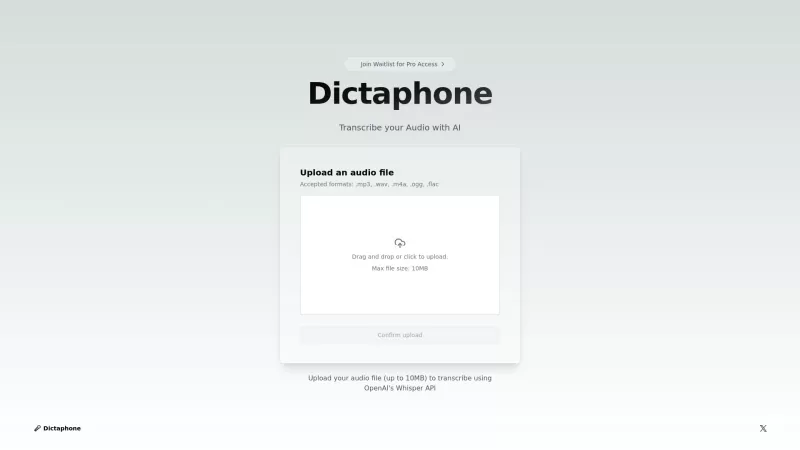
Ever found yourself wishing you could magically turn your audio recordings into text? Well, that's where Dictaphone comes in—a nifty web-based tool that uses AI to transform your audio files into written words. Powered by the cutting-edge OpenAI's Whisper API, Dictaphone supports a wide range of audio formats and delivers transcriptions that are both quick and spot-on. It's like having a personal transcriptionist at your fingertips, without the hassle!
How to Use Dictaphone?
Using Dictaphone is as easy as pie. Just upload your audio file—make sure it's no larger than 10MB—and voila! In a matter of seconds, you'll have a precise transcription ready to go. It's that simple, and it's that fast.
Dictaphone's Core Features
Dictaphone isn't just about turning audio into text; it's packed with features that make it a must-have for anyone dealing with audio files:
Live Transcriptions
Imagine being able to see your words appear in real-time as you speak. That's the magic of live transcriptions with Dictaphone. It's perfect for those moments when you need instant feedback.
Support for Multiple Audio File Formats
Whether you're working with MP3, WAV, or any other common audio format, Dictaphone has got you covered. No need to convert files; just upload and go.
Quick and Accurate Results Using AI Technology
Thanks to the power of AI, Dictaphone delivers transcriptions that are not only fast but also incredibly accurate. Say goodbye to hours spent manually transcribing and hello to efficiency.
User-Friendly Upload Interface
The last thing you want is a complicated interface when you're trying to get work done. Dictaphone's upload process is as straightforward as it gets, making it a breeze to use.
Dictaphone's Use Cases
From students to professionals, Dictaphone has a variety of applications that can make your life easier:
Transcribing Interviews for Note-Taking
Journalists and researchers, rejoice! Dictaphone makes it a snap to turn your interview recordings into detailed notes, saving you time and effort.
Turning Lectures into Written Study Materials
Students, imagine being able to convert your lecture recordings into text for easier studying. Dictaphone makes it possible, helping you ace those exams.
Converting Podcasts into Text for Accessibility
Podcast creators and listeners, Dictaphone can help make your content more accessible by providing text versions of your episodes. It's a win-win for everyone involved.
FAQ from Dictaphone
- What audio formats does Dictaphone support for upload?
- Dictaphone supports a variety of formats including MP3, WAV, and more. You can upload any of these without worrying about compatibility.
- Is there a limit on the file size for audio uploads?
- Yes, the current limit is 10MB per file. Keep your audio files within this size to ensure smooth transcription.
- How quickly can I expect results from Dictaphone?
- You can expect results in just seconds. Dictaphone's AI technology works fast to give you accurate transcriptions without the wait.
Dictaphone Screenshot

2026 Latest Best Top-rated AI Object Removal Editors for portraits travel product shots! XIX.AI curates a powerful game-changing collection regularly updated with weekly rankings. These tools offer real-world tests to help you quickly remove unwanted elements, boost content quality, and save tons of time without compromising results. Must-try for anyone aiming to unlock their AI creation edge. Explore now!
 10 tools
 xix.ai

2026 Latest Best Top-rated AI Text to Speech Tools for Online Courses are curated by XIX.AI based on rigorous real-world tests and weekly updated rankings. These powerful tools help creators deliver crystal-clear audio content effortlessly, boosting writing efficiency and streamlining course production. Check out the free vs paid comparison to find your perfect fit. Explore now to unlock your AI edge in online education.
10 tools
xix.ai

2026 Latest Best Top-Rated AI Blog Title Tools for Higher Click Through Rates! XIX.AI has carefully curated a powerful, game-changing collection of top tools that go through rigorous real-world tests. You’ll find a free vs paid comparison, weekly updated rankings, and detailed insights to help you boost your blog’s traffic efficiently. Must-try options are highlighted to help you unlock your AI edge. Explore now!
10 tools
xix.ai

2026 Latest Best Top-rated AI Task Routing Tools for Support Workflows! XIX.AI has curated a highly powerful game-changing collection of must-try solutions, all undergoing rigorous real-world tests and updated weekly. These tools streamline workflows, boost productivity, and help teams deliver faster, more efficient support. Explore now to discover your perfect tool and unlock your AI edge!
17 tools
xix.ai

2026 Latest Best Top-Rated AI Citation and Paper Summary Tools Curated by XIX.AI. Get powerful game-changing solutions for quick content creation, improved writing efficiency, and boosting productivity. We offer a free vs paid comparison along with real-world tests and weekly updated rankings to help you find the must-try tool that fits your needs perfectly. Explore now to Unlock your AI edge.
10 tools
xix.ai

2026 Latest Best Top-Rated AI Productivity Tools for Daily Work! XIX.AI has curated a powerful, game-changing selection based on rigorous weekly updated rankings and real-world tests. You’ll find must-try options that boost writing efficiency, streamline content creation, and help you overcome daily work challenges. Get a free vs paid comparison to find the perfect fit for your needs. Explore now to unlock your AI edge!
9 tools
xix.ai


Great tool! I've been using it to transcribe my podcast interviews and it handles accents surprisingly well. The web interface is simple and fast. Just wish it could handle longer files without crashing. 😊
Die Genauigkeit von Whisper ist wirklich beeindruckend! Hab gestern ne 20-minütige Vorlesung umgewandelt und kaum Korrekturen gebraucht. Aber die Verarbeitungszeit könnte bisschen schneller sein 😅 Wär cool wenn man mehrere Dateien gleichzeitig in die Warteschlange stellen könnte!


