


 Home
HomeDictanote
Dictanote: Speech Recognition App for Multilingual Notes



Helps TikTok sellers, brands, MCNs, and TAPs discover winning products and find creators.

HelpLook is an AI-powered all-in-one knowledge base tool that helps businesses quickly build knowledge bases, help centers, and...

Your AI Workspace

302.AI is an enterprise-grade AI resource platform with pay-as-you-go pricing, API access to a full range of AI models, and ready-to-use online applications.

剧火AI — AI Screenwriter + Director, a One-Person Short Drama Studio In one sentence, what is it?

Ever stumbled upon Cherry Studio AI and wondered what it's all about? Well, let me break it down for you. Cherry Studio AI isn't just another run-of-the-mill AI tool; it's a powerhouse desktop client that lets you dive into advanced AI interactions across

Discover Plume AI: Your Ultimate Academic Writing AssistantAre you tired of struggling with your academic writing? Well, say hello to Plume AI, the innovative AI assistant that's here to revolutionize the way you write! Designed with students in mind, Plume AI harnesses the power of cutting-edge art

Ever wondered how to turn your jumbled thoughts and complex queries into something you can actually grasp? Enter The Visualizer, your new best friend in the world of learning and creativity. This nifty tool takes your written queries, URLs, and even PDFs,

Ever wished for a trusty sidekick to help you navigate the digital world with ease? Enter Sider, your personal AI companion designed to seamlessly blend into your daily routine. Starting off as a handy Chrome/Edge extension, Sider transforms your browsing

Ever wondered what Ninja AI is all about? Well, let me tell you, it's like having a Swiss Army knife for your digital needs! Ninja AI isn't just another AI tool; it's a powerhouse that brings together over 24 top-notch Large Language Models (LLMs) to help
Dictanote Product Information
What is Dictanote?
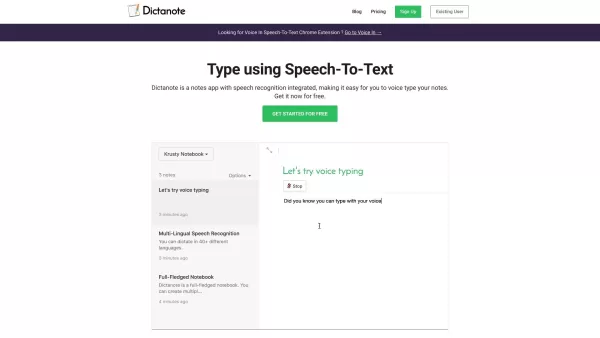
Let me tell you about Dictanote—it’s more than just a notes app; it’s like having a personal assistant who listens to you and writes down everything you say. Think of it as your ultimate tool for getting thoughts out of your head and onto paper—or rather, into digital form. With Dictanote, you can dictate notes effortlessly using speech recognition. Say hello to typing without touching the keyboard!
This nifty app works its magic by turning spoken words into written text in real time. And guess what? It handles over 50 languages and 80 dialects like a pro. Imagine being able to jot down ideas in your native tongue or even switch between languages mid-sentence. Plus, you can throw in voice commands to add punctuation, create paragraphs, insert emojis—you name it. No more awkward finger fumbling on tiny keyboards.
The best part? It’s available across multiple platforms: desktop (Windows, Linux, Mac via Chrome), Android, and iOS (Safari 12+). So whether you’re at your desk or on the go, Dictanote has got you covered.
How to Use Dictanote
Using Dictanote is super straightforward. First things first, download the app or grab the Chrome extension. Once it’s installed, just hit record and start talking. Your device’s mic will pick up your voice, and Dictanote will churn out the text almost instantly. Need to pause or stop? No problem—just use the handy keyboard shortcuts. And hey, if you want to tweak something later, Dictanote lets you edit your notes directly within the app.
Oh, and did I mention you can also dictate emails, write books, or even transcribe audio files? Yeah, this thing is versatile. It’s like having a Swiss Army knife for productivity.
Dictanote’s Core Features
- Real-Time Speech-to-Text Transcription: Watch your words turn into sentences as you speak. It’s like magic!
- Multi-Lingual Support: Over 50 languages and 80 dialects mean you’re never limited by language barriers.
- Voice Commands: Add punctuation, emojis, and formatting with simple voice commands.
- Keyboard Shortcuts: Control dictation with ease using custom shortcuts.
- Accurate Transcription: With over 90% accuracy, you won’t have to waste time fixing typos.
- Secure Storage: Rest easy knowing your notes are safely encrypted on Dictanote’s servers.
Dictanote’s Use Cases
Dictanote isn’t just for jotting down grocery lists. It’s a powerhouse for productivity. Here are some ways people use it:
- Note-Taking: Perfect for brainstorming sessions or capturing important details during meetings.
- Writing Books: Authors love Dictanote for drafting chapters hands-free.
- Class Notes: Students can keep up with lectures effortlessly.
- Blog Posts: Bloggers find it easier to express themselves verbally than typing.
- Emails: Compose messages quickly without typing a single word.
- Journalism: Reporters can capture interviews and thoughts on the fly.
- Transcribing Audio Files: Use Dictanote Transcribe to convert recorded audio into text.
FAQ from Dictanote
- What are the system requirements to use Dictanote?
- Are Dictanote and Voice In different products?
- Can I convert audio files to text?
- What about privacy? Where is my data stored?
Support and Contact
Need help? Reach out to Dictanote’s support team at [email protected].
Dictanote Login
Log in to Dictanote here:Dictanote Sign Up
Sign up for Dictanote here:Dictanote Pricing
Check out Dictanote’s pricing plans here:Dictanote YouTube Channel
Subscribe to Dictanote’s YouTube channel here:Dictanote LinkedIn
Connect with Dictanote on LinkedIn here:Dictanote Twitter
Follow Dictanote on Twitter here:Dictanote Screenshot

2026 Latest Best Cross-Border AI Voice-to-Text Tools: Our top-rated picks for seamless, high-accuracy transcription of client calls. Discover powerful, game-changing tools for effortless multilingual note-taking and meeting documentation. Compare free vs paid options with real-world tests and weekly updated rankings. Unlock superior productivity and communication clarity. Find your perfect AI transcription solution with XIX.AI's curated guide.
 10 tools
 xix.ai


