


 Home
HomeDeckAssistant
Stream Deck AI Assistant for Text and Chat



Helps TikTok sellers, brands, MCNs, and TAPs discover winning products and find creators.

HelpLook is an AI-powered all-in-one knowledge base tool that helps businesses quickly build knowledge bases, help centers, and...

Your AI Workspace

302.AI is an enterprise-grade AI resource platform with pay-as-you-go pricing, API access to a full range of AI models, and ready-to-use online applications.

剧火AI — AI Screenwriter + Director, a One-Person Short Drama Studio In one sentence, what is it?

Ever heard of Grok? It's this nifty AI assistant from xAI that's all about giving you the straight scoop. And the best part? It's totally free! Grok isn't just your average AI; it's packed with cool features like real-time search, image generation, and tr

Ever wondered what Qwen AI is all about? Well, let me introduce you to this gem from Alibaba Cloud. Qwen AI is not your average language model; it's a powerhouse designed to be your go-to buddy for everything from whipping up text to coding, and even reco

Discover Plume AI: Your Ultimate Academic Writing AssistantAre you tired of struggling with your academic writing? Well, say hello to Plume AI, the innovative AI assistant that's here to revolutionize the way you write! Designed with students in mind, Plume AI harnesses the power of cutting-edge art

Ever wished for a trusty sidekick to help you navigate the digital world with ease? Enter Sider, your personal AI companion designed to seamlessly blend into your daily routine. Starting off as a handy Chrome/Edge extension, Sider transforms your browsing

Ever wondered what Ninja AI is all about? Well, let me tell you, it's like having a Swiss Army knife for your digital needs! Ninja AI isn't just another AI tool; it's a powerhouse that brings together over 24 top-notch Large Language Models (LLMs) to help
DeckAssistant Product Information
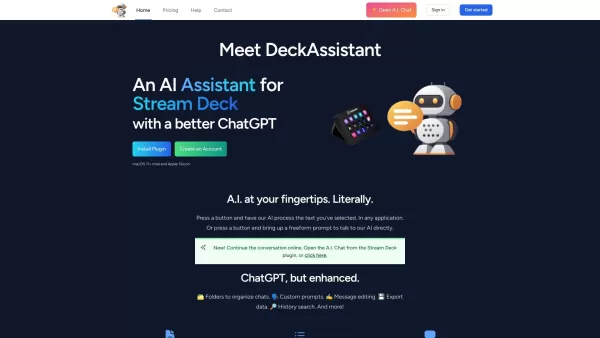
Ever wondered how you can supercharge your Stream Deck with AI? Enter DeckAssistant, a nifty plugin that brings the power of artificial intelligence right to your fingertips. It's like having a smart buddy who can process any text you throw at it or chat with you about anything under the sun. With features like organizing chats into folders, customizing prompts, editing messages, and even exporting data, DeckAssistant takes your ChatGPT experience to a whole new level. Imagine selecting any text from any app and letting the AI work its magic, or just having a casual conversation with it. Sounds cool, right?
How to Get Started with DeckAssistant?
Getting started with DeckAssistant is a breeze. Just follow these steps:
- Head over to the DeckAssistant website and sign up for an account. It's quick and easy!
- Once you're in, grab your API token from the dashboard. This little key is your ticket to AI magic.
- Next, install the Stream Deck plugin. It's like adding a new superpower to your device.
- Now, add a button to your Stream Deck and paste that API token in there. It's like setting up a secret handshake with the AI.
- Finally, press the button and dive into the world of AI. You can either select text from any app to let the AI process it, or use the freeform prompt to chat directly with the AI. The possibilities are endless!
What Can DeckAssistant Do?
DeckAssistant isn't just a one-trick pony. Here's what it brings to the table:
- Text Processing: Select any text from any app, and let the AI analyze it, correct it, or even generate new content from it.
- Freeform Conversations: Got a question or just want to brainstorm? Use the freeform prompt to chat directly with the AI.
- Organize Your Chats: Keep your conversations tidy with folders. It's like having a digital filing cabinet for your AI chats.
- Custom Prompts: Tailor your AI interactions with custom prompts. Make it as personal as you want.
- Message Editing: Made a mistake? No worries. Edit your messages on the fly.
- Data Export: Need to save your chats? Export them easily.
- History Search: Find past conversations quickly with a handy search feature.
- Favorites: Mark your favorite chats for easy access later.
- Screenshot Exports: Want to share your AI chats? Export them as screenshots.
- Prompt Library: Get inspired with a library of prompts to kickstart your AI interactions.
When Can You Use DeckAssistant?
DeckAssistant is versatile and can be your go-to tool in many situations:
- Spelling and Grammar: Need to polish your writing? Let DeckAssistant correct your spelling and grammar.
- Idea Generation: Stuck on a project? Chat with the AI to generate fresh ideas and content.
- Research and Extraction: Need to pull out key information from a text? DeckAssistant can help you research and extract data.
- Language Translation: Traveling or working with international clients? Use DeckAssistant for quick translations.
- Quick Answers: Got a burning question? Ask the AI and get an instant answer.
- Productivity Boost: Automate tasks and streamline your workflow with AI assistance.
Frequently Asked Questions
- Can I use DeckAssistant in any application?
- Absolutely! DeckAssistant works seamlessly with any application where you can select text.
- Can I have direct conversations with the AI using DeckAssistant?
- Yes, you can! Use the freeform prompt to chat directly with the AI about anything you want.
- Can I organize my chats with DeckAssistant?
- Definitely! Use folders to keep your chats organized and easy to find.
- Can I export data from DeckAssistant?
- Yes, you can export your chats and even take screenshots of your conversations.
- Is there a prompt library in DeckAssistant?
- Yes, there's a prompt library to help you get started with your AI interactions.
For more information or to get in touch, visit the contact us page. DeckAssistant is brought to you by Lostdomain. If you're ready to dive in, you can log in or sign up here. Curious about the pricing? Check it out at DeckAssistant Pricing. And don't forget to follow us on Twitter for the latest updates!
DeckAssistant Screenshot


2026 Latest Best Top-rated AI Object Removal Editors for portraits travel product shots! XIX.AI curates a powerful game-changing collection regularly updated with weekly rankings. These tools offer real-world tests to help you quickly remove unwanted elements, boost content quality, and save tons of time without compromising results. Must-try for anyone aiming to unlock their AI creation edge. Explore now!
 10 tools
 xix.ai

2026 Latest Best Top-rated AI Text to Speech Tools for Online Courses are curated by XIX.AI based on rigorous real-world tests and weekly updated rankings. These powerful tools help creators deliver crystal-clear audio content effortlessly, boosting writing efficiency and streamlining course production. Check out the free vs paid comparison to find your perfect fit. Explore now to unlock your AI edge in online education.
10 tools
xix.ai

2026 Latest Best Top-Rated AI Blog Title Tools for Higher Click Through Rates! XIX.AI has carefully curated a powerful, game-changing collection of top tools that go through rigorous real-world tests. You’ll find a free vs paid comparison, weekly updated rankings, and detailed insights to help you boost your blog’s traffic efficiently. Must-try options are highlighted to help you unlock your AI edge. Explore now!
10 tools
xix.ai

2026 Latest Best Top-rated AI Task Routing Tools for Support Workflows! XIX.AI has curated a highly powerful game-changing collection of must-try solutions, all undergoing rigorous real-world tests and updated weekly. These tools streamline workflows, boost productivity, and help teams deliver faster, more efficient support. Explore now to discover your perfect tool and unlock your AI edge!
17 tools
xix.ai

2026 Latest Best Top-Rated AI Citation and Paper Summary Tools Curated by XIX.AI. Get powerful game-changing solutions for quick content creation, improved writing efficiency, and boosting productivity. We offer a free vs paid comparison along with real-world tests and weekly updated rankings to help you find the must-try tool that fits your needs perfectly. Explore now to Unlock your AI edge.
10 tools
xix.ai

2026 Latest Best Top-Rated AI Productivity Tools for Daily Work! XIX.AI has curated a powerful, game-changing selection based on rigorous weekly updated rankings and real-world tests. You’ll find must-try options that boost writing efficiency, streamline content creation, and help you overcome daily work challenges. Get a free vs paid comparison to find the perfect fit for your needs. Explore now to unlock your AI edge!
9 tools
xix.ai


