


 Home
HomeDaVinci 3 d'OpenAI - Chrome Extension
Email response tool with DaVinci 3



Helps TikTok sellers, brands, MCNs, and TAPs discover winning products and find creators.

HelpLook is an AI-powered all-in-one knowledge base tool that helps businesses quickly build knowledge bases, help centers, and...

Your AI Workspace

302.AI is an enterprise-grade AI resource platform with pay-as-you-go pricing, API access to a full range of AI models, and ready-to-use online applications.

剧火AI — AI Screenwriter + Director, a One-Person Short Drama Studio In one sentence, what is it?

What is RAGFlow?RAGFlow is an open-source RAG (Retrieval-Augmented Generation) engine designed to simplify the creation and deployment of AI agents. It merges intelligent document processing with vector search to convert unstructured data from PDFs,

What Are Notion Templates for AI? Notion Templates for AI Integration to Supercharge Productivity Looking to harness the power of AI within your workflow? Notion Templates for AI Integration offers tailored solutions designed to streamline your day-to-day

What is QuickBox AI?QuickBox AI offers a handy browser extension that integrates a suite of AI tools directly into your browser. Pressing cmd+k (or ctrl+k) brings up a compact overlay on your current tab, enabling instant access to AI utilities. You
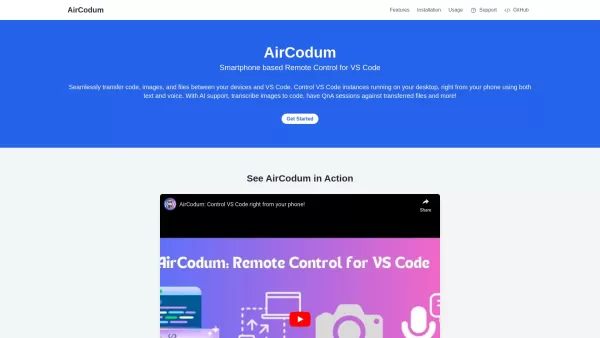
Ever wished you could control your VS Code from your phone? Enter CodeAir, the nifty mobile companion app that lets you do just that. It's like having a remote control for your coding environment, complete with file transfer capabilities right from your s

Docsumo is more than just another tech tool—it’s a powerhouse for businesses looking to streamline their document workflows. At its core, Docsumo uses advanced AI to effortlessly pull critical data from messy, unstructured documents like invoices, contrac
DaVinci 3 d’OpenAI - Chrome Extension Product Information
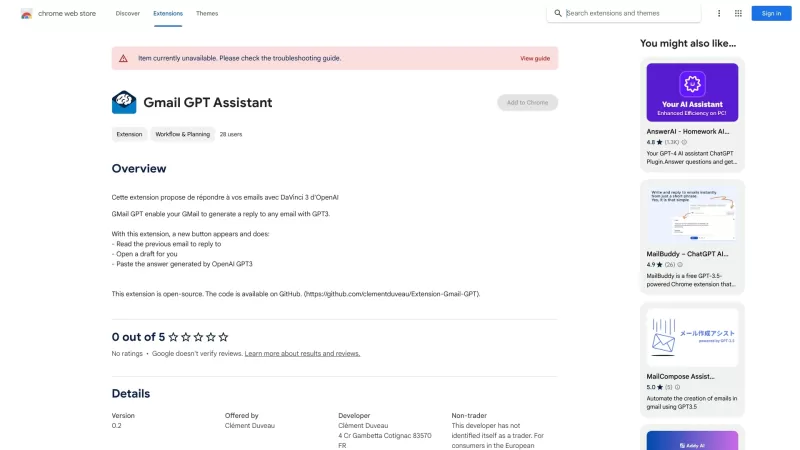
The DaVinci 3 d'OpenAI AI Chrome Extension is a nifty tool designed to revolutionize your email communication. It harnesses the power of OpenAI's DaVinci 3 model to craft responses to your emails, making your life a whole lot easier. Whether you're swamped with work or just looking to streamline your email game, this extension is your new best friend.

How to Use DaVinci 3 d'OpenAI AI Chrome Extension
Getting started with the DaVinci 3 d'OpenAI AI Chrome Extension is a breeze. Just follow these simple steps:
Install the Extension: Head over to the Chrome Web Store and add the DaVinci 3 d'OpenAI AI Chrome Extension to your browser. It's quick and easy!
Integrate with Your Email Platform: Once installed, the extension will seamlessly integrate with your email platform. Whether you're using Gmail, Outlook, or another service, DaVinci 3 has got you covered.
Let DaVinci 3 Do the Work: When you receive an email, simply click on the DaVinci 3 icon in your browser. The AI will analyze the email and generate a response for you. You can then review, edit, and send the response with just a few clicks.
Core Features of DaVinci 3 d'OpenAI AI Chrome Extension
Advanced AI DaVinci 3 Integration: The extension leverages the cutting-edge capabilities of OpenAI's DaVinci 3 model, ensuring that your email responses are not only quick but also incredibly smart and contextually relevant.
Efficient Email Response Generation: Say goodbye to the hassle of crafting emails from scratch. DaVinci 3 can generate responses in a snap, saving you time and effort.
Use Cases for DaVinci 3 d'OpenAI AI Chrome Extension
Automated Email Replies: Perfect for those busy days when you need to respond to a ton of emails but don't have the time. Let DaVinci 3 handle the routine stuff so you can focus on what matters.
Personalized Email Responses: Even though it's AI-generated, DaVinci 3 can tailor responses to sound like they're coming straight from you. It's like having a personal assistant in your browser!
FAQ from DaVinci 3 d'OpenAI
- Can I customize the email responses?
- Absolutely! You can tweak the responses generated by DaVinci 3 to fit your style or add any personal touches you want. It's all about making the email sound like you, even if the AI did the heavy lifting.
So, why wait? Give the DaVinci 3 d'OpenAI AI Chrome Extension a try and see how it can transform your email experience!
DaVinci 3 d’OpenAI - Chrome Extension Screenshot



2026 Latest Best Photoshop AI retouch tools for ecommerce apparel, skin cleanup, and color consistency! This top-rated curated list features powerful game-changing solutions that help you boost writing efficiency, streamline content creation, and achieve perfect visual results effortlessly. Each tool has undergone real-world tests through weekly updated rankings, complete with free vs paid comparison details. Backed by XIX.AI, it’s the must-try guide for anyone aiming to unlock your AI edge. Explore now!
 10 tools
 xix.ai

2026 Latest Best Top-Rated AI Prompt Libraries for optimizing all types of ChatGPT workflows. XIX.AI has curated a powerful, game-changing collection that goes through rigorous real-world tests to ensure top performance. You can find detailed free vs paid comparisons and expert rankings to help you choose the must-try tools that boost your productivity and unlock your AI edge. Explore now!
11 tools
xix.ai

2026 Latest Best AI Quiz Builder Platforms for Teachers, Tutors, and Cohort-Based Learning Programs! XIX.AI has curated a top-rated list of powerful game-changing tools that go through real-world tests to deliver accurate rankings. These must-try platforms help boost writing efficiency, streamline content creation, and simplify quiz design across all learning scenarios. Explore now to discover your perfect tool for unlocking your AI edge in teaching!
13 tools
xix.ai

2026 Latest Best AI Pull Request Review Tools for GitHub Teams are here on XIX.AI! This top-rated curated list showcases powerful game-changing solutions that streamline refactoring, bug fixing, and security gap detection across all team workflows. Enjoy a free vs paid comparison along with real-world tests and detailed rankings to help you find the perfect tool that boosts productivity significantly. Explore now to unlock your AI edge!
12 tools
xix.ai

2026 Latest Best Top-rated AI Text to Speech Tools for Natural Voiceovers are here on XIX.AI! This curated list features powerful, game-changing options that deliver crystal-clear voices for every use case, backed by real-world tests and weekly updated rankings. Get a free vs paid comparison to find the must-try solution that boosts your productivity instantly. Explore now to Unlock your AI edge!
11 tools
xix.ai

2026 Latest Best Manga AI Background Generators Ranked Top-Rated! This curated collection showcases powerful game-changing tools perfect for creating high-quality chapter backgrounds, book covers, and promotional art. Every option has undergone rigorous real-world tests to ensure reliability. Get a free vs paid comparison along with detailed insights. Explore now to discover your perfect tool and unlock your AI edge in manga creation.
6 tools
xix.ai


Just tried the DaVinci 3 Chrome extension for replying to emails. It's pretty smart and saves time, but sometimes the suggestions feel a bit generic. Hope it learns my style better over time! Saves me from the Monday morning inbox dread though. 😅
¡Me encanta esta extensión! Hacer respuestas de correo rápido es un salvavidas, aunque a veces el tono no es exactamente el mío 😅. ¿Será que la IA eventualmente responda a todos mis correos y nadie note la diferencia? 🤖✉️


