


 Home
HomeCueCam Presenter



Helps TikTok sellers, brands, MCNs, and TAPs discover winning products and find creators.

HelpLook is an AI-powered all-in-one knowledge base tool that helps businesses quickly build knowledge bases, help centers, and...

Your AI Workspace

302.AI is an enterprise-grade AI resource platform with pay-as-you-go pricing, API access to a full range of AI models, and ready-to-use online applications.

剧火AI — AI Screenwriter + Director, a One-Person Short Drama Studio In one sentence, what is it?

What is QuickBox AI?QuickBox AI offers a handy browser extension that integrates a suite of AI tools directly into your browser. Pressing cmd+k (or ctrl+k) brings up a compact overlay on your current tab, enabling instant access to AI utilities. You
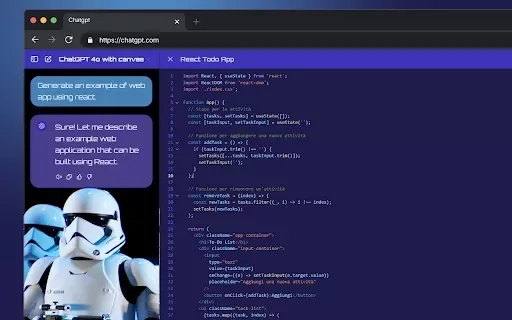
What is StylerGPT: ChatGPT Customization?StylerGPT is a Chrome extension that reimagines your ChatGPT interface as a fully customizable digital workspace. Choose from diverse color palettes, upload custom backgrounds, adjust fonts, and more to create
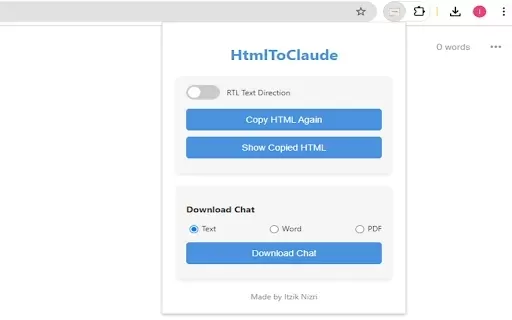
What is HtmlToClaude?HtmlToClaude is a Chrome extension that simplifies your work with Claude AI. It enables you to effortlessly capture HTML content from any webpage and paste it directly into your conversations with Claude. The tool also lets you d

What is Make a Sign?MakeSign is an online platform that enables users to easily design custom signs. It offers a broad selection of templates, design tools, and customization features to help you create professional and attention-grabbing signage for
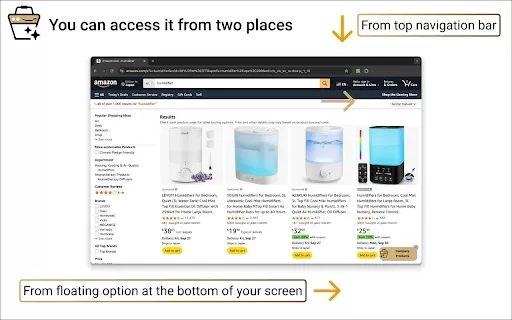
What is Product Comparison Tool?The Smart Amazon Product Comparer is a free Chrome extension that helps you make smarter buying choices on Amazon. It leverages OpenAI's ChatGPT to deliver AI-driven analysis, automatically evaluating product features,
CueCam Presenter Product Information
What is CueCam Presenter?
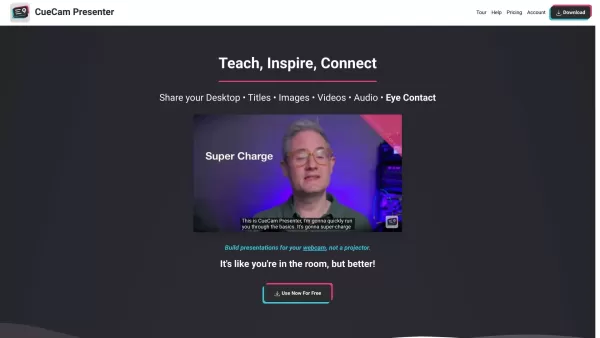
CueCam Presenter is a powerful application that turns your Mac, iPhone, and iPad into a professional-grade production studio. It features a smart script editor for preparing your talking points, the Shoot camera app for capturing high-quality video, and the Video Pencil telestrator app for adding advanced annotations. Perfect for video calls, presentations, or live streaming, CueCam Presenter works seamlessly across your Apple devices to deliver professional results.
Who will use CueCam Presenter?
- Content Creators
- Educators
- Sales Professionals
- Corporate Trainers
- YouTubers
- Virtual Event Hosts
How to use the CueCam Presenter?
- Step 1: Download CueCam Presenter from the official website.
- Step 2: Open the DMG file and drag CueCam Presenter into your Applications folder.
- Step 3: Launch CueCam from the Applications folder, LaunchPad, or using Spotlight.
- Step 4: Prepare your smart cue cards using the built-in script editor.
- Step 5: Start your presentation by clicking the large pink 'Play' button.
Platform
- macOS
CueCam Presenter's Core Features & Benefits
The Core Features
- Smart script editor
- Integrated Shoot camera app
- Video Pencil telestrator app
- Seamless device integration
- Virtual camera and microphone
The Benefits
- Transforms Apple devices into a professional studio setup
- Elevates the quality of video calls and presentations
- User-friendly and intuitive interface
- Improves talk preparation with smart scripting tools
- Eliminates the need for a dedicated control room
CueCam Presenter's Main Use Cases & Applications
- Producing high-quality video presentations
- Conducting professional video conferences
- Live streaming events
- Creating engaging educational materials
- Sales demos and pitches
- Corporate training and workshops
CueCam Presenter's Pros & Cons
The Pros
Enables the creation of compelling live video presentations without complex software or editing
Supports live interactive features like on-screen annotation and multi-camera switching
Integrates with popular platforms including Zoom, Google Meet, OBS, TikTok, and Ecamm Live
Features a redesigned interface with new sharing, editing, and presentation modes
Offers flexible rent-to-own pricing, including a lifetime purchase option
Provides comprehensive tutorials and webinars for user support
The Cons
No explicit AI functionalities or automation features are mentioned
Not an open-source platform
Requires an Apple ID for account management, which may not suit all users
CueCam Presenter's Pricing
Has free plan | YES |
|---|---|
Free trial details | |
Pricing model | Rent To Own |
Is credit card required | No |
Paid from | 4.99 USD |
Has lifetime plan | YES |
Billing frequency | Monthly |
Details of Pricing Plan
Essentials
4.99 USD
- All Connect features
- Share content without watermarks
- Build and run presentations
- Use your iPhone as a teleprompter
- Remotely control your iPhone camera
- Record videos
- Unlocks core iPhone and iPad features
- Removes watermarks in Shoot and Video Pencil for standard features
Suite
9.99 USD
- All Connect and Script features
- Unlocks all iPhone and iPad upgrades
- Includes all Video Pencil tools and Shoot upgrades
- Live Streaming to YouTube and Twitch
- Teleprompter Window
- Audio Delay Calculator
- Stream Deck Plugin
- Green Screen / Chroma Key
- Camera LUTs
- Multiple Audio Inputs
- Control Ecamm Live, mimoLive, and OBS
- Control other apps with keystroke and OSC triggers
- Music Cues
- 60 FPS Video
- Record Isolated Video Tracks
- Generous discounts for existing Shoot, Video Pencil, and Beat Sheet users
- Personal support from the developer
Discount:
Students & Teachers 70% Off
For the latest prices, please visit: https://cuecam-presenter.com/pricing
FAQs of CueCam Presenter
Does CueCam Presenter work with Windows?
No, CueCam Presenter is exclusively designed for Mac, iPhone, and iPad.
Do I need a subscription to access all features?
Advanced features, such as the full Shoot camera app and Video Pencil telestrator app, require a Suite plan subscription.
Can I use CueCam Presenter for live streaming?
Yes, CueCam Presenter integrates with live streaming software to enhance your broadcast experience.
Is there a mobile app available for CueCam Presenter?
CueCam Presenter is fully supported on iPhone and iPad, enabling a mobile production studio.
How do I start using CueCam Presenter?
Download it from the website, install it, prepare your smart cue cards, and begin your presentation by pressing the play button.
Is CueCam Presenter easy to use for beginners?
Yes, CueCam Presenter boasts an intuitive interface designed for users of all skill levels.
Does CueCam Presenter support multiple devices?
Yes, it offers seamless integration across multiple Apple devices.
What apps are included with the Suite plan?
The Suite plan includes full access to the Shoot camera app and the Video Pencil telestrator app.
Can I share my presentations created with CueCam Presenter?
Yes, you can share CueCam Presenter bundles with friends and colleagues.
Is CueCam Presenter suitable for virtual events?
Absolutely, it is an excellent tool for hosting professional virtual events.
CueCam Presenter Company Information
Website:
https://cuecam-presenter.comCompany Name:
CueCam PresenterSupport Email:
Facebook:
NAX(Twitter):
NAYouTube:
NAInstagram:
NATiktok:
NALinkedIn:
NA
CueCam Presenter Screenshot



2026 Latest Best Manga AI Background Generators Ranked Top-Rated! This curated collection showcases powerful game-changing tools perfect for creating high-quality chapter backgrounds, book covers, and promotional art. Every option has undergone rigorous real-world tests to ensure reliability. Get a free vs paid comparison along with detailed insights. Explore now to discover your perfect tool and unlock your AI edge in manga creation.
 6 tools
 xix.ai

2026 Latest Best Top-rated AI Object Removal Editors for portraits travel product shots! XIX.AI curates a powerful game-changing collection regularly updated with weekly rankings. These tools offer real-world tests to help you quickly remove unwanted elements, boost content quality, and save tons of time without compromising results. Must-try for anyone aiming to unlock their AI creation edge. Explore now!
10 tools
xix.ai

2026 Latest Best Top-rated AI Text to Speech Tools for Online Courses are curated by XIX.AI based on rigorous real-world tests and weekly updated rankings. These powerful tools help creators deliver crystal-clear audio content effortlessly, boosting writing efficiency and streamlining course production. Check out the free vs paid comparison to find your perfect fit. Explore now to unlock your AI edge in online education.
10 tools
xix.ai

2026 Latest Best Top-Rated AI Blog Title Tools for Higher Click Through Rates! XIX.AI has carefully curated a powerful, game-changing collection of top tools that go through rigorous real-world tests. You’ll find a free vs paid comparison, weekly updated rankings, and detailed insights to help you boost your blog’s traffic efficiently. Must-try options are highlighted to help you unlock your AI edge. Explore now!
10 tools
xix.ai

2026 Latest Best Top-rated AI Task Routing Tools for Support Workflows! XIX.AI has curated a highly powerful game-changing collection of must-try solutions, all undergoing rigorous real-world tests and updated weekly. These tools streamline workflows, boost productivity, and help teams deliver faster, more efficient support. Explore now to discover your perfect tool and unlock your AI edge!
17 tools
xix.ai

2026 Latest Best Top-Rated AI Citation and Paper Summary Tools Curated by XIX.AI. Get powerful game-changing solutions for quick content creation, improved writing efficiency, and boosting productivity. We offer a free vs paid comparison along with real-world tests and weekly updated rankings to help you find the must-try tool that fits your needs perfectly. Explore now to Unlock your AI edge.
10 tools
xix.ai


