


 Home
HomeCorrectify
AI Proofread Restaurant Menus Fast



Helps TikTok sellers, brands, MCNs, and TAPs discover winning products and find creators.

HelpLook is an AI-powered all-in-one knowledge base tool that helps businesses quickly build knowledge bases, help centers, and...

Your AI Workspace

302.AI is an enterprise-grade AI resource platform with pay-as-you-go pricing, API access to a full range of AI models, and ready-to-use online applications.

剧火AI — AI Screenwriter + Director, a One-Person Short Drama Studio In one sentence, what is it?

Ever wondered how to get a leg up in *Call of Duty: Mobile*? Well, redeem codes are your golden ticket to a whole bunch of in-game goodies. These codes can give you a sweet boost to your Weapon XP or Battle Pass XP, making it a breeze to level up your arsenal and unlock those coveted new weapons, at
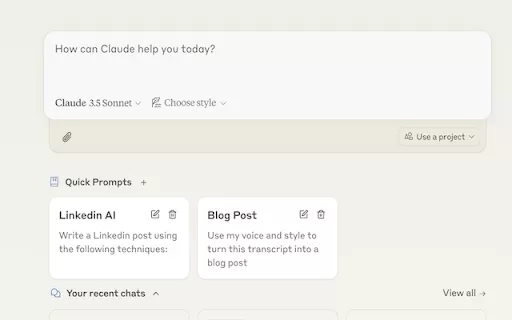
Ever find yourself stuck in a loop, typing the same prompts over and over? Enter Claude, the AI-powered Chrome extension that's here to save your sanity. This nifty tool is all about managing and saving your prompts, so you can keep your creative juices flowing without the frustration of repetition.

If you're looking to level up your typing game, the AI Typing Assistant is your go-to tool. It's like having a personal coach that tailors its advice just for you, based on how you type. Ever wish you could type faster and with fewer mistakes? This a

Pixelcode is a revolutionary tool that transforms screenshots of code into editable text, saving you from the tedious task of typing out code manually. Imagine snapping a picture of a code snippet and instantly having it ready to edit in your preferred co

What is Giststack? Giststack is an AI-driven platform that assists users, especially solopreneurs and marketers, in tackling the hurdles of social media content creation. It gathers content from your preferred websites and newsletters, spots trending
Correctify Product Information
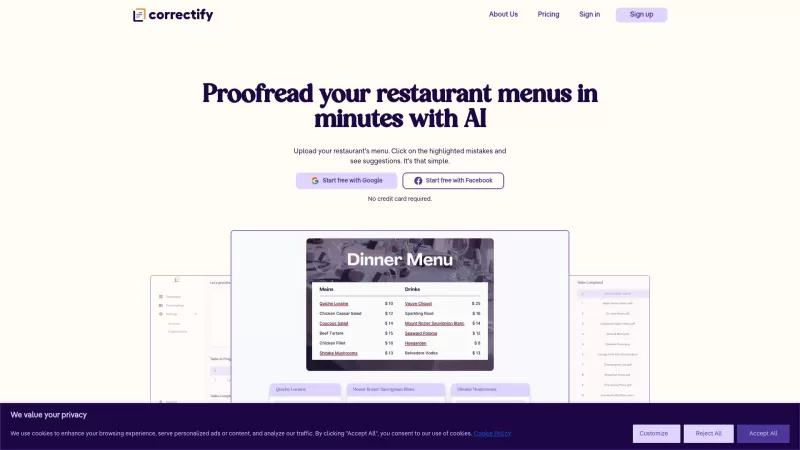
Ever wondered how to make your restaurant menu look as impeccable as your dishes taste? Enter Correctify, an AI-powered proofreading tool crafted specifically for the culinary world. It's like having a meticulous editor on your team, spotting those pesky typos and grammatical slip-ups in your menu, and offering smart suggestions to fix them—all in just a few minutes. With Correctify, your menu will shine, presenting your food business in the best light possible.
How to Use Correctify?
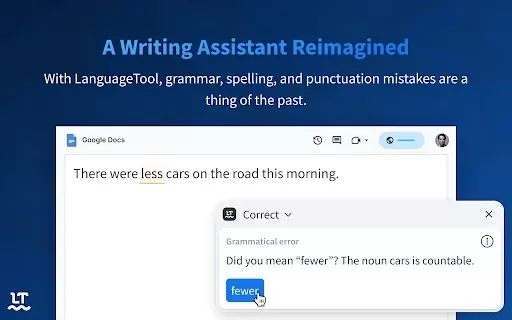
Using Correctify is as easy as pie. Just upload your restaurant menu document to the platform. Once it's up, Correctify will scan through it, highlighting any mistakes it finds. Click on these highlights, and voila! You'll get a list of suggested corrections to make your menu flawless. It's a breeze, really.
Correctify's Core Features
Speedy Proofreading for Restaurant Menus
Correctify works its magic fast, ensuring your menus are error-free in no time. Whether you're rushing to print or just want to keep things tidy, this feature is a game-changer.
AI-Powered Correction Suggestions
The AI behind Correctify doesn't just point out errors; it suggests ways to fix them. It's like having a grammar guru by your side, making sure your menu's language is as tasty as your cuisine.
Collaborative Workspace for Teams
Got a team working on your menu? Correctify offers a space where everyone can chip in. It's perfect for those last-minute tweaks or when you're brainstorming the perfect description for your signature dish.
Versatile Document Compatibility
Whether your menu is in PDF, Word, or any other format, Correctify has got you covered. No need to worry about file types; just upload and let the tool do its thing.
Correctify's Use Cases
Polishing a Fine Dining Menu
Before you print that elegant fine dining menu, run it through Correctify. It'll catch those subtle errors that could otherwise tarnish your upscale presentation.
Crafting a Perfect Drinks List
Your drinks list deserves to be as clear and inviting as your cocktails. Use Correctify to ensure every description is spelled correctly and grammatically sound, enhancing the overall experience for your guests.
FAQ from Correctify
- What types of documents can I upload for proofreading?
- Correctify supports a variety of document formats, including PDF, Word, and more, making it easy to upload and proofread your menus.
- Is there a free trial available for Correctify?
- Yes, you can try Correctify for free to see how it can elevate your menu's presentation.
- Can multiple team members collaborate on menu creation?
- Absolutely! Correctify's collaborative workspace allows your team to work together seamlessly on your menu.
Correctify Screenshot

2026 Latest Best Top-rated AI Object Removal Editors for portraits travel product shots! XIX.AI curates a powerful game-changing collection regularly updated with weekly rankings. These tools offer real-world tests to help you quickly remove unwanted elements, boost content quality, and save tons of time without compromising results. Must-try for anyone aiming to unlock their AI creation edge. Explore now!
 10 tools
 xix.ai

2026 Latest Best Top-rated AI Text to Speech Tools for Online Courses are curated by XIX.AI based on rigorous real-world tests and weekly updated rankings. These powerful tools help creators deliver crystal-clear audio content effortlessly, boosting writing efficiency and streamlining course production. Check out the free vs paid comparison to find your perfect fit. Explore now to unlock your AI edge in online education.
10 tools
xix.ai

2026 Latest Best Top-Rated AI Blog Title Tools for Higher Click Through Rates! XIX.AI has carefully curated a powerful, game-changing collection of top tools that go through rigorous real-world tests. You’ll find a free vs paid comparison, weekly updated rankings, and detailed insights to help you boost your blog’s traffic efficiently. Must-try options are highlighted to help you unlock your AI edge. Explore now!
10 tools
xix.ai

2026 Latest Best Top-rated AI Task Routing Tools for Support Workflows! XIX.AI has curated a highly powerful game-changing collection of must-try solutions, all undergoing rigorous real-world tests and updated weekly. These tools streamline workflows, boost productivity, and help teams deliver faster, more efficient support. Explore now to discover your perfect tool and unlock your AI edge!
17 tools
xix.ai

2026 Latest Best Top-Rated AI Citation and Paper Summary Tools Curated by XIX.AI. Get powerful game-changing solutions for quick content creation, improved writing efficiency, and boosting productivity. We offer a free vs paid comparison along with real-world tests and weekly updated rankings to help you find the must-try tool that fits your needs perfectly. Explore now to Unlock your AI edge.
10 tools
xix.ai

2026 Latest Best Top-Rated AI Productivity Tools for Daily Work! XIX.AI has curated a powerful, game-changing selection based on rigorous weekly updated rankings and real-world tests. You’ll find must-try options that boost writing efficiency, streamline content creation, and help you overcome daily work challenges. Get a free vs paid comparison to find the perfect fit for your needs. Explore now to unlock your AI edge!
9 tools
xix.ai


Correctify is a game-changer for my café's menu! It caught typos I’d never notice and made the descriptions sound so polished. Feels like having a pro editor on speed dial. 😋 Only wish it could help with my chef's handwriting too!


