


 Home
HomeCordial
Cordial: AI Writing Assistant for Chrome



Helps TikTok sellers, brands, MCNs, and TAPs discover winning products and find creators.

HelpLook is an AI-powered all-in-one knowledge base tool that helps businesses quickly build knowledge bases, help centers, and...

Your AI Workspace

302.AI is an enterprise-grade AI resource platform with pay-as-you-go pricing, API access to a full range of AI models, and ready-to-use online applications.

剧火AI — AI Screenwriter + Director, a One-Person Short Drama Studio In one sentence, what is it?

What is Originality?Originality.AI is an advanced AI-powered platform built to identify AI-generated text and detect plagiarism. It serves writers, publishers, and educators by verifying the authenticity and originality of content. The tool utilizes

What is PaperRed? PaperRed is a game-changer in the world of academic tools. It’s a free online plagiarism checker powered by AI technology, designed to help students, writers, and researchers ensure their work is original and polished. Think of it as you
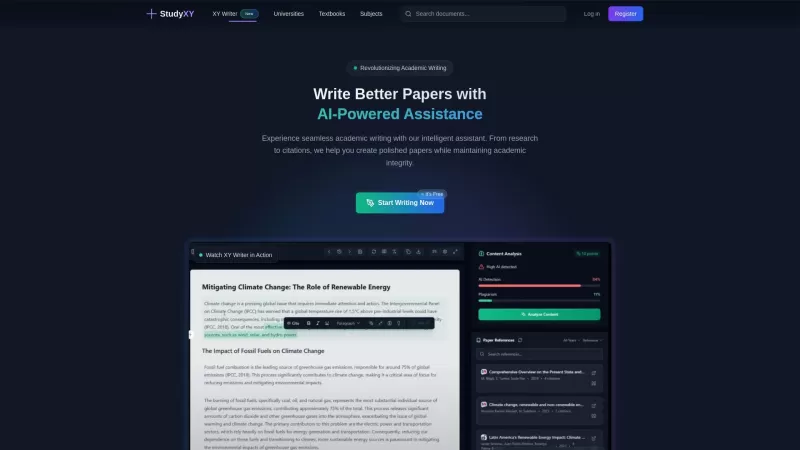
What is XYWriter?XYWriter is your go-to AI-powered academic writing assistant. It's designed to make life easier for students and researchers by helping with everything from managing citations to checking for plagiarism. Plus, it's all about keeping things honest and academically sound.How to Use XY

What is Diagrimo?Diagrimo is an AI-powered text-to-visual tool that helps users transform text or concepts into structured diagrams like flowcharts, SWOT analyses, pyramids, and infographics. It supports users in organizing ideas, planning projects,

What is Giststack? Giststack is an AI-driven platform that assists users, especially solopreneurs and marketers, in tackling the hurdles of social media content creation. It gathers content from your preferred websites and newsletters, spots trending
Cordial Product Information
What is Cordial?
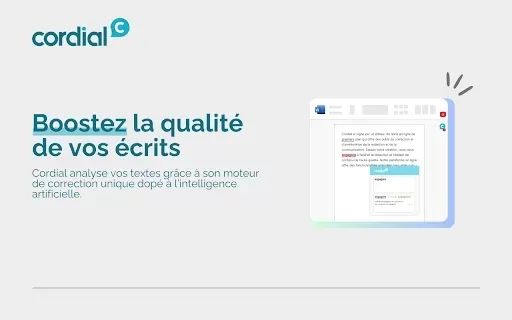
Cordial is a Chrome extension powered by AI that assists you with writing. It evaluates your text for grammar, spelling, and style problems, delivering color-coded feedback to distinguish between different types of errors. This tool enables users to improve their writing, guaranteeing clarity and a professional tone in their work. Features such as live suggestions and customized corrections make writing simple and efficient for all users, including students and working professionals.
Who can benefit from Cordial?
- Students
- Writers
- Professionals
- Educators
- Content creators
How to get started with Cordial
- Step 1: Get the Cordial extension from the Chrome Web Store.
- Step 2: Activate the extension in your browser’s settings.
- Step 3: Begin typing in any text box; Cordial will instantly review your writing.
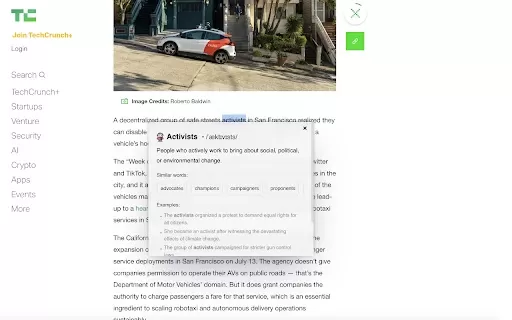
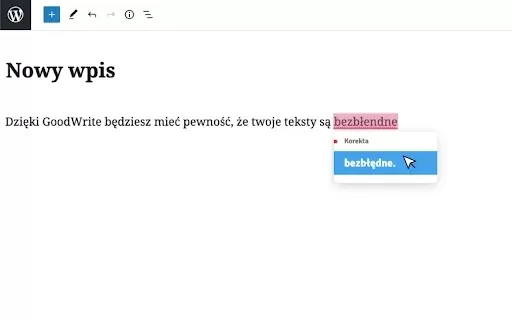
- Step 4: See live, underlined suggestions for any mistakes.
- Step 5: Select the underlined text to view correction choices and detailed explanations.
Platform
- web
- chrome
Cordial's Core Features & Benefits
The Core Features
- Live grammar and spelling checking
- Color-coded highlighting of errors
- Comprehensive explanations for edits
- Intuitive interface for easy use
The Benefits
- Rapidly elevates writing quality
- Boosts grammar comprehension and learning
- Reduces time spent on revisions
- Builds confidence in your writing abilities
Cordial's Main Use Cases & Applications
- Composing essays and reports
- Generating content for websites and blogs
- Writing formal emails
- Revising academic papers or dissertations
FAQs of Cordial
Is Cordial free to use?
Yes, Cordial is a free Chrome extension.
How does Cordial work?
Cordial employs AI to assess your writing and offer corrections as you type.
Can I use Cordial for multiple languages?
Cordial mainly works with English, although you can watch for additional language support.
How do I get support for Cordial?
Support is accessible via the Chrome Web Store listing or the official Cordial website.
What types of errors does Cordial detect?
Cordial finds spelling mistakes, grammar issues, and stylistic inconsistencies.
Do I need internet access to use Cordial?
Yes, an active internet connection is necessary for live analysis.
Can I customize the settings in Cordial?
Yes, you can modify the settings to match your personal feedback preferences.
Does Cordial save my writing?
No, Cordial does not store any user information or written content.
How often is Cordial updated?
Cordial receives frequent updates to enhance its precision and functionality.
Is there a limit to the text Cordial can analyze?
No, Cordial can evaluate text continuously in compatible text fields.
Cordial Company Information
- Cordial
- https://cordial.com
Cordial Screenshot


2026 Latest Best Manga AI Background Generators Ranked Top-Rated! This curated collection showcases powerful game-changing tools perfect for creating high-quality chapter backgrounds, book covers, and promotional art. Every option has undergone rigorous real-world tests to ensure reliability. Get a free vs paid comparison along with detailed insights. Explore now to discover your perfect tool and unlock your AI edge in manga creation.
 6 tools
 xix.ai

2026 Latest Best Top-rated AI Object Removal Editors for portraits travel product shots! XIX.AI curates a powerful game-changing collection regularly updated with weekly rankings. These tools offer real-world tests to help you quickly remove unwanted elements, boost content quality, and save tons of time without compromising results. Must-try for anyone aiming to unlock their AI creation edge. Explore now!
10 tools
xix.ai

2026 Latest Best Top-rated AI Text to Speech Tools for Online Courses are curated by XIX.AI based on rigorous real-world tests and weekly updated rankings. These powerful tools help creators deliver crystal-clear audio content effortlessly, boosting writing efficiency and streamlining course production. Check out the free vs paid comparison to find your perfect fit. Explore now to unlock your AI edge in online education.
10 tools
xix.ai

2026 Latest Best Top-Rated AI Blog Title Tools for Higher Click Through Rates! XIX.AI has carefully curated a powerful, game-changing collection of top tools that go through rigorous real-world tests. You’ll find a free vs paid comparison, weekly updated rankings, and detailed insights to help you boost your blog’s traffic efficiently. Must-try options are highlighted to help you unlock your AI edge. Explore now!
10 tools
xix.ai

2026 Latest Best Top-rated AI Task Routing Tools for Support Workflows! XIX.AI has curated a highly powerful game-changing collection of must-try solutions, all undergoing rigorous real-world tests and updated weekly. These tools streamline workflows, boost productivity, and help teams deliver faster, more efficient support. Explore now to discover your perfect tool and unlock your AI edge!
17 tools
xix.ai

2026 Latest Best Top-Rated AI Citation and Paper Summary Tools Curated by XIX.AI. Get powerful game-changing solutions for quick content creation, improved writing efficiency, and boosting productivity. We offer a free vs paid comparison along with real-world tests and weekly updated rankings to help you find the must-try tool that fits your needs perfectly. Explore now to Unlock your AI edge.
10 tools
xix.ai


