


 Home
HomeClaudeSave
ClaudeSave Chrome Extension: Save Claude Chats to GitHub Gists



Helps TikTok sellers, brands, MCNs, and TAPs discover winning products and find creators.

HelpLook is an AI-powered all-in-one knowledge base tool that helps businesses quickly build knowledge bases, help centers, and...

Your AI Workspace

302.AI is an enterprise-grade AI resource platform with pay-as-you-go pricing, API access to a full range of AI models, and ready-to-use online applications.

剧火AI — AI Screenwriter + Director, a One-Person Short Drama Studio In one sentence, what is it?

What is Originality?Originality.AI is an advanced AI-powered platform built to identify AI-generated text and detect plagiarism. It serves writers, publishers, and educators by verifying the authenticity and originality of content. The tool utilizes

What is Altsite?Altsite is a browser extension that helps users find websites similar to the one they're currently visiting. Using advanced AI technology, it analyzes website content and instantly generates a list of related sites. This tool is ideal

What is Hive AI Detector?Hive AI Detector uses advanced machine learning to analyze various types of media and determine whether they were generated or altered by artificial intelligence. This tool is ideal for journalists, educators, marketers, and

What is Lilybank AI? Lilybank AI is a game-changer in the world of content creation. It's like having a team of AI wizards at your fingertips, ready to churn out high-quality content faster than you can say "publish." From crafting compelling blog posts t
What is Rosebud?Rosebud.ai is a cutting-edge platform that uses generative AI to streamline the game development workflow. It offers a suite of tools to produce game assets—including characters, environments, and textures—and to animate avatars using
ClaudeSave Product Information
What is ClaudeSave?
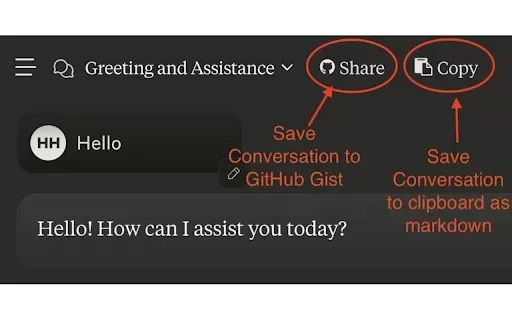
ClaudeSave is a Chrome extension that lets you easily save your conversations with Anthropic's Claude AI directly to GitHub Gists. Its simple interface allows you to quickly save messages, text artifacts, and file attachments to your GitHub account in one click. The extension also includes helpful new features like copying a Markdown-formatted version of your conversation to your clipboard, making it a versatile tool for developers and regular users. To get started, install the extension from the Chrome Web Store, manage it through Chrome's settings, and configure it with a GitHub Personal Access Token that has gist permissions.
Who will use ClaudeSave?
- Developers
- Technical Writers
- GitHub Users
- Anthropic Claude Users
How to use the ClaudeSave?
- Step 1: Install the ClaudeSave extension from the Chrome Web Store.
- Step 2: Open Chrome's extension manager in the top-right corner.
- Step 3: Add your GitHub Personal Access Token (PAT) with gist permissions.
- Step 4: Start a conversation with Anthropic Claude.
- Step 5: Click the ClaudeSave button to save the conversation to a GitHub Gist.
- Step 6: You can also copy the conversation in Markdown format to your clipboard.
Platform
- Chrome
ClaudeSave's Core Features & Benefits
The Core Features
- Save Claude conversations to GitHub Gists
- Save text artifacts and file attachments
- Copy conversations in Markdown format
The Benefits
- Simple and efficient conversation management
- Boosts productivity for developers and writers
- Seamless integration with your GitHub workflow
ClaudeSave's Main Use Cases & Applications
- Archiving important Claude conversations for future reference
- Organizing technical documentation
- Sharing conversation logs with your team via GitHub
FAQs of ClaudeSave
What is ClaudeSave?
ClaudeSave is a Chrome extension that saves your Anthropic Claude conversations to GitHub Gists.
How do I use ClaudeSave?
Install the extension, set up a GitHub Personal Access Token with gist access, and save conversations with a single click.
What permissions are needed for ClaudeSave?
You need a GitHub Personal Access Token with permissions scoped to gists.
Can I copy conversations in different formats?
Yes, ClaudeSave lets you copy conversations in Markdown format to your clipboard.
Does ClaudeSave support attachments?
Yes, it supports saving both text artifacts and file attachments.
Is my data secure with ClaudeSave?
Yes. The developer does not collect or use your data, keeping it secure.
Can I use ClaudeSave on other browsers?
Currently, ClaudeSave is only available for the Chrome browser.
How do I report issues with ClaudeSave?
For assistance, please visit the developer's support site at hamel.dev.
Are there alternative tools to ClaudeSave?
Yes, alternatives include tools like Chrome Notes and ChatGPT to Markdown.
How do I update ClaudeSave?
Updates are handled automatically through the Chrome Web Store. Please ensure your extension is up to date.
ClaudeSave Company Information
- Parlance Labs
- https://hamel.dev
ClaudeSave Screenshot





2026 Latest Best AI Pull Request Review Tools for GitHub Teams are here on XIX.AI! This top-rated curated list showcases powerful game-changing solutions that streamline refactoring, bug fixing, and security gap detection across all team workflows. Enjoy a free vs paid comparison along with real-world tests and detailed rankings to help you find the perfect tool that boosts productivity significantly. Explore now to unlock your AI edge!
 12 tools
 xix.ai

2026 Latest Best Top-rated AI Text to Speech Tools for Natural Voiceovers are here on XIX.AI! This curated list features powerful, game-changing options that deliver crystal-clear voices for every use case, backed by real-world tests and weekly updated rankings. Get a free vs paid comparison to find the must-try solution that boosts your productivity instantly. Explore now to Unlock your AI edge!
11 tools
xix.ai

2026 Latest Best Manga AI Background Generators Ranked Top-Rated! This curated collection showcases powerful game-changing tools perfect for creating high-quality chapter backgrounds, book covers, and promotional art. Every option has undergone rigorous real-world tests to ensure reliability. Get a free vs paid comparison along with detailed insights. Explore now to discover your perfect tool and unlock your AI edge in manga creation.
6 tools
xix.ai

2026 Latest Best Top-rated AI Object Removal Editors for portraits travel product shots! XIX.AI curates a powerful game-changing collection regularly updated with weekly rankings. These tools offer real-world tests to help you quickly remove unwanted elements, boost content quality, and save tons of time without compromising results. Must-try for anyone aiming to unlock their AI creation edge. Explore now!
10 tools
xix.ai

2026 Latest Best Top-rated AI Text to Speech Tools for Online Courses are curated by XIX.AI based on rigorous real-world tests and weekly updated rankings. These powerful tools help creators deliver crystal-clear audio content effortlessly, boosting writing efficiency and streamlining course production. Check out the free vs paid comparison to find your perfect fit. Explore now to unlock your AI edge in online education.
10 tools
xix.ai

2026 Latest Best Top-Rated AI Blog Title Tools for Higher Click Through Rates! XIX.AI has carefully curated a powerful, game-changing collection of top tools that go through rigorous real-world tests. You’ll find a free vs paid comparison, weekly updated rankings, and detailed insights to help you boost your blog’s traffic efficiently. Must-try options are highlighted to help you unlock your AI edge. Explore now!
10 tools
xix.ai


