


 Home
HomeChattyDocs: AI assistant for your documents
ChattyDocs - AI Assistant for Documents & Data Communication



Helps TikTok sellers, brands, MCNs, and TAPs discover winning products and find creators.

HelpLook is an AI-powered all-in-one knowledge base tool that helps businesses quickly build knowledge bases, help centers, and...

Your AI Workspace

302.AI is an enterprise-grade AI resource platform with pay-as-you-go pricing, API access to a full range of AI models, and ready-to-use online applications.

剧火AI — AI Screenwriter + Director, a One-Person Short Drama Studio In one sentence, what is it?

Ever heard of Grok? It's this nifty AI assistant from xAI that's all about giving you the straight scoop. And the best part? It's totally free! Grok isn't just your average AI; it's packed with cool features like real-time search, image generation, and tr

Ever wondered what Qwen AI is all about? Well, let me introduce you to this gem from Alibaba Cloud. Qwen AI is not your average language model; it's a powerhouse designed to be your go-to buddy for everything from whipping up text to coding, and even reco

Discover Plume AI: Your Ultimate Academic Writing AssistantAre you tired of struggling with your academic writing? Well, say hello to Plume AI, the innovative AI assistant that's here to revolutionize the way you write! Designed with students in mind, Plume AI harnesses the power of cutting-edge art

Ever wished for a trusty sidekick to help you navigate the digital world with ease? Enter Sider, your personal AI companion designed to seamlessly blend into your daily routine. Starting off as a handy Chrome/Edge extension, Sider transforms your browsing

Ever wondered what Ninja AI is all about? Well, let me tell you, it's like having a Swiss Army knife for your digital needs! Ninja AI isn't just another AI tool; it's a powerhouse that brings together over 24 top-notch Large Language Models (LLMs) to help
ChattyDocs: AI assistant for your documents Product Information
- ChattyDocs: AI Assistant for Your Documents Overview
- How to Get Started with ChattyDocs
- Upload Your Data
- Tailor Your AI Experience
- Chat with Your Files
- Preview Conversations
- Core Features of ChattyDocs
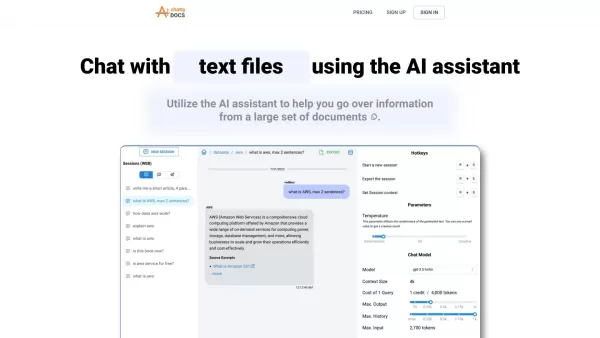
Picture this: you've got piles of documents, PDFs, or even entire websites full of information, and you're drowning in details. Enter ChattyDocs—an AI assistant designed to rescue you from information overload. It’s like having your own digital librarian who doesn’t just store your data but lets you chat with it too. Whether you’re managing huge datasets or trying to find answers buried deep within your files, ChattyDocs uses AI to simplify the process.
First things first: prep your dataset. You can upload files straight from your device or give ChattyDocs a website URL to scrape and organize the content for you. It’s like handing over your messy desk and letting someone tidy it up while answering your questions.
Next, set the tone. Pick a chat model that fits your needs, tweak the AI’s creativity levels, and maybe even give it a fun nickname—it’ll feel less robotic already. Now you’re ready to start chatting.
Type away and let the AI do its thing. You’ll get replies backed by relevant sources, and you can easily export those answers with one click. Need to keep track of multiple conversations? No problem—ChattyDocs supports chat sessions and contexts so you can stay organized.
Want a quick glance at what’s been said? Preview your chats directly from the app, the embedded web source, or even Telegram. It’s like checking your messages without diving into the full conversation.
- Chat with Documents Using AI: Ask questions, explore insights, and get answers without sifting through pages manually.
- Upload Files or Website Links: Easily add data sources and watch ChattyDocs index them in the background.
- Add or Delete Docs: Manage your dataset effortlessly by tweaking as needed.
- Background Indexing: Let the AI work behind the scenes so you don’t have to.
- Track Usage: Keep tabs on your data consumption and subscription limits.
- Select AI Model & Creativity Levels: Customize how the AI responds to fit your style.
- Share Datasets: Collaborate with others by sharing your organized datasets.
- Replies with Sources: Stay informed with traceable answers.
- Export Answers: Download responses with ease.
- Chat Sessions & Context: Maintain continuity across multiple interactions.
- Preview Chats: Quick peeks available from different angles.
- Review Large Sets of Documents: Need to quickly skim through hundreds of pages? ChattyDocs makes it simple.
- Efficient Dataset Management: Streamline your workflow and focus on what matters.
- Communicate via Telegram: Extend your reach by integrating with Telegram.
- Share Knowledge Bases: Distribute valuable insights among team members.
- Support Email: For queries, feedback, or issues, reach out to [\[email protected\]](/cdn-cgi/l/email-protection#96e5e3e6e6f9e4e2d6f5fef7e2e2eff2f9f5e5b8f5f9fb).
- Login: Head over to ChattyDocs Login.
- Sign Up: Create an account at ChattyDocs Signup.
- Pricing: Check out plans and pricing at ChattyDocs Pricing.
- Twitter: Follow updates on ChattyDocs Twitter.
ChattyDocs: AI assistant for your documents Screenshot





2026 Latest Best Top-rated AI Text to Speech Tools for Online Courses are curated by XIX.AI based on rigorous real-world tests and weekly updated rankings. These powerful tools help creators deliver crystal-clear audio content effortlessly, boosting writing efficiency and streamlining course production. Check out the free vs paid comparison to find your perfect fit. Explore now to unlock your AI edge in online education.
 10 tools
 xix.ai

2026 Latest Best Top-Rated AI Blog Title Tools for Higher Click Through Rates! XIX.AI has carefully curated a powerful, game-changing collection of top tools that go through rigorous real-world tests. You’ll find a free vs paid comparison, weekly updated rankings, and detailed insights to help you boost your blog’s traffic efficiently. Must-try options are highlighted to help you unlock your AI edge. Explore now!
10 tools
xix.ai

2026 Latest Best Top-rated AI Task Routing Tools for Support Workflows! XIX.AI has curated a highly powerful game-changing collection of must-try solutions, all undergoing rigorous real-world tests and updated weekly. These tools streamline workflows, boost productivity, and help teams deliver faster, more efficient support. Explore now to discover your perfect tool and unlock your AI edge!
17 tools
xix.ai

2026 Latest Best Top-Rated AI Citation and Paper Summary Tools Curated by XIX.AI. Get powerful game-changing solutions for quick content creation, improved writing efficiency, and boosting productivity. We offer a free vs paid comparison along with real-world tests and weekly updated rankings to help you find the must-try tool that fits your needs perfectly. Explore now to Unlock your AI edge.
10 tools
xix.ai

2026 Latest Best Top-Rated AI Productivity Tools for Daily Work! XIX.AI has curated a powerful, game-changing selection based on rigorous weekly updated rankings and real-world tests. You’ll find must-try options that boost writing efficiency, streamline content creation, and help you overcome daily work challenges. Get a free vs paid comparison to find the perfect fit for your needs. Explore now to unlock your AI edge!
9 tools
xix.ai

2026 Latest Best Top-Rated AI Systematic Review Tools for Research Screening are here on XIX.AI! This curated collection includes powerful, game-changing solutions that go through rigorous real-world tests to deliver accurate results. We also offer a free vs paid comparison along with weekly updated rankings to help you find the must-try option that boosts your research efficiency significantly. Explore now to unlock your AI edge in academic work!
11 tools
xix.ai


