


 Home
HomeChatGPT for Gmail and Google
ChatGPT Integration for Google and Gmail



Helps TikTok sellers, brands, MCNs, and TAPs discover winning products and find creators.

HelpLook is an AI-powered all-in-one knowledge base tool that helps businesses quickly build knowledge bases, help centers, and...

Your AI Workspace

302.AI is an enterprise-grade AI resource platform with pay-as-you-go pricing, API access to a full range of AI models, and ready-to-use online applications.

剧火AI — AI Screenwriter + Director, a One-Person Short Drama Studio In one sentence, what is it?

Ever stumbled upon Cherry Studio AI and wondered what it's all about? Well, let me break it down for you. Cherry Studio AI isn't just another run-of-the-mill AI tool; it's a powerhouse desktop client that lets you dive into advanced AI interactions across

Discover Plume AI: Your Ultimate Academic Writing AssistantAre you tired of struggling with your academic writing? Well, say hello to Plume AI, the innovative AI assistant that's here to revolutionize the way you write! Designed with students in mind, Plume AI harnesses the power of cutting-edge art

Ever wondered how to turn your jumbled thoughts and complex queries into something you can actually grasp? Enter The Visualizer, your new best friend in the world of learning and creativity. This nifty tool takes your written queries, URLs, and even PDFs,

Ever wished for a trusty sidekick to help you navigate the digital world with ease? Enter Sider, your personal AI companion designed to seamlessly blend into your daily routine. Starting off as a handy Chrome/Edge extension, Sider transforms your browsing

Ever wondered what Ninja AI is all about? Well, let me tell you, it's like having a Swiss Army knife for your digital needs! Ninja AI isn't just another AI tool; it's a powerhouse that brings together over 24 top-notch Large Language Models (LLMs) to help
ChatGPT for Gmail and Google Product Information
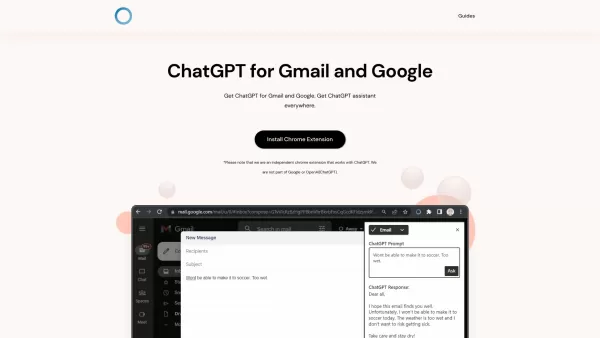
Ever wished you had a smart assistant right at your fingertips while navigating through your Gmail or Google searches? Well, the ChatGPT for Gmail and Google Chrome extension might just be your new best friend. This nifty tool integrates the power of ChatGPT directly into your browsing experience, allowing you to tap into a vast reservoir of knowledge and get instant, accurate responses to your queries.
How to Dive into ChatGPT for Gmail and Google?
Getting started is a breeze:
- First, you'll need to download and install the ChatGPT Everywhere Chrome extension. It's like adding a superpower to your browser.
- Once installed, head over to Google or simply click on the extension icon in the top right corner of your browser. It's that easy!
- Now, just type in your question or query. Before you know it, ChatGPT will be serving up responses like a well-oiled machine.
- Want to go all-in? Click the extension button to open the sidebar and unleash the full potential of ChatGPT on any web page you visit.
Unpacking the Core Features of ChatGPT for Gmail and Google
Knowledge at Your Fingertips
With ChatGPT's vast database at your disposal, you're never more than a click away from a wealth of information. It's like having a personal librarian who never sleeps.
Supercharge Your Google Searches
Use the Google Search Query Response feature to effortlessly gather information. It's like having a search assistant that works overtime to make your life easier.
Sidebar Everywhere: Your Constant Companion
No matter where you are on the web, a single click can open the ChatGPT sidebar. It's like having a trusty sidekick ready to jump into action whenever you need it.
Flexibility and Accessibility
The beauty of ChatGPT lies in its adaptability. No matter where you are online, it's there to provide answers and assistance, making your digital life smoother and more efficient.
Real-World Uses for ChatGPT for Gmail and Google
Boost Your Productivity
With ChatGPT's intelligence, you can get things done faster, turning what used to be a slog into a sprint. It's like having a productivity coach in your corner.
Endless Answers and Accurate Information
Dive into ChatGPT's vast knowledge base and you'll find there's no limit to the information you can access. It's like having a direct line to the universe's collective wisdom.
Streamline Your Workflow
Utilize the Google Search Query Response feature to save time and streamline your daily tasks. It's like cutting through the clutter with a laser-focused assistant.
Maximize Webpage Interaction
With the Sidebar Everywhere feature, you can harness the full potential of ChatGPT on any web page. It's like having a Swiss Army knife for the web, ready to tackle any task.
Frequently Asked Questions
- Is the extension free?
- Yes, the extension is free to use, though additional features might require a subscription.
- Can I open the ChatGPT sidebar on any page?
- Absolutely, the Sidebar Everywhere feature lets you access ChatGPT no matter where you are online.
- Why does it ask me to login after opening the sidebar?
- Logging in ensures you get a personalized experience and access to your account's full capabilities.
- Is ChatGPT Everywhere part of OpenAI?
- No, ChatGPT Everywhere is a separate entity, although it utilizes the technology developed by OpenAI.
For further assistance or to reach out for support, visit the contact us page. And if you're a visual learner, check out the ChatGPT for Gmail and Google YouTube tutorial to see it in action.
ChatGPT for Gmail and Google Screenshot




2026 Latest Best Photoshop AI retouch tools for ecommerce apparel, skin cleanup, and color consistency! This top-rated curated list features powerful game-changing solutions that help you boost writing efficiency, streamline content creation, and achieve perfect visual results effortlessly. Each tool has undergone real-world tests through weekly updated rankings, complete with free vs paid comparison details. Backed by XIX.AI, it’s the must-try guide for anyone aiming to unlock your AI edge. Explore now!
 10 tools
 xix.ai

2026 Latest Best Top-Rated AI Prompt Libraries for optimizing all types of ChatGPT workflows. XIX.AI has curated a powerful, game-changing collection that goes through rigorous real-world tests to ensure top performance. You can find detailed free vs paid comparisons and expert rankings to help you choose the must-try tools that boost your productivity and unlock your AI edge. Explore now!
11 tools
xix.ai

2026 Latest Best AI Quiz Builder Platforms for Teachers, Tutors, and Cohort-Based Learning Programs! XIX.AI has curated a top-rated list of powerful game-changing tools that go through real-world tests to deliver accurate rankings. These must-try platforms help boost writing efficiency, streamline content creation, and simplify quiz design across all learning scenarios. Explore now to discover your perfect tool for unlocking your AI edge in teaching!
13 tools
xix.ai

2026 Latest Best AI Pull Request Review Tools for GitHub Teams are here on XIX.AI! This top-rated curated list showcases powerful game-changing solutions that streamline refactoring, bug fixing, and security gap detection across all team workflows. Enjoy a free vs paid comparison along with real-world tests and detailed rankings to help you find the perfect tool that boosts productivity significantly. Explore now to unlock your AI edge!
12 tools
xix.ai

2026 Latest Best Top-rated AI Text to Speech Tools for Natural Voiceovers are here on XIX.AI! This curated list features powerful, game-changing options that deliver crystal-clear voices for every use case, backed by real-world tests and weekly updated rankings. Get a free vs paid comparison to find the must-try solution that boosts your productivity instantly. Explore now to Unlock your AI edge!
11 tools
xix.ai

2026 Latest Best Manga AI Background Generators Ranked Top-Rated! This curated collection showcases powerful game-changing tools perfect for creating high-quality chapter backgrounds, book covers, and promotional art. Every option has undergone rigorous real-world tests to ensure reliability. Get a free vs paid comparison along with detailed insights. Explore now to discover your perfect tool and unlock your AI edge in manga creation.
6 tools
xix.ai


这个插件简直是 Gmail 用户的福音!📧 以前回邮件还得切出去问 AI,现在直接侧边栏搞定,效率翻倍。不过就是有时候响应有点慢,希望后面能优化下速度,不然卡顿的时候真挺着急的。总的来说,懒人必备,强烈安利给所有被邮件淹死的打工人!🚀
Ce ChatGPT pour Gmail et Google est incroyable! Écrire des réponses ou chercher des infos est devenu si rapide. Parfois, je me demande si je deviens trop dépendant... mais bon, tant que ça m'économise du temps, c'est parfait 😅. Un peu peur que ça lise trop dans mes pensées, mais pour l'instant, super pratique!


