


 Home
HomeChatGPT Conversation History Search
ChatGPT History Manager & Organizer



Helps TikTok sellers, brands, MCNs, and TAPs discover winning products and find creators.

HelpLook is an AI-powered all-in-one knowledge base tool that helps businesses quickly build knowledge bases, help centers, and...

Your AI Workspace

302.AI is an enterprise-grade AI resource platform with pay-as-you-go pricing, API access to a full range of AI models, and ready-to-use online applications.

剧火AI — AI Screenwriter + Director, a One-Person Short Drama Studio In one sentence, what is it?
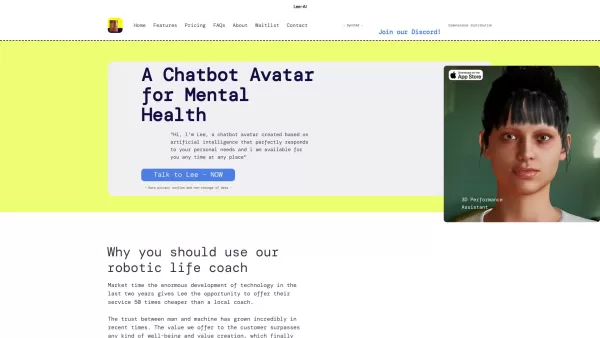
Ever wondered what Lee-AI is all about? Let me tell you, it's not just another chatbot. Lee-AI is your personal AI avatar, designed to cater to your unique needs with responses that feel like they're made just for you. And the best part? It's always there

Ever wondered what it would be like to see your face on your favorite movie star or perhaps swap faces with your pet for a laugh? That's where Faceswap.tech comes into play, offering a cutting-edge AI-powered platform that lets you do just that with stunn

Ever wondered how businesses can harness the power of AI to communicate and analyze data in a way that feels uniquely tailored to their needs? Enter ZBrain, a dynamic AI platform designed to do just that. Imagine having your very own personalized ChatGPT

Ever heard of Freenote? It's not just another note-taking app; it's your personal, open-source AI journal that lets you jot down your thoughts and ideas with a twist. Imagine having an AI buddy that not only helps you find your old musings but also gives

What is PIXM Phishing Protection?PIXM Phishing Protection is a browser extension that leverages artificial intelligence to offer real-time defense against phishing attacks. It inspects the visual elements of websites to immediately detect hazardous o
ChatGPT Conversation History Search Product Information
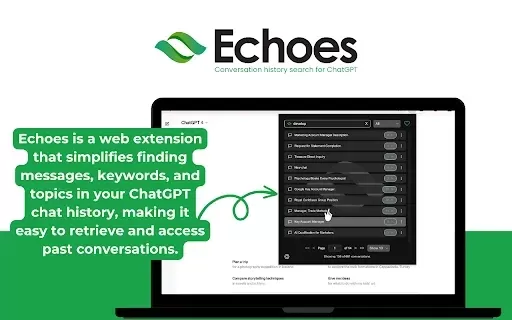
What is Echoes: The ChatGPT Search Tool?
Echoes is a Chrome extension that simplifies searching and managing your ChatGPT conversation history. It provides an intuitive interface for quickly and efficiently finding and organizing your past interactions. With powerful search and summarization features, Echoes helps you retrieve the information you need effortlessly. All data is handled securely to keep your conversations private. Whether you're revisiting key discussions or simply tracking your AI interactions, Echoes delivers a smooth, streamlined experience.
Who Can Benefit from Echoes?
- Regular ChatGPT Users
- Academics & Researchers
- Content Creators & Writers
- AI Hobbyists & Enthusiasts
- Students & Learners
How to Get Started with Echoes
- Step 1: Install the Echoes extension from the Chrome Web Store.
- Step 2: Launch the extension and allow the required permissions.
- Step 3: Enter keywords into the search bar to locate past conversations.
- Step 4: Create folders to neatly organize your chats.
- Step 5: Generate summaries of conversations whenever needed.
Platform Availability
- Google Chrome
Core Features & Benefits of Echoes
Key Features
- Advanced Keyword Search
- Conversation Categorization & Folders
- Built-in Summarization Tools
- Secure, Local Data Handling
Key Benefits
- Instantly find old conversations
- Keep your chat history neatly organized
- Get clear overviews with summaries
- Boost your productivity and workflow efficiency
Primary Use Cases & Applications
- Rapidly locating specific past discussions
- Organizing chat logs for research projects
- Condensing lengthy conversation threads
- Referencing prior chats for writing and content creation
Frequently Asked Questions
What is Echoes?
Echoes is a Chrome extension that lets you search, manage, and organize your entire ChatGPT conversation history.
How do I install Echoes?
Simply visit the Echoes page on the Chrome Web Store and click 'Add to Chrome' to install it.
Is Echoes free to use?
Yes, Echoes is completely free to download and use from the Chrome Web Store.
Can I organize my chat history with Echoes?
Absolutely. You can sort your chats into custom folders for easy access and better organization.
Does Echoes offer conversation summarization?
Yes, Echoes includes a feature to generate concise summaries of your conversations.
Is my conversation data secure with Echoes?
Yes. Echoes is designed with security in mind and handles your conversation data safely on your device.
Can Echoes search across long chat threads?
Yes. Its advanced search functionality can quickly scan through extensive chat histories using your keywords.
What platforms support Echoes?
Echoes is a dedicated extension for the Google Chrome browser.
How do I use the search feature in Echoes?
Open the Echoes extension, type your search terms into the bar, and it will display all relevant past conversations.
Can Echoes be used for academic research?
Certainly. Researchers find Echoes invaluable for systematically organizing and retrieving relevant parts of their chat history.
Company Information
Website:
https://echoes.r2bits.comCompany Name:
EchoesSupport Email:
Facebook:
NAX(Twitter):
NAYouTube:
NAInstagram:
NATiktok:
NALinkedIn:
NA
ChatGPT Conversation History Search Screenshot

2026 Latest Best AI Vocal Demo Tools for Songwriters, Hook Creators, and Multi-Language Content Teams! XIX.AI has curated a top-rated list of powerful game-changing tools that go through rigorous real-world tests. You’ll find detailed free vs paid comparison data, comprehensive rankings, and must-try options to help you boost writing efficiency and unlock your creative potential. Explore now to discover your perfect tool for all your content needs!
 9 tools
 xix.ai

2026 Latest Best Top-rated AI Competitive Research Tools for Small Businesses! XIX.AI has curated a highly powerful game-changing collection, updated weekly with rigorous real-world tests and detailed rankings. You can find a comprehensive free vs paid comparison to help you identify the must-try tools that boost your productivity and give you a competitive edge. Explore now to discover your perfect tool!
9 tools
xix.ai

2026 Latest Best Photoshop AI retouch tools for ecommerce apparel, skin cleanup, and color consistency! This top-rated curated list features powerful game-changing solutions that help you boost writing efficiency, streamline content creation, and achieve perfect visual results effortlessly. Each tool has undergone real-world tests through weekly updated rankings, complete with free vs paid comparison details. Backed by XIX.AI, it’s the must-try guide for anyone aiming to unlock your AI edge. Explore now!
10 tools
xix.ai

2026 Latest Best Top-Rated AI Prompt Libraries for optimizing all types of ChatGPT workflows. XIX.AI has curated a powerful, game-changing collection that goes through rigorous real-world tests to ensure top performance. You can find detailed free vs paid comparisons and expert rankings to help you choose the must-try tools that boost your productivity and unlock your AI edge. Explore now!
11 tools
xix.ai

2026 Latest Best AI Quiz Builder Platforms for Teachers, Tutors, and Cohort-Based Learning Programs! XIX.AI has curated a top-rated list of powerful game-changing tools that go through real-world tests to deliver accurate rankings. These must-try platforms help boost writing efficiency, streamline content creation, and simplify quiz design across all learning scenarios. Explore now to discover your perfect tool for unlocking your AI edge in teaching!
13 tools
xix.ai

2026 Latest Best AI Pull Request Review Tools for GitHub Teams are here on XIX.AI! This top-rated curated list showcases powerful game-changing solutions that streamline refactoring, bug fixing, and security gap detection across all team workflows. Enjoy a free vs paid comparison along with real-world tests and detailed rankings to help you find the perfect tool that boosts productivity significantly. Explore now to unlock your AI edge!
12 tools
xix.ai


