


 Home
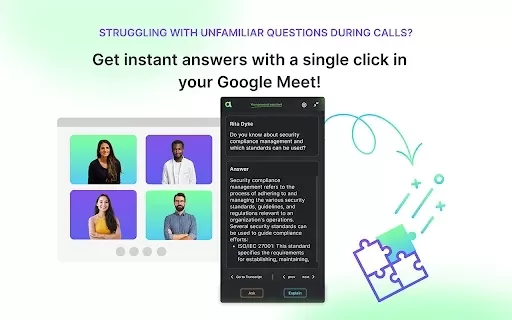
HomeChatGPT assistant for Google Meet



Helps TikTok sellers, brands, MCNs, and TAPs discover winning products and find creators.

HelpLook is an AI-powered all-in-one knowledge base tool that helps businesses quickly build knowledge bases, help centers, and...

Your AI Workspace

302.AI is an enterprise-grade AI resource platform with pay-as-you-go pricing, API access to a full range of AI models, and ready-to-use online applications.

剧火AI — AI Screenwriter + Director, a One-Person Short Drama Studio In one sentence, what is it?

What is Speech Translator?Speech Translator leverages Google's advanced speech recognition to deliver real-time translation for videos, audio, and live streams. This tool bridges language gaps, enabling seamless conversations and fostering clearer un

Ever wondered how to effortlessly turn your audio and video files into text? Enter Clipto, the powerhouse of AI transcription on the web. Imagine harnessing the same cutting-edge tech that fuels ChatGPT to convert your Zoom meetings, interviews, and

What is Revoldiv AI Chrome Extension? Revoldiv is a Chrome browser extension that instantly transcribes audio and video directly in your browser. It lets users follow along by reading live transcriptions and search for specific spoken words within po

Ever found yourself needing to turn spoken words into written text? Well, let me introduce you to tulz.AI—an AI-powered service that's all about making audio transcription a breeze. Whether it's a podcast, a business meeting, or any other spoken content,

Ever found yourself in need of a quick and accurate transcription of a video or audio file? That's where Video To Text AI comes into play. It's a slick AI-powered tool designed to effortlessly convert your media into text. Whether you're juggling YouTube
ChatGPT assistant for Google Meet Product Information
What Is the ChatGPT Assistant for Google Meet?
The ChatGPT Assistant is designed to boost user productivity by providing instant access to OpenAI's language processing capabilities directly in the Chrome browser. Users can engage in conversations, ask questions, and receive quick answers without leaving their current tasks. Whether for writing, research, or everyday inquiries, this extension simplifies access to AI assistance, making it a valuable tool for both personal and professional use.
Who Will Use the ChatGPT Assistant for Google Meet?
- Students
- Professionals
- Content creators
- Researchers
- General users seeking assistance
How to Use the ChatGPT Assistant for Google Meet
- Step 1: Install the ChatGPT Assistant from the Chrome Web Store.
- Step 2: Click on the extension icon in the toolbar.
- Step 3: Type your inquiry or request in the chat box.
- Step 4: Press Enter to receive instant responses from ChatGPT.
- Step 5: Use the suggestions or information provided to enhance your tasks.
Platform
- Chrome
ChatGPT Assistant for Google Meet's Core Features and Benefits
The Core Features
- Instant access to ChatGPT
- Natural language processing
- Multiple language support
- Integration with various websites
- Customizable prompts
The Benefits
- Saves time on research and writing tasks
- Improves productivity and efficiency
- Enhances learning and knowledge acquisition
- Facilitates easy communication
- Provides quick answers to queries
ChatGPT Assistant for Google Meet's Main Use Cases and Applications
- Writing assistance for blogs and emails
- Instant answers to academic questions
- Content generation and idea brainstorming
- Language translation and grammar checking
- Research aid and information sourcing
FAQs of ChatGPT Assistant for Google Meet
How Do I Install the ChatGPT Assistant?
You can install it directly from the Chrome Web Store.
Can I Use the ChatGPT Assistant on Any Website?
Yes, it can be used across various websites for assistance.
Is It Free to Use?
Yes, the ChatGPT Assistant is available for free.
What Kind of Tasks Can It Help With?
It can assist with writing, research, brainstorming, and more.
Does It Support Multiple Languages?
Yes, it offers support for various languages.
How Accurate Are the Responses?
Responses are generated using advanced AI models, providing high accuracy.
Do I Need an OpenAI Account to Use It?
No, you do not need an OpenAI account to use the extension.
Can I Customize the Prompts?
Yes, it allows for customizable prompts to fit your needs.
What Platforms Are Supported?
The extension is designed specifically for the Chrome browser.
What Is the ChatGPT Assistant?
It's a Chrome extension that provides instant access to OpenAI's ChatGPT for assistance.
ChatGPT Assistant for Google Meet Company Information
Website:
NACompany Name:
OpenAISupport Email:
NAFacebook:
NAX (Twitter):
NAYouTube:
NAInstagram:
NATikTok:
NALinkedIn:
NA
ChatGPT assistant for Google Meet Screenshot


2026 Latest Best Photoshop AI retouch tools for ecommerce apparel, skin cleanup, and color consistency! This top-rated curated list features powerful game-changing solutions that help you boost writing efficiency, streamline content creation, and achieve perfect visual results effortlessly. Each tool has undergone real-world tests through weekly updated rankings, complete with free vs paid comparison details. Backed by XIX.AI, it’s the must-try guide for anyone aiming to unlock your AI edge. Explore now!
 10 tools
 xix.ai

2026 Latest Best Top-Rated AI Prompt Libraries for optimizing all types of ChatGPT workflows. XIX.AI has curated a powerful, game-changing collection that goes through rigorous real-world tests to ensure top performance. You can find detailed free vs paid comparisons and expert rankings to help you choose the must-try tools that boost your productivity and unlock your AI edge. Explore now!
11 tools
xix.ai

2026 Latest Best AI Quiz Builder Platforms for Teachers, Tutors, and Cohort-Based Learning Programs! XIX.AI has curated a top-rated list of powerful game-changing tools that go through real-world tests to deliver accurate rankings. These must-try platforms help boost writing efficiency, streamline content creation, and simplify quiz design across all learning scenarios. Explore now to discover your perfect tool for unlocking your AI edge in teaching!
13 tools
xix.ai

2026 Latest Best AI Pull Request Review Tools for GitHub Teams are here on XIX.AI! This top-rated curated list showcases powerful game-changing solutions that streamline refactoring, bug fixing, and security gap detection across all team workflows. Enjoy a free vs paid comparison along with real-world tests and detailed rankings to help you find the perfect tool that boosts productivity significantly. Explore now to unlock your AI edge!
12 tools
xix.ai

2026 Latest Best Top-rated AI Text to Speech Tools for Natural Voiceovers are here on XIX.AI! This curated list features powerful, game-changing options that deliver crystal-clear voices for every use case, backed by real-world tests and weekly updated rankings. Get a free vs paid comparison to find the must-try solution that boosts your productivity instantly. Explore now to Unlock your AI edge!
11 tools
xix.ai

2026 Latest Best Manga AI Background Generators Ranked Top-Rated! This curated collection showcases powerful game-changing tools perfect for creating high-quality chapter backgrounds, book covers, and promotional art. Every option has undergone rigorous real-world tests to ensure reliability. Get a free vs paid comparison along with detailed insights. Explore now to discover your perfect tool and unlock your AI edge in manga creation.
6 tools
xix.ai


