


 Home
HomeChatGPT AI assistant for Youtube comments



Helps TikTok sellers, brands, MCNs, and TAPs discover winning products and find creators.

HelpLook is an AI-powered all-in-one knowledge base tool that helps businesses quickly build knowledge bases, help centers, and...

Your AI Workspace

302.AI is an enterprise-grade AI resource platform with pay-as-you-go pricing, API access to a full range of AI models, and ready-to-use online applications.

剧火AI — AI Screenwriter + Director, a One-Person Short Drama Studio In one sentence, what is it?

Ever heard of Grok? It's this nifty AI assistant from xAI that's all about giving you the straight scoop. And the best part? It's totally free! Grok isn't just your average AI; it's packed with cool features like real-time search, image generation, and tr

Ever wondered what Qwen AI is all about? Well, let me introduce you to this gem from Alibaba Cloud. Qwen AI is not your average language model; it's a powerhouse designed to be your go-to buddy for everything from whipping up text to coding, and even reco

Discover Plume AI: Your Ultimate Academic Writing AssistantAre you tired of struggling with your academic writing? Well, say hello to Plume AI, the innovative AI assistant that's here to revolutionize the way you write! Designed with students in mind, Plume AI harnesses the power of cutting-edge art

Ever wished for a trusty sidekick to help you navigate the digital world with ease? Enter Sider, your personal AI companion designed to seamlessly blend into your daily routine. Starting off as a handy Chrome/Edge extension, Sider transforms your browsing

Ever wondered what Ninja AI is all about? Well, let me tell you, it's like having a Swiss Army knife for your digital needs! Ninja AI isn't just another AI tool; it's a powerhouse that brings together over 24 top-notch Large Language Models (LLMs) to help
ChatGPT AI assistant for Youtube comments Product Information
What is the ChatGPT AI Assistant for YouTube Comments?
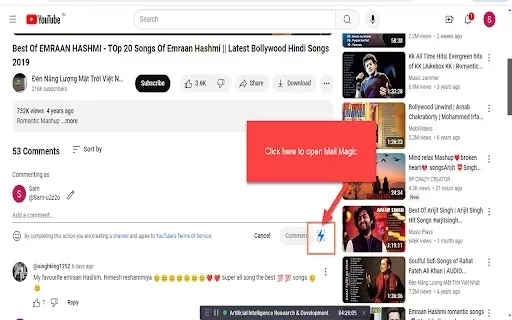
The ChatGPT AI Assistant for YouTube Comments enables you to quickly and efficiently generate personalized replies to comments. It automates responses on your own videos, other creators' content, and community posts, making the entire process faster and simpler. Supporting all languages, the AI can be trained with your specific FAQs to provide tailored answers. This tool is designed to enhance engagement and streamline community interaction for YouTube creators.
Who is the ChatGPT AI Assistant for YouTube Comments For?
- YouTube Content Creators
- Social Media Managers
- Businesses
- Influencers
- Community Managers
How to Use the ChatGPT AI Assistant for YouTube Comments
- Step 1: Install the ChatGPT AI Assistant from the Chrome Web Store.
- Step 2: Navigate to any YouTube video with comments.
- Step 3: Click the AI Assistant icon in your browser.
- Step 4: Select or input the comment you want to reply to.
- Step 5: Allow the AI to generate a response.
- Step 6: Review and make any necessary edits to the response.
- Step 7: Publish your comment.
Platform
- Chrome
ChatGPT AI Assistant for YouTube Comments: Core Features & Benefits
Core Features
- AI-Generated YouTube Comment Responses
- Reply to Comments on Your Videos or Others'
- Full Multilingual Support
- Customizable AI Training with Your FAQs
- Ad-Free Experience
Benefits
- Accelerate Viewer Engagement
- Increase Overall Interaction on YouTube
- Streamline Comment Moderation
- Completely Free to Use
- Personalized and Context-Aware Replies
Main Use Cases & Applications
- Responding to Comments on Viral Videos
- Managing YouTube Community Engagement
- Delivering Support via Comments
- Boosting Interactions on YouTube Posts
- Enhancing Customer Support Response Times
ChatGPT AI Assistant for YouTube Comments FAQs
What is the ChatGPT AI Assistant for YouTube Comments?
It is an AI-powered tool that helps you efficiently create and post replies to YouTube comments.
Is the ChatGPT AI Assistant free to use?
Yes, it is completely free and contains no advertisements.
Can the AI reply in different languages?
Yes, the AI supports generating responses in every language.
Can I use this tool on other social media platforms?
This specific assistant is built exclusively for YouTube comments.
How does the AI generate its responses?
The AI crafts replies based on the comment's context and can be personalized through training with your FAQs.
Can I edit the AI's generated responses?
Yes, you can review and edit all responses before posting them.
Does the tool collect personal data?
No, the developer has stated that it does not collect or utilize user data.
Can it reply to comments on other people's videos?
Yes, it can generate replies for comments on both your videos and other creators' content.
Will this tool improve my YouTube engagement?
Yes, by enabling faster and more consistent replies, it can help boost viewer engagement.
How do I install the ChatGPT AI Assistant for YouTube Comments?
Install it from the Chrome Web Store by clicking the 'Add to Chrome' button.
ChatGPT AI Assistant for YouTube Comments Company Information
- 9361-9195 Quebec Inc
- https://mailmagic.ai
- [email protected]
ChatGPT AI assistant for Youtube comments Screenshot

2026 Latest Best AI Study Tools for Homework and Exam Prep! XIX.AI curates a top-rated list of powerful, game-changing tools that help students boost productivity, streamline homework completion, and ace exams through real-world tests. Get a free vs paid comparison, detailed rankings, and must-try options to unlock your AI edge. Explore now!
 10 tools
 xix.ai

2026 Latest Best AI Vocal Demo Tools for Songwriters, Hook Creators, and Multi-Language Content Teams! XIX.AI has curated a top-rated list of powerful game-changing tools that go through rigorous real-world tests. You’ll find detailed free vs paid comparison data, comprehensive rankings, and must-try options to help you boost writing efficiency and unlock your creative potential. Explore now to discover your perfect tool for all your content needs!
9 tools
xix.ai

2026 Latest Best Top-rated AI Competitive Research Tools for Small Businesses! XIX.AI has curated a highly powerful game-changing collection, updated weekly with rigorous real-world tests and detailed rankings. You can find a comprehensive free vs paid comparison to help you identify the must-try tools that boost your productivity and give you a competitive edge. Explore now to discover your perfect tool!
9 tools
xix.ai

2026 Latest Best Photoshop AI retouch tools for ecommerce apparel, skin cleanup, and color consistency! This top-rated curated list features powerful game-changing solutions that help you boost writing efficiency, streamline content creation, and achieve perfect visual results effortlessly. Each tool has undergone real-world tests through weekly updated rankings, complete with free vs paid comparison details. Backed by XIX.AI, it’s the must-try guide for anyone aiming to unlock your AI edge. Explore now!
10 tools
xix.ai

2026 Latest Best Top-Rated AI Prompt Libraries for optimizing all types of ChatGPT workflows. XIX.AI has curated a powerful, game-changing collection that goes through rigorous real-world tests to ensure top performance. You can find detailed free vs paid comparisons and expert rankings to help you choose the must-try tools that boost your productivity and unlock your AI edge. Explore now!
11 tools
xix.ai

2026 Latest Best AI Quiz Builder Platforms for Teachers, Tutors, and Cohort-Based Learning Programs! XIX.AI has curated a top-rated list of powerful game-changing tools that go through real-world tests to deliver accurate rankings. These must-try platforms help boost writing efficiency, streamline content creation, and simplify quiz design across all learning scenarios. Explore now to discover your perfect tool for unlocking your AI edge in teaching!
13 tools
xix.ai


