


 Home
HomeChat with page. Free & Open source



Helps TikTok sellers, brands, MCNs, and TAPs discover winning products and find creators.

HelpLook is an AI-powered all-in-one knowledge base tool that helps businesses quickly build knowledge bases, help centers, and...

Your AI Workspace

302.AI is an enterprise-grade AI resource platform with pay-as-you-go pricing, API access to a full range of AI models, and ready-to-use online applications.

剧火AI — AI Screenwriter + Director, a One-Person Short Drama Studio In one sentence, what is it?
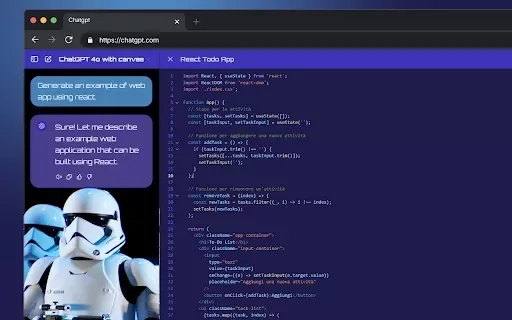
What is StylerGPT: ChatGPT Customization?StylerGPT is a Chrome extension that reimagines your ChatGPT interface as a fully customizable digital workspace. Choose from diverse color palettes, upload custom backgrounds, adjust fonts, and more to create
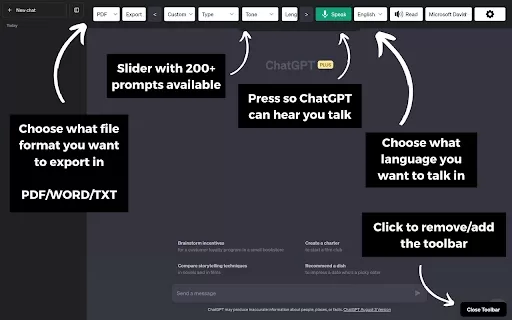
What is the ChatGPT Toolbar Companion Chrome Extension? The ChatGPT Toolbar Companion is a Chrome extension that elevates your ChatGPT interactions. It provides numerous features such as powerful prompts, text-to-speech, speech-to-text, auto-continue

What is Save ChatGPT for Chrome?Save ChatGPT for Chrome is a robust browser extension built to help users effortlessly preserve their ChatGPT chat history. Perfect for personal records, research, or sharing, it offers a simple solution. Choose from T
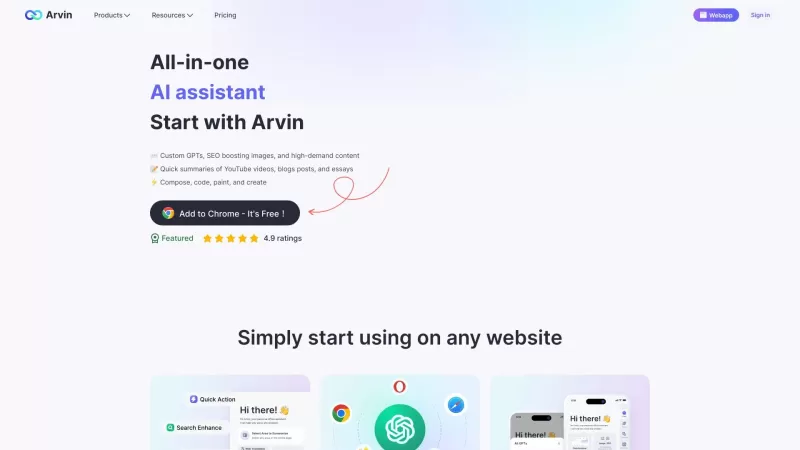
Ever wondered what Arvin - AI Assistant is all about? Well, let me break it down for you. Arvin is a nifty, free Chrome extension that harnesses the power of GPT-4 to be your go-to AI assistant. Whether you're into AI art, need quick summaries, or are looking to create content, Arvin's got your back
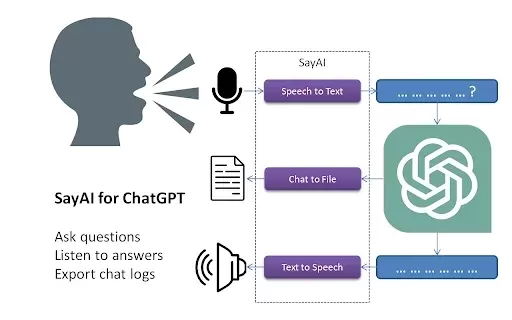
What is SayAI?SayAI is a Chrome extension that enhances ChatGPT by integrating voice features. It lets users ask questions aloud using speech-to-text and hear spoken responses via text-to-speech. This hands-free, voice-driven interaction makes conver
Chat with page. Free & Open source Product Information
What is Chat with Page?
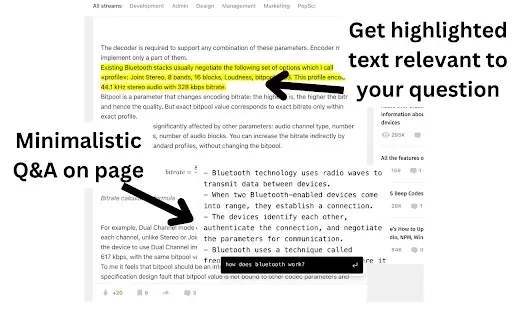
Chat with Page is a free and open-source Chrome extension that brings the power of ChatGPT directly to your browser. It lets you interact with an AI assistant on any webpage, enabling you to ask questions about the content, get clarifications, or dive deeper into topics without ever leaving the page. This tool is designed to streamline your browsing, making research and information gathering faster and more efficient.
Who is Chat with Page for?
- Students
- Professionals
- Researchers
- Everyday internet users
How to use Chat with Page
- Step 1: Install the Chat with Page extension from the Chrome Web Store.
- Step 2: Go to any webpage you want to explore.
- Step 3: Click the extension icon in your browser toolbar.
- Step 4: Type your question or topic into the chat interface.
- Step 5: Hit enter to receive an instant, context-aware response from ChatGPT.
Platform
- Chrome
Chat with Page: Core Features & Benefits
Key Features
- Contextual AI chat on any webpage
- Simple, one-click installation
- Real-time, intelligent responses
Key Benefits
- Saves time and boosts productivity while browsing
- Makes online information more accessible
- Creates a more interactive and engaging web experience
Primary Use Cases
- Conducting online research
- Summarizing articles and long-form content
- Understanding complex or technical web pages
Frequently Asked Questions
What is Chat with Page?
Chat with Page is a free Chrome extension that integrates ChatGPT, allowing you to converse with AI directly on the webpage you are viewing.
How do I install Chat with Page?
Simply visit the Chrome Web Store and search for 'Chat with Page' to add it to your browser.
Is it free?
Yes, it is completely free and open-source.
Can I use it on any website?
Absolutely. It works on any webpage you visit in Chrome.
What kind of questions can I ask?
You can ask anything related to the page content or any other topic you're curious about.
Is my data safe while using this extension?
Yes, the extension is designed with privacy in mind and adheres to strict data safety policies.
Does it require an internet connection?
Yes, an active internet connection is required to communicate with the ChatGPT service.
Can I use it in multiple tabs at once?
Yes, you can use the extension independently across multiple browser tabs.
How do I get support?
For help, please visit the support section on the extension's Chrome Web Store page.
Can I uninstall it later?
Yes, you can remove the extension at any time through your Chrome browser settings.
Company & Distribution
- Available on the Google Chrome Web Store
- https://chromewebstore.google.com
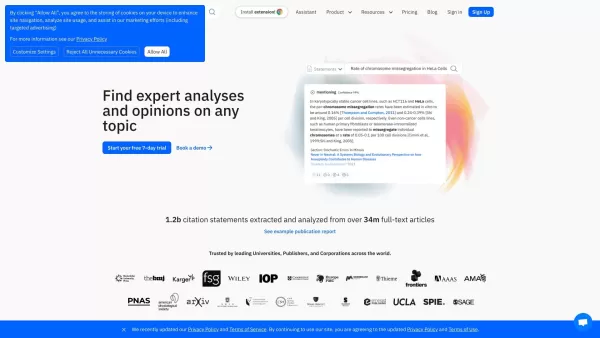
Chat with page. Free & Open source Screenshot

2026 Latest Best Top-rated AI Competitive Research Tools for Small Businesses! XIX.AI has curated a highly powerful game-changing collection, updated weekly with rigorous real-world tests and detailed rankings. You can find a comprehensive free vs paid comparison to help you identify the must-try tools that boost your productivity and give you a competitive edge. Explore now to discover your perfect tool!
 9 tools
 xix.ai

2026 Latest Best Photoshop AI retouch tools for ecommerce apparel, skin cleanup, and color consistency! This top-rated curated list features powerful game-changing solutions that help you boost writing efficiency, streamline content creation, and achieve perfect visual results effortlessly. Each tool has undergone real-world tests through weekly updated rankings, complete with free vs paid comparison details. Backed by XIX.AI, it’s the must-try guide for anyone aiming to unlock your AI edge. Explore now!
10 tools
xix.ai

2026 Latest Best Top-Rated AI Prompt Libraries for optimizing all types of ChatGPT workflows. XIX.AI has curated a powerful, game-changing collection that goes through rigorous real-world tests to ensure top performance. You can find detailed free vs paid comparisons and expert rankings to help you choose the must-try tools that boost your productivity and unlock your AI edge. Explore now!
11 tools
xix.ai

2026 Latest Best AI Quiz Builder Platforms for Teachers, Tutors, and Cohort-Based Learning Programs! XIX.AI has curated a top-rated list of powerful game-changing tools that go through real-world tests to deliver accurate rankings. These must-try platforms help boost writing efficiency, streamline content creation, and simplify quiz design across all learning scenarios. Explore now to discover your perfect tool for unlocking your AI edge in teaching!
13 tools
xix.ai

2026 Latest Best AI Pull Request Review Tools for GitHub Teams are here on XIX.AI! This top-rated curated list showcases powerful game-changing solutions that streamline refactoring, bug fixing, and security gap detection across all team workflows. Enjoy a free vs paid comparison along with real-world tests and detailed rankings to help you find the perfect tool that boosts productivity significantly. Explore now to unlock your AI edge!
12 tools
xix.ai

2026 Latest Best Top-rated AI Text to Speech Tools for Natural Voiceovers are here on XIX.AI! This curated list features powerful, game-changing options that deliver crystal-clear voices for every use case, backed by real-world tests and weekly updated rankings. Get a free vs paid comparison to find the must-try solution that boosts your productivity instantly. Explore now to Unlock your AI edge!
11 tools
xix.ai


