


 Home
HomeChat GPT Logger



Helps TikTok sellers, brands, MCNs, and TAPs discover winning products and find creators.

HelpLook is an AI-powered all-in-one knowledge base tool that helps businesses quickly build knowledge bases, help centers, and...

Your AI Workspace

302.AI is an enterprise-grade AI resource platform with pay-as-you-go pricing, API access to a full range of AI models, and ready-to-use online applications.

剧火AI — AI Screenwriter + Director, a One-Person Short Drama Studio In one sentence, what is it?

What is Speech Translator?Speech Translator leverages Google's advanced speech recognition to deliver real-time translation for videos, audio, and live streams. This tool bridges language gaps, enabling seamless conversations and fostering clearer un

Ever wondered how to effortlessly turn your audio and video files into text? Enter Clipto, the powerhouse of AI transcription on the web. Imagine harnessing the same cutting-edge tech that fuels ChatGPT to convert your Zoom meetings, interviews, and

What is Revoldiv AI Chrome Extension? Revoldiv is a Chrome browser extension that instantly transcribes audio and video directly in your browser. It lets users follow along by reading live transcriptions and search for specific spoken words within po

Ever found yourself needing to turn spoken words into written text? Well, let me introduce you to tulz.AI—an AI-powered service that's all about making audio transcription a breeze. Whether it's a podcast, a business meeting, or any other spoken content,

Ever found yourself in need of a quick and accurate transcription of a video or audio file? That's where Video To Text AI comes into play. It's a slick AI-powered tool designed to effortlessly convert your media into text. Whether you're juggling YouTube
Chat GPT Logger Product Information
What Is Chat GPT Logger?
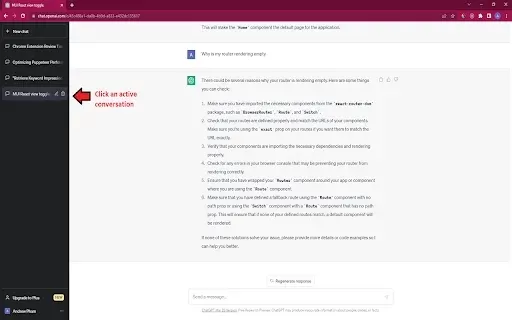
Chat GPT Logger is a tool designed to improve your ChatGPT experience by letting you log and save your chat conversations directly to your computer. This simple yet powerful extension ensures that important dialogues, insights, and creative exchanges are easily preserved. Users can download conversations in a text format, making it convenient for future reference, analysis, or sharing. The extension aims to streamline your workflow, especially for professionals and students who frequently interact with AI for research, brainstorming, or learning.
Who Will Use Chat GPT Logger?
- Students
- Researchers
- Professionals
- Writers
- Content Creators
How to Use Chat GPT Logger
- Step 1: Install the Chat GPT Logger extension from the Chrome Web Store.
- Step 2: Open ChatGPT and start a conversation.
- Step 3: Click the Chat GPT Logger icon in your browser.
- Step 4: Select 'Save Conversation' to download the text file.
Platform
- Chrome
Chat GPT Logger's Core Features & Benefits
The Core Features
- Save conversations to local text files
- User-friendly interface
- Quick access to saved logs
The Benefits
- Easily store and retrieve important dialogues
- Enhance productivity by documenting chats
- Facilitate better knowledge sharing
Chat GPT Logger's Main Use Cases & Applications
- Research documentation
- Content ideation
- Dialogue analysis
- Creative writing aid
FAQs of Chat GPT Logger
How Do I Install Chat GPT Logger?
You can install it directly from the Chrome Web Store.
Is There a Cost for Using Chat GPT Logger?
No, the extension is completely free to use.
Where Are the Conversations Saved?
Conversations are saved as text files on your local computer.
Can I Share My Saved Conversations?
Yes, you can share the text files via email or other platforms.
Does It Require Any Special Permissions?
The extension only needs permission to access your browsing data.
Can I Use It on Browsers Other Than Chrome?
Currently, it is only available for Chrome.
What File Format Are the Conversations Saved In?
Conversations are saved in .txt format.
Can I Use This Tool Offline?
Yes, once downloaded, you can access saved conversations offline.
How Often Should I Save My Conversations?
It is recommended to save after significant exchanges to avoid data loss.
Is There a Limit to How Many Conversations I Can Save?
No, you can save as many conversations as needed.
Chat GPT Logger Company Information
Website:
https://unproductive.proCompany Name:
Unproductive ProSupport Email:
Facebook:
NAX(Twitter):
NAYouTube:
NAInstagram:
NATiktok:
NALinkedIn:
NA
Chat GPT Logger Screenshot


2026 Latest Best Top-rated AI Text to Speech Tools for Natural Voiceovers are here on XIX.AI! This curated list features powerful, game-changing options that deliver crystal-clear voices for every use case, backed by real-world tests and weekly updated rankings. Get a free vs paid comparison to find the must-try solution that boosts your productivity instantly. Explore now to Unlock your AI edge!
 11 tools
 xix.ai

2026 Latest Best Manga AI Background Generators Ranked Top-Rated! This curated collection showcases powerful game-changing tools perfect for creating high-quality chapter backgrounds, book covers, and promotional art. Every option has undergone rigorous real-world tests to ensure reliability. Get a free vs paid comparison along with detailed insights. Explore now to discover your perfect tool and unlock your AI edge in manga creation.
6 tools
xix.ai

2026 Latest Best Top-rated AI Object Removal Editors for portraits travel product shots! XIX.AI curates a powerful game-changing collection regularly updated with weekly rankings. These tools offer real-world tests to help you quickly remove unwanted elements, boost content quality, and save tons of time without compromising results. Must-try for anyone aiming to unlock their AI creation edge. Explore now!
10 tools
xix.ai

2026 Latest Best Top-rated AI Text to Speech Tools for Online Courses are curated by XIX.AI based on rigorous real-world tests and weekly updated rankings. These powerful tools help creators deliver crystal-clear audio content effortlessly, boosting writing efficiency and streamlining course production. Check out the free vs paid comparison to find your perfect fit. Explore now to unlock your AI edge in online education.
10 tools
xix.ai

2026 Latest Best Top-Rated AI Blog Title Tools for Higher Click Through Rates! XIX.AI has carefully curated a powerful, game-changing collection of top tools that go through rigorous real-world tests. You’ll find a free vs paid comparison, weekly updated rankings, and detailed insights to help you boost your blog’s traffic efficiently. Must-try options are highlighted to help you unlock your AI edge. Explore now!
10 tools
xix.ai

2026 Latest Best Top-rated AI Task Routing Tools for Support Workflows! XIX.AI has curated a highly powerful game-changing collection of must-try solutions, all undergoing rigorous real-world tests and updated weekly. These tools streamline workflows, boost productivity, and help teams deliver faster, more efficient support. Explore now to discover your perfect tool and unlock your AI edge!
17 tools
xix.ai


