


 Home
HomeCapture.dev
Visual Bug Capture Tool for Product Teams



Helps TikTok sellers, brands, MCNs, and TAPs discover winning products and find creators.

HelpLook is an AI-powered all-in-one knowledge base tool that helps businesses quickly build knowledge bases, help centers, and...

Your AI Workspace

302.AI is an enterprise-grade AI resource platform with pay-as-you-go pricing, API access to a full range of AI models, and ready-to-use online applications.

剧火AI — AI Screenwriter + Director, a One-Person Short Drama Studio In one sentence, what is it?

Ever stumbled upon Cherry Studio AI and wondered what it's all about? Well, let me break it down for you. Cherry Studio AI isn't just another run-of-the-mill AI tool; it's a powerhouse desktop client that lets you dive into advanced AI interactions across

Discover Plume AI: Your Ultimate Academic Writing AssistantAre you tired of struggling with your academic writing? Well, say hello to Plume AI, the innovative AI assistant that's here to revolutionize the way you write! Designed with students in mind, Plume AI harnesses the power of cutting-edge art

Ever wondered how to turn your jumbled thoughts and complex queries into something you can actually grasp? Enter The Visualizer, your new best friend in the world of learning and creativity. This nifty tool takes your written queries, URLs, and even PDFs,

Ever wished for a trusty sidekick to help you navigate the digital world with ease? Enter Sider, your personal AI companion designed to seamlessly blend into your daily routine. Starting off as a handy Chrome/Edge extension, Sider transforms your browsing

Ever wondered what Ninja AI is all about? Well, let me tell you, it's like having a Swiss Army knife for your digital needs! Ninja AI isn't just another AI tool; it's a powerhouse that brings together over 24 top-notch Large Language Models (LLMs) to help
Capture.dev Product Information
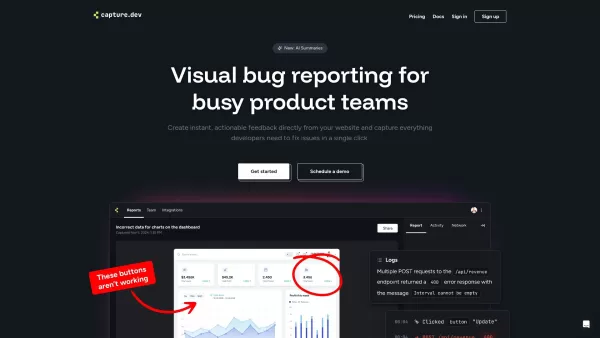
Ever stumbled upon a pesky bug on your website and wished you could just snap a pic and send it off to your team? Well, that's where Capture.dev comes in! It's not just any tool; it's your new best friend for visual feedback and bug reporting. Designed for product teams, Capture.dev allows you to capture bugs and feedback directly from your website, making it a breeze to annotate and resolve issues with a few clicks.
How to Use Capture.dev?
Getting started with Capture.dev is as easy as pie. Just add the capture widget to your website with a snippet of code, and voila! You're all set to start capturing bugs and feedback instantly. It's like having a superpower at your fingertips, enabling you to squash those bugs faster than ever.
Capture.dev's Core Features
Visual Bug Reporting
With Capture.dev, you can visually report bugs right where you see them. No more vague descriptions; just point, click, and annotate. It's like drawing on a digital whiteboard, but way more helpful.
Automatic Context Capture
Ever tried to explain a bug without the full context? It's a nightmare. Capture.dev automatically captures the context around the bug, saving you from those frustrating back-and-forths.
Automatic History Tracking
Remembering the steps that led to a bug can be tricky. Capture.dev keeps a history of actions, making it easier to trace back and fix those sneaky issues.
Automatic Summaries
Who has time to write detailed bug reports? Capture.dev generates automatic summaries, so you can focus on fixing rather than writing.
Integration with Major Workflow Tools
Capture.dev plays nice with your favorite workflow tools. Whether it's Jira, Asana, or something else, integration is seamless, keeping your workflow smooth and efficient.
Capture.dev's Use Cases
Capture Visual Bugs Directly from Your Website
Say goodbye to the hassle of reporting bugs. With Capture.dev, you can capture visual bugs right on your website, making it easier for your team to see and fix them.
Provide Audio and Video Feedback for Complex Issues
Sometimes, a picture isn't enough. Capture.dev lets you add audio and video feedback, perfect for those complex issues that need a bit more explanation.
FAQ from Capture.dev
- Is there a free trial available for Capture.dev?
- Yes, Capture.dev offers a free trial so you can test out its features before committing.
- What browsers does Capture.dev support?
- Capture.dev supports a wide range of browsers, including Chrome, Firefox, Safari, and Edge, ensuring compatibility across different platforms.
- How does Capture.dev integrate with other tools?
- Capture.dev integrates smoothly with major workflow tools like Jira, Asana, and others, allowing for a seamless bug reporting and resolution process.
Capture.dev Company
Capture.dev is brought to you by Capture.dev, a company dedicated to simplifying the bug reporting and feedback process for product teams.
Capture.dev Login
Ready to log in and start using Capture.dev? Here's the link: Capture.dev Login.
Capture.dev Sign up
Not a member yet? Sign up here and start capturing those bugs: Capture.dev Sign up.
Capture.dev Pricing
Curious about the pricing? Check it out here: Capture.dev Pricing.
Capture.dev Screenshot



2026 Latest Best AI Quiz Builder Platforms for Teachers, Tutors, and Cohort-Based Learning Programs! XIX.AI has curated a top-rated list of powerful game-changing tools that go through real-world tests to deliver accurate rankings. These must-try platforms help boost writing efficiency, streamline content creation, and simplify quiz design across all learning scenarios. Explore now to discover your perfect tool for unlocking your AI edge in teaching!
 13 tools
 xix.ai

2026 Latest Best AI Pull Request Review Tools for GitHub Teams are here on XIX.AI! This top-rated curated list showcases powerful game-changing solutions that streamline refactoring, bug fixing, and security gap detection across all team workflows. Enjoy a free vs paid comparison along with real-world tests and detailed rankings to help you find the perfect tool that boosts productivity significantly. Explore now to unlock your AI edge!
12 tools
xix.ai

2026 Latest Best Top-rated AI Text to Speech Tools for Natural Voiceovers are here on XIX.AI! This curated list features powerful, game-changing options that deliver crystal-clear voices for every use case, backed by real-world tests and weekly updated rankings. Get a free vs paid comparison to find the must-try solution that boosts your productivity instantly. Explore now to Unlock your AI edge!
11 tools
xix.ai

2026 Latest Best Manga AI Background Generators Ranked Top-Rated! This curated collection showcases powerful game-changing tools perfect for creating high-quality chapter backgrounds, book covers, and promotional art. Every option has undergone rigorous real-world tests to ensure reliability. Get a free vs paid comparison along with detailed insights. Explore now to discover your perfect tool and unlock your AI edge in manga creation.
6 tools
xix.ai

2026 Latest Best Top-rated AI Object Removal Editors for portraits travel product shots! XIX.AI curates a powerful game-changing collection regularly updated with weekly rankings. These tools offer real-world tests to help you quickly remove unwanted elements, boost content quality, and save tons of time without compromising results. Must-try for anyone aiming to unlock their AI creation edge. Explore now!
10 tools
xix.ai

2026 Latest Best Top-rated AI Text to Speech Tools for Online Courses are curated by XIX.AI based on rigorous real-world tests and weekly updated rankings. These powerful tools help creators deliver crystal-clear audio content effortlessly, boosting writing efficiency and streamlining course production. Check out the free vs paid comparison to find your perfect fit. Explore now to unlock your AI edge in online education.
10 tools
xix.ai


Capture.dev is a lifesaver! 😍 I can just snap a screenshot, scribble my thoughts, and send it to the team without any hassle. Makes bug reporting feel like doodling on a napkin. Only wish it had a dark mode for my late-night debugging sessions!
Capture.devは私たちのチームにとって救世主です!バグを撮って送るのがこれまでになく簡単になりました。まるで指先にあるビジュアルバグレポーターを持っているみたい。自動で問題を検出してくれるとさらに最高なのに!🪲📸
Capture.dev is a lifesaver for our team! Snapping bugs and sending them over has never been easier. It's like having a visual bug reporter at your fingertips. Only wish it could auto-detect issues too, that would be the cherry on top! 🪲📸
Capture.dev는 우리 팀의 구세주예요! 버그를 찍어서 보내는 게 이제껏 이렇게 쉬운 적이 없었어요. 마치 손끝에 있는 비주얼 버그 리포터를 가진 것 같아요. 문제를 자동으로 감지해주면 더 완벽할 텐데요! 🪲📸
Capture.dev es un salvavidas para nuestro equipo. Sacar fotos de los errores y enviarlos nunca ha sido tan fácil. Es como tener un reportero de errores visual a tu alcance. Ojalá también pudiera detectar problemas automáticamente, ¡eso sería la guinda del pastel! 🪲📸


