


 Home
HomeCandy
Candy: Lawyer Workspace Addon for Enhanced Productivity



Helps TikTok sellers, brands, MCNs, and TAPs discover winning products and find creators.

HelpLook is an AI-powered all-in-one knowledge base tool that helps businesses quickly build knowledge bases, help centers, and...

Your AI Workspace

302.AI is an enterprise-grade AI resource platform with pay-as-you-go pricing, API access to a full range of AI models, and ready-to-use online applications.

剧火AI — AI Screenwriter + Director, a One-Person Short Drama Studio In one sentence, what is it?

Ever heard of Grok? It's this nifty AI assistant from xAI that's all about giving you the straight scoop. And the best part? It's totally free! Grok isn't just your average AI; it's packed with cool features like real-time search, image generation, and tr

Ever wondered what Qwen AI is all about? Well, let me introduce you to this gem from Alibaba Cloud. Qwen AI is not your average language model; it's a powerhouse designed to be your go-to buddy for everything from whipping up text to coding, and even reco

Discover Plume AI: Your Ultimate Academic Writing AssistantAre you tired of struggling with your academic writing? Well, say hello to Plume AI, the innovative AI assistant that's here to revolutionize the way you write! Designed with students in mind, Plume AI harnesses the power of cutting-edge art

Ever wished for a trusty sidekick to help you navigate the digital world with ease? Enter Sider, your personal AI companion designed to seamlessly blend into your daily routine. Starting off as a handy Chrome/Edge extension, Sider transforms your browsing

Ever wondered what Ninja AI is all about? Well, let me tell you, it's like having a Swiss Army knife for your digital needs! Ninja AI isn't just another AI tool; it's a powerhouse that brings together over 24 top-notch Large Language Models (LLMs) to help
Candy Product Information
What is Candy?
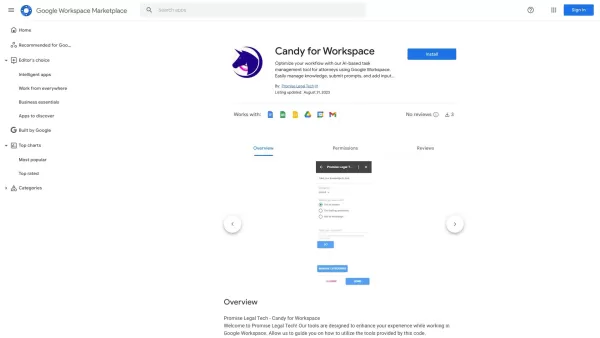
Candy isn’t just another tool—it’s a game-changer for lawyers on Workspace. Think of it as your personal productivity powerhouse, complete with an AI assistant, a document hyperlink manager, and an email templater that’s so easy to use, it practically sets itself up. Whether you're juggling tight deadlines or trying to keep track of endless documents, Candy has your back. Lawyers rave about how it streamlines their workflow and saves hours of tedious tasks. It’s like having a Swiss Army knife for your legal practice—except this one works smarter, not harder.
How to Use Candy
Using Candy is as straightforward as it gets. First things first, head over to Workspace and install the Candy addon. Seriously, it takes less time than making a cup of coffee. Once it’s up and running, you’ll find all its features right there in your Workspace dashboard. No hunting around, no complicated setups—just pure, unadulterated productivity.
Candy’s Core Features
An AI assistant powered by your own knowledge
Imagine having a virtual assistant that knows your firm inside out. That’s what Candy’s AI does—it learns from your documents and emails, giving you lightning-fast answers and insights whenever you need them.
A document hyperlink manager
Tired of sifting through endless PDFs or Word docs to find the exact passage you need? Candy’s hyperlink manager turns every document into a seamless web of clickable links, saving you hours of scrolling.
An email templater with zero setup required
Crafting emails is one of those repetitive tasks that eats away at your day. With Candy’s email templater, you can create custom templates in seconds, then send them off with just a few clicks. No more reinventing the wheel every time you write a follow-up.
FAQ from Candy
- How does the AI assistant work?
- Think of it as your digital secretary who never sleeps. The AI assistant pulls data directly from your previous documents and communications, so it always gives you relevant answers tailored to your firm.
- What is the document hyperlink manager?
- Ever tried finding a specific paragraph in a 50-page brief? The hyperlink manager lets you instantly jump between sections within a document. It’s like having a GPS for your files!
- Do I need to set up the email templater?
- Nope! Candy’s email templater is ready to go right out of the box. Just fill in the blanks and hit send. It’s that simple.
Candy Screenshot



2026 Latest Best Top-rated AI Object Removal Editors for portraits travel product shots! XIX.AI curates a powerful game-changing collection regularly updated with weekly rankings. These tools offer real-world tests to help you quickly remove unwanted elements, boost content quality, and save tons of time without compromising results. Must-try for anyone aiming to unlock their AI creation edge. Explore now!
 10 tools
 xix.ai

2026 Latest Best Top-rated AI Text to Speech Tools for Online Courses are curated by XIX.AI based on rigorous real-world tests and weekly updated rankings. These powerful tools help creators deliver crystal-clear audio content effortlessly, boosting writing efficiency and streamlining course production. Check out the free vs paid comparison to find your perfect fit. Explore now to unlock your AI edge in online education.
10 tools
xix.ai

2026 Latest Best Top-Rated AI Blog Title Tools for Higher Click Through Rates! XIX.AI has carefully curated a powerful, game-changing collection of top tools that go through rigorous real-world tests. You’ll find a free vs paid comparison, weekly updated rankings, and detailed insights to help you boost your blog’s traffic efficiently. Must-try options are highlighted to help you unlock your AI edge. Explore now!
10 tools
xix.ai

2026 Latest Best Top-rated AI Task Routing Tools for Support Workflows! XIX.AI has curated a highly powerful game-changing collection of must-try solutions, all undergoing rigorous real-world tests and updated weekly. These tools streamline workflows, boost productivity, and help teams deliver faster, more efficient support. Explore now to discover your perfect tool and unlock your AI edge!
17 tools
xix.ai

2026 Latest Best Top-Rated AI Citation and Paper Summary Tools Curated by XIX.AI. Get powerful game-changing solutions for quick content creation, improved writing efficiency, and boosting productivity. We offer a free vs paid comparison along with real-world tests and weekly updated rankings to help you find the must-try tool that fits your needs perfectly. Explore now to Unlock your AI edge.
10 tools
xix.ai

2026 Latest Best Top-Rated AI Productivity Tools for Daily Work! XIX.AI has curated a powerful, game-changing selection based on rigorous weekly updated rankings and real-world tests. You’ll find must-try options that boost writing efficiency, streamline content creation, and help you overcome daily work challenges. Get a free vs paid comparison to find the perfect fit for your needs. Explore now to unlock your AI edge!
9 tools
xix.ai


