


 Home
HomeCandy - Chrome Extension
AI tool for automatic image filename generation.



Helps TikTok sellers, brands, MCNs, and TAPs discover winning products and find creators.

HelpLook is an AI-powered all-in-one knowledge base tool that helps businesses quickly build knowledge bases, help centers, and...

Your AI Workspace

302.AI is an enterprise-grade AI resource platform with pay-as-you-go pricing, API access to a full range of AI models, and ready-to-use online applications.

剧火AI — AI Screenwriter + Director, a One-Person Short Drama Studio In one sentence, what is it?

Ever wished for a trusty sidekick to help you navigate the digital world with ease? Enter Sider, your personal AI companion designed to seamlessly blend into your daily routine. Starting off as a handy Chrome/Edge extension, Sider transforms your browsing

What is Concisely?Concisely is a cutting-edge Chrome extension that redefines email reading by using advanced AI to deliver one-sentence summaries of entire email threads. It allows busy professionals to capture the main idea instantly, eliminating t

What is Altsite?Altsite is a browser extension that helps users find websites similar to the one they're currently visiting. Using advanced AI technology, it analyzes website content and instantly generates a list of related sites. This tool is ideal

What is Comment Generator?Comment Generator is an innovative AI tool that crafts authentic and compelling comments for Instagram and Threads. This Chrome extension uses sophisticated algorithms to automate comment writing, saving you time while prese

Pixelcode is a revolutionary tool that transforms screenshots of code into editable text, saving you from the tedious task of typing out code manually. Imagine snapping a picture of a code snippet and instantly having it ready to edit in your preferred co
Candy - Chrome Extension Product Information
Ever found yourself swimming in a sea of downloaded images, struggling to find that one picture you saved last week? Enter Candy AI, a nifty Google Chrome extension that's here to save the day by smartly organizing your image downloads with descriptive filenames. It's like having a personal assistant for your image library, but without the hassle of actually hiring one!
Using Candy AI is a breeze. Just install the extension on your Chrome browser, and watch as it starts working its magic. From the moment you save an image, Candy AI kicks in, using its AI smarts to give each file a name that actually makes sense. No more "IMG_1234.jpg" mysteries—you'll know exactly what each image is just by looking at the filename.
Core Features of Candy AI Chrome Extension
Automated Image Filename Generation
Candy AI's star feature is its ability to automatically generate descriptive filenames for your images. It's like having a librarian for your digital photos, making sure everything is neatly labeled and easy to find.
User-Friendly Interface
Don't worry about needing a degree in computer science to use Candy AI. Its interface is designed to be as user-friendly as possible, so you can focus on what matters—your images.
Local AI Analysis for Privacy
Worried about privacy? Candy AI performs all its magic locally on your device, ensuring that your images and data stay private. No cloud, no worries.
Use Cases for Candy AI Chrome Extension
Easily Organize and Find Downloaded Images
With Candy AI, gone are the days of endless scrolling through a disorganized mess of images. You'll be able to find what you're looking for in a snap, thanks to those smart filenames.
Share Images with Clear Descriptive Filenames
Sharing images becomes a whole lot easier when the filenames actually describe what's in the picture. Whether it's for work, school, or just showing off to friends, Candy AI makes sure your images are share-ready.
FAQ from Candy
- Does Candy store my personal data or images?
- No, Candy AI respects your privacy. All image analysis and filename generation happen locally on your device, so your data stays yours.
- How does Candy generate filenames?
- Candy AI uses local AI to analyze the content of each image. It then generates a filename based on what it sees, ensuring that your images are labeled in a way that makes sense to you.
So, if you're tired of the chaos that comes with managing a hoard of downloaded images, give Candy AI a try. It's like bringing order to the digital universe, one image at a time!
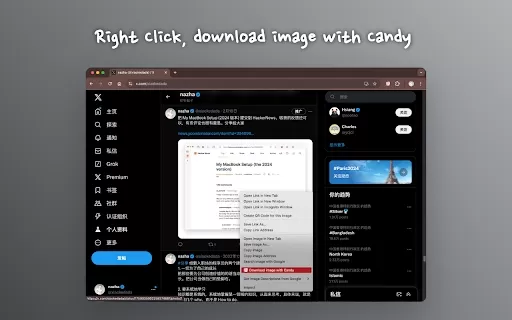
Candy - Chrome Extension Screenshot



2026 Latest & Top-Rated AI Scriptwriting Tools: Elevate your YouTube production with powerful, must-try aids for generating engaging scripts fast. Our weekly updated, curated showdown compares free vs paid options based on real-world tests. Break through creator's block and boost productivity. Discover your perfect AI assistant at XIX.AI.
 10 tools
 xix.ai


Okay, this extension is a game-changer! I always dump downloads into one messy folder and spend ages searching. Candy's auto-filenaming actually works surprisingly well—it's like having a tiny librarian for my memes and reference pics. Saves me a few minutes every day, which adds up! Hoping they keep improving the AI tags. 😅


