


 Home
HomeBacktrack
Backtrack Mac Recorder for Audio Screen Mic



Helps TikTok sellers, brands, MCNs, and TAPs discover winning products and find creators.

HelpLook is an AI-powered all-in-one knowledge base tool that helps businesses quickly build knowledge bases, help centers, and...

Your AI Workspace

302.AI is an enterprise-grade AI resource platform with pay-as-you-go pricing, API access to a full range of AI models, and ready-to-use online applications.

剧火AI — AI Screenwriter + Director, a One-Person Short Drama Studio In one sentence, what is it?

What is Speech Translator?Speech Translator leverages Google's advanced speech recognition to deliver real-time translation for videos, audio, and live streams. This tool bridges language gaps, enabling seamless conversations and fostering clearer un

Ever wondered how to effortlessly turn your audio and video files into text? Enter Clipto, the powerhouse of AI transcription on the web. Imagine harnessing the same cutting-edge tech that fuels ChatGPT to convert your Zoom meetings, interviews, and

What is Revoldiv AI Chrome Extension? Revoldiv is a Chrome browser extension that instantly transcribes audio and video directly in your browser. It lets users follow along by reading live transcriptions and search for specific spoken words within po

Ever found yourself needing to turn spoken words into written text? Well, let me introduce you to tulz.AI—an AI-powered service that's all about making audio transcription a breeze. Whether it's a podcast, a business meeting, or any other spoken content,

Ever found yourself in need of a quick and accurate transcription of a video or audio file? That's where Video To Text AI comes into play. It's a slick AI-powered tool designed to effortlessly convert your media into text. Whether you're juggling YouTube
Backtrack Product Information
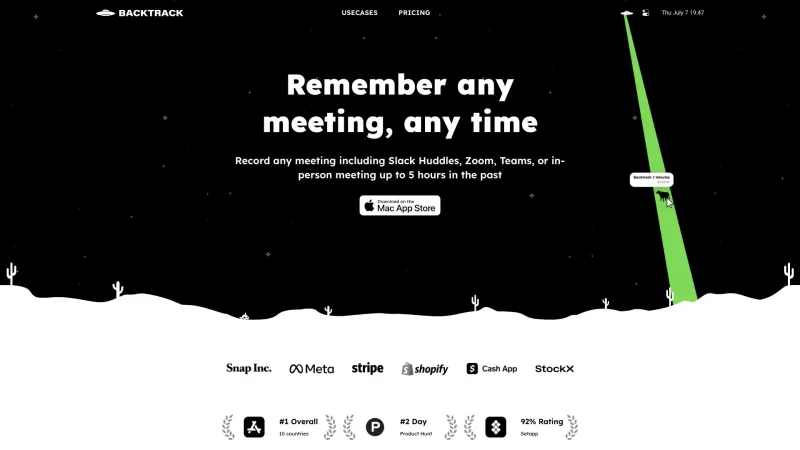
Ever found yourself wishing you could go back in time to record that brilliant idea from a meeting or a crucial point in a client call? Well, Backtrack is here to make that wish come true! It's a nifty Mac menu bar recorder that lets you save your past audio, screen, and microphone recordings. Whether you're in a Zoom call, a brainstorming session, or even at a conference booth, Backtrack has got you covered. It's perfect for everything from user interviews and sales calls to webinars and bug reporting.
How to Use Backtrack?
Getting started with Backtrack is a breeze. Just install the app on your Mac, and you'll see the Backtrack icon pop up in your menu bar. When you need to save something, all you have to do is click and drag the icon. You can save up to an hour of your in-person or Zoom calls from the past. How cool is that? Backtrack keeps the last hour of internal and external audio and screen recordings ready for you. Before you download, you can preview and tailor what you want to keep from your Zoom calls or in-person chats. Plus, your recordings stay completely private until you decide to share them with a link.
Backtrack's Core Features
Backtrack isn't just about recording; it's packed with features that make your life easier. You can locally record up to 5 hours of past audio, screen, or microphone activity. Before you download, you get to preview and customize your recordings. Want to take it a step further? Upload your recordings to the cloud for AI-powered note-taking. Backtrack can generate AI transcripts and summaries, saving you time and hassle. And the best part? It works seamlessly with various platforms like Zoom, Slack Huddles, and even in-person meetings.
Backtrack's Use Cases
From recording Slack Huddles to capturing the essence of client calls, Backtrack is versatile. It's your go-to tool for brainstorming sessions, user interviews, sales calls, webinars, and even those bustling conference booths. And if you're in tech, it's a lifesaver for bug reporting. With Backtrack, you'll never miss a beat.
FAQ from Backtrack
- What platforms does Backtrack support for recording?
- How far back can I record with Backtrack?
- Can I customize what I want to save from Zoom calls or in-person conversations?
- Is my recording data private?
- Backtrack Company
Backtrack Company name: Yac Inc.
- Backtrack Pricing
Backtrack Pricing Link: https://www.usebacktrack.com/pricing
- Backtrack Linkedin
Backtrack Linkedin Link: https://www.linkedin.com/company/40904393
- Backtrack Twitter
Backtrack Twitter Link: https://twitter.com/UseBacktrack
- Backtrack Instagram
Backtrack Instagram Link: https://www.instagram.com/usebacktrack
Backtrack Screenshot

2026 Latest Best Top-rated AI Object Removal Editors for portraits travel product shots! XIX.AI curates a powerful game-changing collection regularly updated with weekly rankings. These tools offer real-world tests to help you quickly remove unwanted elements, boost content quality, and save tons of time without compromising results. Must-try for anyone aiming to unlock their AI creation edge. Explore now!
 10 tools
 xix.ai

2026 Latest Best Top-rated AI Text to Speech Tools for Online Courses are curated by XIX.AI based on rigorous real-world tests and weekly updated rankings. These powerful tools help creators deliver crystal-clear audio content effortlessly, boosting writing efficiency and streamlining course production. Check out the free vs paid comparison to find your perfect fit. Explore now to unlock your AI edge in online education.
10 tools
xix.ai

2026 Latest Best Top-Rated AI Blog Title Tools for Higher Click Through Rates! XIX.AI has carefully curated a powerful, game-changing collection of top tools that go through rigorous real-world tests. You’ll find a free vs paid comparison, weekly updated rankings, and detailed insights to help you boost your blog’s traffic efficiently. Must-try options are highlighted to help you unlock your AI edge. Explore now!
10 tools
xix.ai

2026 Latest Best Top-rated AI Task Routing Tools for Support Workflows! XIX.AI has curated a highly powerful game-changing collection of must-try solutions, all undergoing rigorous real-world tests and updated weekly. These tools streamline workflows, boost productivity, and help teams deliver faster, more efficient support. Explore now to discover your perfect tool and unlock your AI edge!
17 tools
xix.ai

2026 Latest Best Top-Rated AI Citation and Paper Summary Tools Curated by XIX.AI. Get powerful game-changing solutions for quick content creation, improved writing efficiency, and boosting productivity. We offer a free vs paid comparison along with real-world tests and weekly updated rankings to help you find the must-try tool that fits your needs perfectly. Explore now to Unlock your AI edge.
10 tools
xix.ai

2026 Latest Best Top-Rated AI Productivity Tools for Daily Work! XIX.AI has curated a powerful, game-changing selection based on rigorous weekly updated rankings and real-world tests. You’ll find must-try options that boost writing efficiency, streamline content creation, and help you overcome daily work challenges. Get a free vs paid comparison to find the perfect fit for your needs. Explore now to unlock your AI edge!
9 tools
xix.ai


Just tried Backtrack for capturing those unexpected genius moments in meetings - total game changer! 🤯 Only gripe is the 60min limit, but honestly when was the last time I had a good idea longer than an hour? 😂 Perfect for recovering when someone says 'Wait what was that link again?'
Backtrack is an absolute lifesaver! No more frantic scribbling notes during calls - just tap and save the last minute of convo ✨ Only wish it worked cross-platform (Windows user here crying). Still, this is peak productivity tech!
Backtrack is a lifesaver for scatterbrains like me! 🤯 No more "what was that genius thought I just had?" moments. Only wish it worked outside meetings too - my shower ideas deserve preservation! 🌟
Backtrackは本当に便利です!会議で思いついたアイデアを逃すことがなくなりました。使い方も簡単で、ただ過去に戻って録音するだけ。ただ、音質がもう少し良ければ完璧だったのに。でも、これは天才的な瞬間を捉えるのに必須のアプリですね!😊
Backtrack 덕분에 회의 중에 떠오른 아이디어를 놓치지 않게 되었어요! 사용하기도 쉽고, 과거로 돌아가 녹음만 하면 되니까요. 다만, 음질이 좀 더 좋았으면 좋겠어요. 그래도 천재적인 순간을 잡아내는 데는 필수 앱이에요! 😄


