


 Home
HomeAutoppt
AI-Powered PPT Maker with Templates



Helps TikTok sellers, brands, MCNs, and TAPs discover winning products and find creators.

HelpLook is an AI-powered all-in-one knowledge base tool that helps businesses quickly build knowledge bases, help centers, and...

Your AI Workspace

302.AI is an enterprise-grade AI resource platform with pay-as-you-go pricing, API access to a full range of AI models, and ready-to-use online applications.

剧火AI — AI Screenwriter + Director, a One-Person Short Drama Studio In one sentence, what is it?

Ever stumbled upon Cherry Studio AI and wondered what it's all about? Well, let me break it down for you. Cherry Studio AI isn't just another run-of-the-mill AI tool; it's a powerhouse desktop client that lets you dive into advanced AI interactions across

Discover Plume AI: Your Ultimate Academic Writing AssistantAre you tired of struggling with your academic writing? Well, say hello to Plume AI, the innovative AI assistant that's here to revolutionize the way you write! Designed with students in mind, Plume AI harnesses the power of cutting-edge art

Ever wondered how to turn your jumbled thoughts and complex queries into something you can actually grasp? Enter The Visualizer, your new best friend in the world of learning and creativity. This nifty tool takes your written queries, URLs, and even PDFs,

Ever wished for a trusty sidekick to help you navigate the digital world with ease? Enter Sider, your personal AI companion designed to seamlessly blend into your daily routine. Starting off as a handy Chrome/Edge extension, Sider transforms your browsing

Ever wondered what Ninja AI is all about? Well, let me tell you, it's like having a Swiss Army knife for your digital needs! Ninja AI isn't just another AI tool; it's a powerhouse that brings together over 24 top-notch Large Language Models (LLMs) to help
Autoppt Product Information
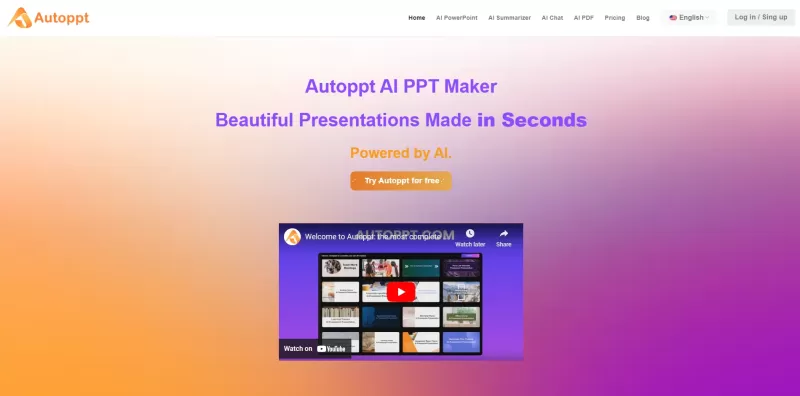
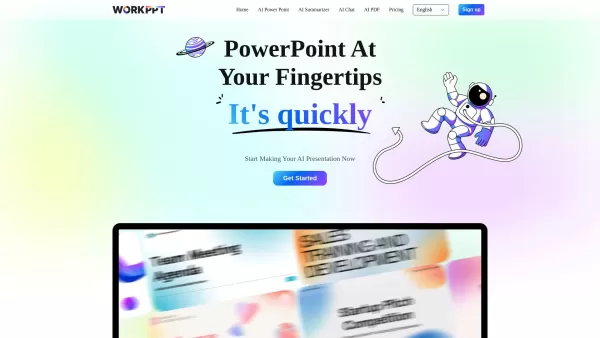
Ever found yourself staring at a blank PowerPoint slide, wondering how to turn your ideas into a stunning presentation? Enter Autoppt, your new best friend in the world of slide creation. This AI-powered tool is like a magic wand for your presentations. Just type in a topic or upload a file—be it a Word doc, PDF, Excel sheet, or even an image—and watch as Autoppt transforms it into a professional, eye-catching presentation in no time. It's like having a personal design assistant at your fingertips!
How to Use Autoppt?
Using Autoppt is as easy as pie. Here's how you can get started:
Step 1: Add Your Topic or File
Just type in a topic that's on your mind, or if you've got a document ready, upload it. Whether it's a PDF, Word, Excel, PPT, or JPG, Autoppt is ready to work its magic. Sit back and let the AI do the heavy lifting.
Step 2: Select a Template
With a variety of templates at your disposal, you can find the perfect match for your message and audience. Whether you're aiming for something sleek and professional or fun and creative, there's a template for every occasion.
Step 3: Edit Your Slides
Now comes the fun part—making it your own. Tweak the text, play with colors, and shuffle the layouts until it feels just right. Want to add a table or an image? Go for it! Autoppt's editing tools are there to help you refine your slides to perfection.
Step 4: Download and Share
Once you're happy with your masterpiece, save it as a PowerPoint file. Want to share it with your team or friends? Just send them a link, and they can view your presentation in all its glory.
Autoppt's Core Features
What makes Autoppt stand out? Let's dive into its core features:
AI Slide Creation
In the blink of an eye, Autoppt can generate up to 30 polished slides from your topic or uploaded file. It's like having a team of designers working around the clock, but without the coffee runs.
File Compatibility
No matter what format your content is in—Word, PDF, Excel, PPT, or JPG—Autoppt can handle it. It seamlessly converts your files into stunning slides, making your life a whole lot easier.
Diverse Templates
With a range of templates designed for different themes and styles, you're sure to find one that fits your presentation like a glove. Whether it's for a business meeting or a classroom lecture, Autoppt has you covered.
Built-In Editing Tools
Need to make some last-minute changes? No problem. Autoppt's editing tools let you tweak text, add visuals, and adjust designs with ease. It's like having a mini design studio at your fingertips.
Easy Sharing and Exporting
Once your presentation is ready, you can export it in PowerPoint format or share it via a direct link. It's that simple. No more fumbling with file transfers or worrying about compatibility issues.
Autoppt's Use Cases
From business meetings to classroom lectures, Autoppt is versatile enough to handle a variety of use cases:
AI PowerPoint Maker
Need a quick and professional PowerPoint? Autoppt is your go-to tool for creating presentations that impress.
Business Presentation Creation
Whether you're pitching a new idea or reporting on quarterly results, Autoppt helps you create business presentations that stand out.
Education Presentations Maker
Teachers and students alike can benefit from Autoppt's ability to turn complex topics into engaging, easy-to-understand slides.
AI PDF Summarizer
Got a long PDF that you need to present? Autoppt can summarize it and turn it into a concise, visually appealing presentation.
AI Mindmap
Organize your thoughts and ideas with Autoppt's mindmap feature, perfect for brainstorming sessions or planning projects.
AI Chatbot
Need help with your presentation? Autoppt's AI chatbot is there to answer your questions and guide you through the process.
FAQ from Autoppt
- What is Autoppt?
- Autoppt is an AI-powered tool that helps you create stunning PowerPoint presentations quickly and easily.
- Does Autoppt offer a free trial?
- Yes, Autoppt offers a free trial so you can test out its features before committing.
- How does Autoppt work?
- Autoppt uses AI to generate slides from a topic or uploaded file. You can then customize the slides using built-in editing tools.
- Does Autoppt offer templates?
- Yes, Autoppt provides a variety of templates designed for different themes and styles.
- Does Autoppt support PowerPoint and Google Slides?
- Autoppt primarily supports PowerPoint, but you can export your presentations to be compatible with Google Slides.
For any questions or issues, you can reach out to Autoppt's support team at [email protected]. For more contact options, visit the contact us page.
Autoppt Inc. is the company behind this innovative tool. For more information about the company, check out the about us page.
To log in to Autoppt, visit the login page. If you're new to Autoppt, you can sign up at the sign-up page.
Interested in Autoppt's pricing? Check out the pricing page for more details.
Autoppt Screenshot

2026 Latest Best Top-rated AI Text to Speech Tools for Natural Voiceovers are here on XIX.AI! This curated list features powerful, game-changing options that deliver crystal-clear voices for every use case, backed by real-world tests and weekly updated rankings. Get a free vs paid comparison to find the must-try solution that boosts your productivity instantly. Explore now to Unlock your AI edge!
 11 tools
 xix.ai

2026 Latest Best Manga AI Background Generators Ranked Top-Rated! This curated collection showcases powerful game-changing tools perfect for creating high-quality chapter backgrounds, book covers, and promotional art. Every option has undergone rigorous real-world tests to ensure reliability. Get a free vs paid comparison along with detailed insights. Explore now to discover your perfect tool and unlock your AI edge in manga creation.
6 tools
xix.ai

2026 Latest Best Top-rated AI Object Removal Editors for portraits travel product shots! XIX.AI curates a powerful game-changing collection regularly updated with weekly rankings. These tools offer real-world tests to help you quickly remove unwanted elements, boost content quality, and save tons of time without compromising results. Must-try for anyone aiming to unlock their AI creation edge. Explore now!
10 tools
xix.ai

2026 Latest Best Top-rated AI Text to Speech Tools for Online Courses are curated by XIX.AI based on rigorous real-world tests and weekly updated rankings. These powerful tools help creators deliver crystal-clear audio content effortlessly, boosting writing efficiency and streamlining course production. Check out the free vs paid comparison to find your perfect fit. Explore now to unlock your AI edge in online education.
10 tools
xix.ai

2026 Latest Best Top-Rated AI Blog Title Tools for Higher Click Through Rates! XIX.AI has carefully curated a powerful, game-changing collection of top tools that go through rigorous real-world tests. You’ll find a free vs paid comparison, weekly updated rankings, and detailed insights to help you boost your blog’s traffic efficiently. Must-try options are highlighted to help you unlock your AI edge. Explore now!
10 tools
xix.ai

2026 Latest Best Top-rated AI Task Routing Tools for Support Workflows! XIX.AI has curated a highly powerful game-changing collection of must-try solutions, all undergoing rigorous real-world tests and updated weekly. These tools streamline workflows, boost productivity, and help teams deliver faster, more efficient support. Explore now to discover your perfect tool and unlock your AI edge!
17 tools
xix.ai


Autoppt es un cambio de juego. Convierte mis diapositivas aburridas en algo visualmente atractivo en minutos. A veces, la IA elige combinaciones de colores raras, pero en general, es un gran ahorro de tiempo. Solo desearía que tuviera más plantillas para elegir. Aún así, una herramienta sólida. 📊
Autoppt é um divisor de águas! Transforma meus slides chatos em algo visualmente atraente em minutos. O AI às vezes escolhe combinações de cores estranhas, mas no geral, é uma grande economia de tempo. Só desejo que tivesse mais templates para escolher. Ainda assim, uma ferramenta sólida! 📊
Autoppt는 게임 체인저입니다! 제 지루한 슬라이드를 몇 분 만에 시각적으로 매력적인 것으로 바꿔줍니다. AI가 가끔 이상한 색상 조합을 선택하기도 하지만, 전반적으로 큰 시간 절약이 됩니다. 더 많은 템플릿을 선택할 수 있으면 좋겠어요. 그래도 훌륭한 도구입니다! 📊
Autopptはゲームチェンジャーです!私の退屈なスライドを数分で視覚的に魅力的なものに変えてくれます。AIが時々奇妙な色の組み合わせを選ぶことがありますが、全体的に見て、大きな時間の節約になります。もっとテンプレートが選べると良いですね。それでも、優れたツールです!📊
Autoppt is a game-changer! It turns my boring slides into something visually appealing in minutes. The AI sometimes picks weird color combos, but overall, it's a huge time-saver. Just wish it had more templates to choose from. Still, a solid tool! 📊


