


 Home
HomeAnyGPT
AnyGPT: ChatGPT in macOS Text Fields



Helps TikTok sellers, brands, MCNs, and TAPs discover winning products and find creators.

HelpLook is an AI-powered all-in-one knowledge base tool that helps businesses quickly build knowledge bases, help centers, and...

Your AI Workspace

302.AI is an enterprise-grade AI resource platform with pay-as-you-go pricing, API access to a full range of AI models, and ready-to-use online applications.

剧火AI — AI Screenwriter + Director, a One-Person Short Drama Studio In one sentence, what is it?

Ever wondered what the buzz about Gemini is all about? Let me break it down for you. Gemini is this cool generative AI chatbot, crafted by the brains at Google DeepMind. It's like having a super-smart friend who's been around the internet block, soaking u

Ever wondered what it's like to dive into your wildest fantasies and roleplay scenarios without leaving your room? Well, Kink AI might just be the ticket you're looking for. This isn't your average chatbot; it's an early access platform designed to push t
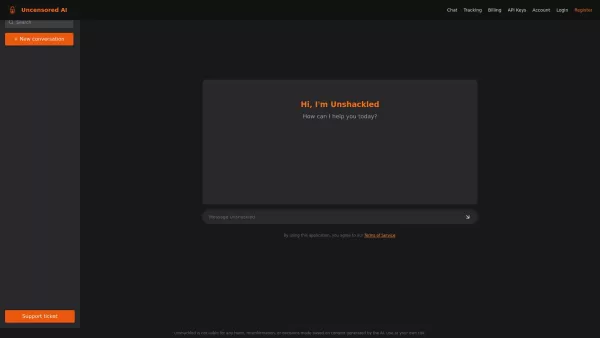
What is Unshackled AI? Unshackled Chat is an AI-driven chatbot enabling free, uncensored conversations. It offers a platform for unrestricted AI interaction, prioritizing open expression. Available mo

Poly AI is a dynamic platform that's redefining how we interact with artificial intelligence. Imagine diving into a world where you can chat with over 10 million characters, roleplay without limits, and even create your own AI companions. It's like steppi

RushChat.AI is a unique platform that caters to those who seek deep, emotionally intense conversations with AI characters. It's all about letting go of any filters and diving into unrestricted dialogues that can take you on quite the emotional journey. Wh
AnyGPT Product Information
What is AnyGPT?
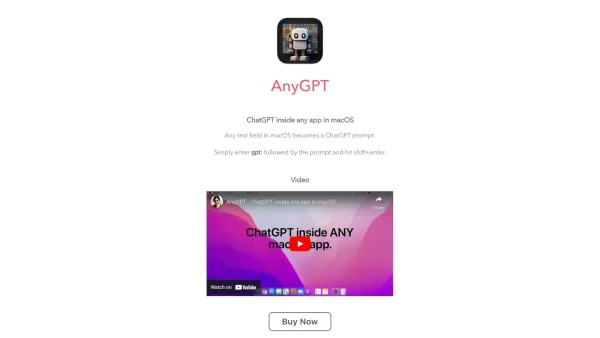
AnyGPT is a groundbreaking macOS application that embeds OpenAI's ChatGPT directly into any text field on your Mac. Simply type 'gpt:' followed by your prompt to effortlessly harness ChatGPT for tasks like text generation, translation, rewording, or casual conversation. This tool puts AI power at your fingertips, boosting productivity and making AI interactions feel natural and intuitive.
Who can benefit from AnyGPT?
- macOS users
- Professionals
- Content creators
- Students
- Developers
How to use AnyGPT
- Step 1: Download and install AnyGPT on your macOS device.
- Step 2: Open any application containing a text field.
- Step 3: Type ‘gpt:’ followed by your prompt.
- Step 4: Wait for ChatGPT's response to appear in the text field.
Platform
- macOS
AnyGPT's Core Features & Benefits
The Core Features
- ChatGPT integration
- Seamless interaction
- Works in any text field
- Easy installation
The Benefits
- Increased productivity
- Smooth AI interaction
- Versatile usage
- Intuitive user experience
AnyGPT's Main Use Cases & Applications
- Content generation
- Text translation
- Text rephrasing
- Casual conversation
- Idea brainstorming
AnyGPT's Pros & Cons
The Pros
Highly customizable AI personas with flexible personality settings
Support for multiple AI models to optimize cost and performance
User-friendly interface suitable for both beginners and advanced users
Adjustable parameters to fine-tune chatbot responses
Ability to deploy chatbots across multiple platforms
Backed by a company dedicated to ethical AI and scalable infrastructure
The Cons
No open-source code or GitHub repository available
May be complex for users unfamiliar with AI model configuration
Pricing information requires visiting a separate webpage
AnyGPT's Pricing
Free plan available | No |
|---|---|
Free trial details | |
Pricing model | |
Credit card required | No |
Paid plans start from | |
Lifetime plan available | No |
Billing frequency |
For current pricing, please visit: https://anygpt.app/pricing
AnyGPT FAQs
What is AnyGPT?
AnyGPT is a macOS application that integrates ChatGPT directly into any text field on your Mac.
How does AnyGPT work?
Simply type 'gpt:' followed by your prompt in any text field to engage with ChatGPT.
Which platforms are supported?
AnyGPT is compatible with macOS.
Is AnyGPT free to use?
Complete pricing details are available on the official website.
How do I install AnyGPT?
Download the application from the official website and follow the setup instructions.
How can I use ChatGPT on my Mac?
Install AnyGPT, then type 'gpt:' followed by your prompt in any text field.
What are AnyGPT's main features?
ChatGPT integration, compatibility with any text field, and straightforward installation.
Can I use AnyGPT for content creation?
Yes, AnyGPT is excellent for generating content, translating languages, rewording text, and more.
Can AnyGPT assist with brainstorming ideas?
Definitely, just type 'gpt:' followed by your brainstorming subject.
How do I get support for AnyGPT?
Visit the official website for available support channels.
AnyGPT Company Information
Website:
https://anygpt.appCompany Name:
AnyGPTSupport Email:
Not availableFacebook:
Not availableX (Twitter):
Not availableYouTube:
Not availableInstagram:
Not availableTikTok:
Not availableLinkedIn:
Not available
AnyGPT Screenshot

2026 Latest Best Top-rated AI Object Removal Editors for portraits travel product shots! XIX.AI curates a powerful game-changing collection regularly updated with weekly rankings. These tools offer real-world tests to help you quickly remove unwanted elements, boost content quality, and save tons of time without compromising results. Must-try for anyone aiming to unlock their AI creation edge. Explore now!
 10 tools
 xix.ai

2026 Latest Best Top-rated AI Text to Speech Tools for Online Courses are curated by XIX.AI based on rigorous real-world tests and weekly updated rankings. These powerful tools help creators deliver crystal-clear audio content effortlessly, boosting writing efficiency and streamlining course production. Check out the free vs paid comparison to find your perfect fit. Explore now to unlock your AI edge in online education.
10 tools
xix.ai

2026 Latest Best Top-Rated AI Blog Title Tools for Higher Click Through Rates! XIX.AI has carefully curated a powerful, game-changing collection of top tools that go through rigorous real-world tests. You’ll find a free vs paid comparison, weekly updated rankings, and detailed insights to help you boost your blog’s traffic efficiently. Must-try options are highlighted to help you unlock your AI edge. Explore now!
10 tools
xix.ai

2026 Latest Best Top-rated AI Task Routing Tools for Support Workflows! XIX.AI has curated a highly powerful game-changing collection of must-try solutions, all undergoing rigorous real-world tests and updated weekly. These tools streamline workflows, boost productivity, and help teams deliver faster, more efficient support. Explore now to discover your perfect tool and unlock your AI edge!
17 tools
xix.ai

2026 Latest Best Top-Rated AI Citation and Paper Summary Tools Curated by XIX.AI. Get powerful game-changing solutions for quick content creation, improved writing efficiency, and boosting productivity. We offer a free vs paid comparison along with real-world tests and weekly updated rankings to help you find the must-try tool that fits your needs perfectly. Explore now to Unlock your AI edge.
10 tools
xix.ai

2026 Latest Best Top-Rated AI Productivity Tools for Daily Work! XIX.AI has curated a powerful, game-changing selection based on rigorous weekly updated rankings and real-world tests. You’ll find must-try options that boost writing efficiency, streamline content creation, and help you overcome daily work challenges. Get a free vs paid comparison to find the perfect fit for your needs. Explore now to unlock your AI edge!
9 tools
xix.ai


Just tried AnyGPT on my Mac and it's a game-changer! No more switching apps to get AI help while writing emails or coding. The 'gpt:' prefix feels so natural. My only worry is getting too dependent on it 😅. Hope they add more model options soon!


