


 Home
HomeAnimeSR
AnimeSR: AI Anime Video Enhancer



Helps TikTok sellers, brands, MCNs, and TAPs discover winning products and find creators.

HelpLook is an AI-powered all-in-one knowledge base tool that helps businesses quickly build knowledge bases, help centers, and...

Your AI Workspace

302.AI is an enterprise-grade AI resource platform with pay-as-you-go pricing, API access to a full range of AI models, and ready-to-use online applications.

剧火AI — AI Screenwriter + Director, a One-Person Short Drama Studio In one sentence, what is it?
Ever wondered what OpenArt is all about? Well, let me tell you, it's like having a magic wand for your creativity! OpenArt is an AI image generator that's designed to take your creative ideas and turn them into stunning visuals. With a variety of AI model

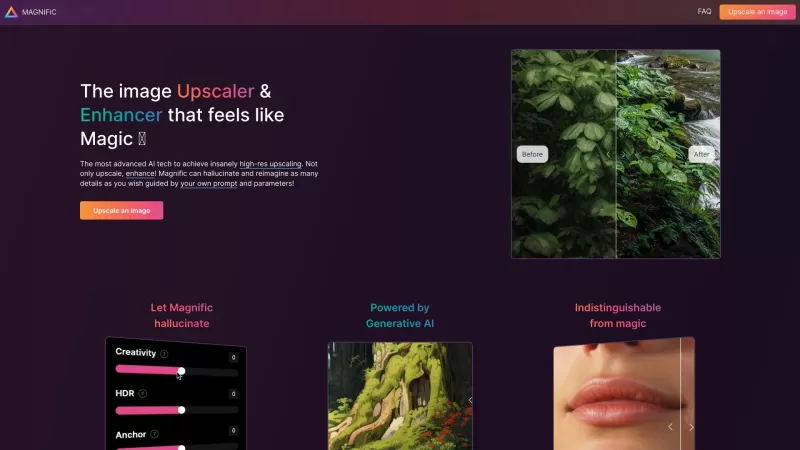
Ever stumbled upon an old photo that's lost its charm over time? Or perhaps you've got a collection of low-res images that just don't cut it anymore? Enter Pictura, a MacOS-native gem that's here to breathe new life into your images. This isn't just anoth
AnimeSR Product Information
What is AnimeSR?
AnimeSR enhances the image quality of streamed anime directly in your browser. This smart extension employs advanced AI to upscale video and animation, delivering sharper, more vivid visuals. Enjoy a superior viewing experience on major platforms like YouTube and Netflix by eliminating pixelation and boosting color richness. AnimeSR allows fans to watch anime as it was intended—with stunning clarity.
Who is AnimeSR for?
- Anime fans
- Streamers
- Video creators
- Gamers
- Everyday online video viewers
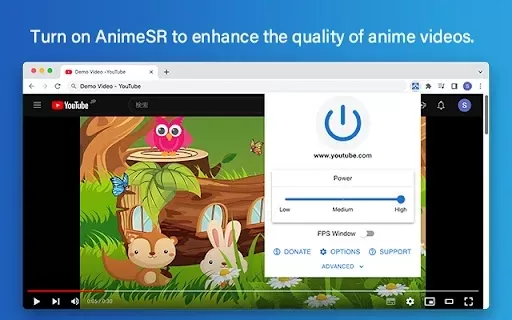
How to use AnimeSR
- Step 1: Install the AnimeSR extension from the Chrome Web Store.
- Step 2: Pin the extension to your browser toolbar for quick access.
- Step 3: Navigate to your favorite streaming website.
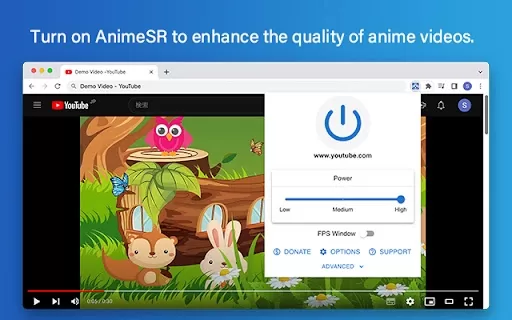
- Step 4: Click the AnimeSR icon to enable its enhancement features.
- Step 5: Sit back and enjoy your anime with noticeably better quality.
Platform
- Chrome
AnimeSR's Core Features & Benefits
Core Features
- Real-time video enhancement
- Support for multiple streaming platforms
- AI-powered image upscaling
Key Benefits
- A more immersive viewing experience
- Crisper and more vibrant visuals
- Significantly reduced pixelation
AnimeSR's Main Use Cases & Applications
- Enhancing quality for live anime streaming
- Improving video production for content creators
- Revitalizing older or low-resolution anime videos
AnimeSR FAQs
How does AnimeSR work?
AnimeSR utilizes AI technology to upscale and enhance video quality in real time.
Is AnimeSR free to use?
Yes, the AnimeSR extension is completely free to download and use from the Chrome Web Store.
Which streaming platforms support AnimeSR?
AnimeSR is compatible with major streaming services, including YouTube and Netflix.
Do I need a powerful device to use AnimeSR?
It runs best on capable hardware but is also functional on standard devices.
Can I run AnimeSR on mobile devices?
AnimeSR is currently only available for the Chrome desktop browser.
Can I adjust the enhancement settings?
Yes, you can fine-tune the enhancement intensity within the extension's settings panel.
Is it safe to use AnimeSR?
Absolutely. The extension is secure and does not collect your personal information.
How do I uninstall AnimeSR?
You can remove it at any time via the Extensions management page in Chrome.
What happens if AnimeSR is not working?
Try refreshing your streaming page or restarting your browser to resolve the issue.
Can I use AnimeSR for non-anime content?
Though optimized for anime, it can also enhance other types of video content.
AnimeSR Company Information
AnimeSR Screenshot

2026 Latest Best Top-rated AI Text to Speech Tools for Natural Voiceovers are here on XIX.AI! This curated list features powerful, game-changing options that deliver crystal-clear voices for every use case, backed by real-world tests and weekly updated rankings. Get a free vs paid comparison to find the must-try solution that boosts your productivity instantly. Explore now to Unlock your AI edge!
 11 tools
 xix.ai

2026 Latest Best Manga AI Background Generators Ranked Top-Rated! This curated collection showcases powerful game-changing tools perfect for creating high-quality chapter backgrounds, book covers, and promotional art. Every option has undergone rigorous real-world tests to ensure reliability. Get a free vs paid comparison along with detailed insights. Explore now to discover your perfect tool and unlock your AI edge in manga creation.
6 tools
xix.ai

2026 Latest Best Top-rated AI Object Removal Editors for portraits travel product shots! XIX.AI curates a powerful game-changing collection regularly updated with weekly rankings. These tools offer real-world tests to help you quickly remove unwanted elements, boost content quality, and save tons of time without compromising results. Must-try for anyone aiming to unlock their AI creation edge. Explore now!
10 tools
xix.ai

2026 Latest Best Top-rated AI Text to Speech Tools for Online Courses are curated by XIX.AI based on rigorous real-world tests and weekly updated rankings. These powerful tools help creators deliver crystal-clear audio content effortlessly, boosting writing efficiency and streamlining course production. Check out the free vs paid comparison to find your perfect fit. Explore now to unlock your AI edge in online education.
10 tools
xix.ai

2026 Latest Best Top-Rated AI Blog Title Tools for Higher Click Through Rates! XIX.AI has carefully curated a powerful, game-changing collection of top tools that go through rigorous real-world tests. You’ll find a free vs paid comparison, weekly updated rankings, and detailed insights to help you boost your blog’s traffic efficiently. Must-try options are highlighted to help you unlock your AI edge. Explore now!
10 tools
xix.ai

2026 Latest Best Top-rated AI Task Routing Tools for Support Workflows! XIX.AI has curated a highly powerful game-changing collection of must-try solutions, all undergoing rigorous real-world tests and updated weekly. These tools streamline workflows, boost productivity, and help teams deliver faster, more efficient support. Explore now to discover your perfect tool and unlock your AI edge!
17 tools
xix.ai


I've been using AnimeSR for weeks now, and it's absolutely amazing! The upscalled anime looks way crisper than before, even with slow internet connections. It’s such a lifesaver for binge-watching my favorite series without pixelated mess. Highly recommend it to everyone who loves anime!


