


 Home
HomeAIpex —— Tab & History Manager, AI Companion



Helps TikTok sellers, brands, MCNs, and TAPs discover winning products and find creators.

HelpLook is an AI-powered all-in-one knowledge base tool that helps businesses quickly build knowledge bases, help centers, and...

Your AI Workspace

302.AI is an enterprise-grade AI resource platform with pay-as-you-go pricing, API access to a full range of AI models, and ready-to-use online applications.

剧火AI — AI Screenwriter + Director, a One-Person Short Drama Studio In one sentence, what is it?

Ever wondered what the buzz about Gemini is all about? Let me break it down for you. Gemini is this cool generative AI chatbot, crafted by the brains at Google DeepMind. It's like having a super-smart friend who's been around the internet block, soaking u

Ever wondered what it's like to dive into your wildest fantasies and roleplay scenarios without leaving your room? Well, Kink AI might just be the ticket you're looking for. This isn't your average chatbot; it's an early access platform designed to push t
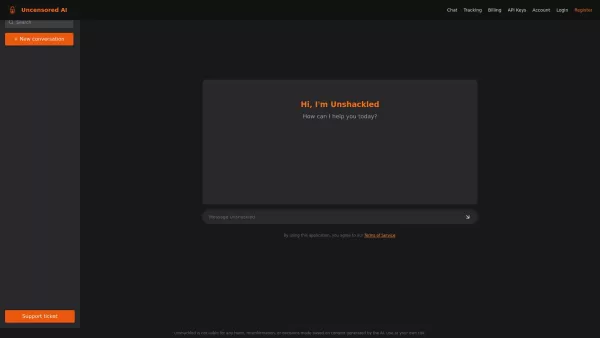
What is Unshackled AI? Unshackled Chat is an AI-driven chatbot enabling free, uncensored conversations. It offers a platform for unrestricted AI interaction, prioritizing open expression. Available mo

Poly AI is a dynamic platform that's redefining how we interact with artificial intelligence. Imagine diving into a world where you can chat with over 10 million characters, roleplay without limits, and even create your own AI companions. It's like steppi

RushChat.AI is a unique platform that caters to those who seek deep, emotionally intense conversations with AI characters. It's all about letting go of any filters and diving into unrestricted dialogues that can take you on quite the emotional journey. Wh
AIpex —— Tab & History Manager, AI Companion Product Information
What is AIpex – Your AI-Powered Tab & History Manager?
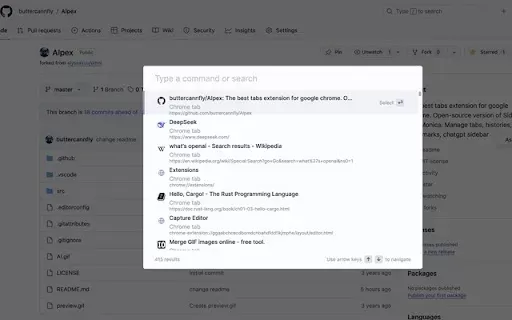
AIpex is a robust Chrome extension designed to streamline your tab and browsing history management. It enables effortless tab switching, opening, and closing, along with restoring closed tabs and intelligent, AI-driven tab organization. You can also easily browse and manage bookmarks and perform quick searches through your history. Boost your productivity with more than 50 actions, including muting, pinning tabs, and advanced bookmarking shortcuts. An integrated AI chatbot sidebar offers added functionality like text translation, webpage summarization, and web searches. The extension is customizable, integrates with popular tools like Notion, Figma, and Docs, and adapts to your preference with dark and light modes.
Who is AIpex – Tab & History Manager, AI Companion For?
- Students
- Professionals
- Researchers
- Web Developers
- Designers
How to Use AIpex – Tab & History Manager, AI Companion
- Step 1: Install AIpex from the Chrome Web Store.
- Step 2: Pin the extension to your Chrome toolbar.
- Step 3: Open the extension to access tab management tools.
- Step 4: Use the dashboard to switch, open, close, and organize tabs.
- Step 5: Access the AI chatbot for translation, summarization, and searches.
Platform
- Web
- Chrome
AIpex – Tab & History Manager, AI Companion: Core Features & Benefits
Core Features
- AI-powered tab organization
- Comprehensive history search
- Bookmark management
- Over 50 productivity actions
- Integrated AI chatbot
Key Benefits
- Enhanced browsing efficiency
- Improved productivity
- Seamless AI integration
- Customizable features
- Versatile usage
AIpex – Tab & History Manager, AI Companion: Main Use Cases & Applications
- Efficient tab management
- Quick search and access to browsing history
- Bookmark organization
- Productivity enhancement
- AI-assisted browsing
FAQs About AIpex – Tab & History Manager, AI Companion
How do I install AIpex?
Install AIpex from the Chrome Web Store by clicking the 'Add to Chrome' button.
Is AIpex free to use?
Yes, AIpex is free to use.
Does AIpex support multi-device sync?
Currently, AIpex operates on the Chrome browser where it is installed.
Can I customize the extension settings?
Yes, AIpex allows you to customize various settings to match your preferences.
How does the AI chatbot work?
The AI chatbot can translate text, summarize web pages, and conduct searches directly within the sidebar.
Is there a dark mode available?
Yes, AIpex supports both dark and light modes.
Can AIpex restore closed tabs?
Yes, AIpex can restore tabs you've previously closed.
Which browsers are supported?
AIpex is built for the Chrome browser.
How do I access the bookmark manager?
Access the bookmark manager via the AIpex icon in your Chrome toolbar.
Where can I find more information on data privacy?
Find detailed information in the developer's privacy policy linked on the Chrome Web Store page.
AIpex – Tab & History Manager, AI Companion Company Information
AIpex —— Tab & History Manager, AI Companion Screenshot


2026 Latest Best Top-rated AI SERP Analysis Tools for Search Strategy are curated by XIX.AI through rigorous real-world tests and weekly updated rankings. These powerful tools help you unlock hidden optimization opportunities, boost content performance, and gain a competitive edge in search. Discover your perfect tool to elevate your search strategy today. Explore now!
 13 tools
 xix.ai

2026 Latest Best Top-rated AI Anomaly Detection Tools for KPI Monitoring in SaaS and Ecommerce teams! XIX.AI has curated a powerful, game-changing collection based on rigorous real-world tests and weekly updated rankings. You’ll find detailed free vs paid comparison insights to help you identify the must-try solution that boosts productivity and unlocks your AI edge. Explore now!
10 tools
xix.ai

2026 Latest Best Top-Rated AI Outline Generators for Long-Form SEO Articles, meticulously curated by XIX.AI. These powerful tools offer game-changing assistance in creating high-quality content quickly, boosting writing efficiency significantly. Get a free vs paid comparison along with real-world tests and detailed rankings to help you find the must-try option that suits your needs. Explore now to unlock your AI edge.
8 tools
xix.ai

2026 Latest Best AI Study Tools for Homework and Exam Prep! XIX.AI curates a top-rated list of powerful, game-changing tools that help students boost productivity, streamline homework completion, and ace exams through real-world tests. Get a free vs paid comparison, detailed rankings, and must-try options to unlock your AI edge. Explore now!
10 tools
xix.ai

2026 Latest Best AI Vocal Demo Tools for Songwriters, Hook Creators, and Multi-Language Content Teams! XIX.AI has curated a top-rated list of powerful game-changing tools that go through rigorous real-world tests. You’ll find detailed free vs paid comparison data, comprehensive rankings, and must-try options to help you boost writing efficiency and unlock your creative potential. Explore now to discover your perfect tool for all your content needs!
9 tools
xix.ai

2026 Latest Best Top-rated AI Competitive Research Tools for Small Businesses! XIX.AI has curated a highly powerful game-changing collection, updated weekly with rigorous real-world tests and detailed rankings. You can find a comprehensive free vs paid comparison to help you identify the must-try tools that boost your productivity and give you a competitive edge. Explore now to discover your perfect tool!
9 tools
xix.ai


