


 Home
HomeAI Mesh Gradient Tool: Meshing
Mesh Gradient Creator for Wallpapers



Helps TikTok sellers, brands, MCNs, and TAPs discover winning products and find creators.

HelpLook is an AI-powered all-in-one knowledge base tool that helps businesses quickly build knowledge bases, help centers, and...

Your AI Workspace

302.AI is an enterprise-grade AI resource platform with pay-as-you-go pricing, API access to a full range of AI models, and ready-to-use online applications.

剧火AI — AI Screenwriter + Director, a One-Person Short Drama Studio In one sentence, what is it?

What is RAGFlow?RAGFlow is an open-source RAG (Retrieval-Augmented Generation) engine designed to simplify the creation and deployment of AI agents. It merges intelligent document processing with vector search to convert unstructured data from PDFs,

What Are Notion Templates for AI? Notion Templates for AI Integration to Supercharge Productivity Looking to harness the power of AI within your workflow? Notion Templates for AI Integration offers tailored solutions designed to streamline your day-to-day

What is QuickBox AI?QuickBox AI offers a handy browser extension that integrates a suite of AI tools directly into your browser. Pressing cmd+k (or ctrl+k) brings up a compact overlay on your current tab, enabling instant access to AI utilities. You
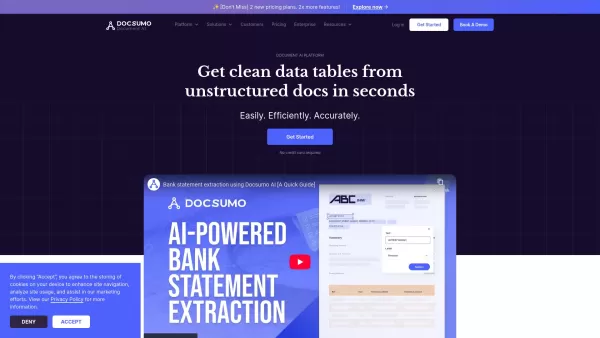
Docsumo is more than just another tech tool—it’s a powerhouse for businesses looking to streamline their document workflows. At its core, Docsumo uses advanced AI to effortlessly pull critical data from messy, unstructured documents like invoices, contrac
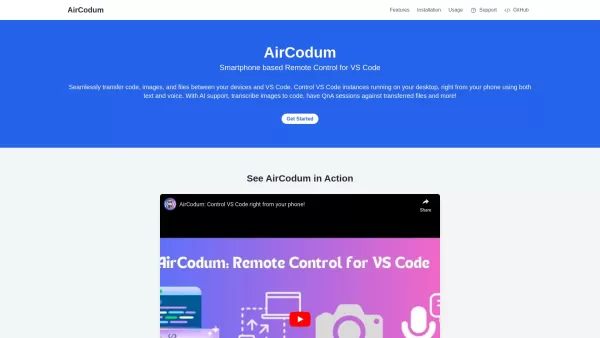
Ever wished you could control your VS Code from your phone? Enter CodeAir, the nifty mobile companion app that lets you do just that. It's like having a remote control for your coding environment, complete with file transfer capabilities right from your s
AI Mesh Gradient Tool: Meshing Product Information
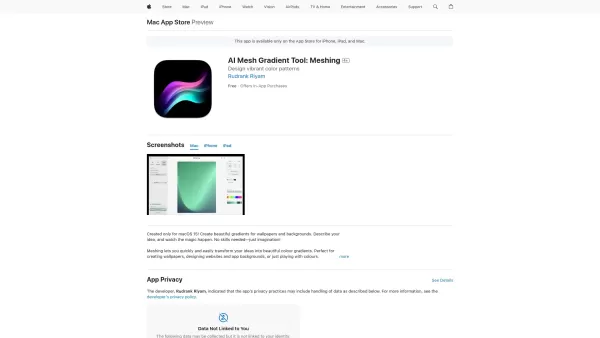
Ever stumbled upon an app that feels like it was made just for you? That's what you get with Meshing, the AI Mesh Gradient Tool that's turning heads in the world of digital design. This isn't just another app; it's your personal artist, crafting stunning mesh gradients that are perfect for sprucing up your wallpapers and backgrounds. What makes Meshing stand out? It's all about the AI magic that lets you edit in real-time and generate gradients that are as unique as your fingerprint.
How to Dive into AI Mesh Gradient Tool: Meshing?
Ready to get creative? Here's how you can start playing with Meshing:
- Fire up the app and let your imagination run wild. Describe the gradient you're dreaming of, or if you're feeling inspired, upload a photo.
- Sit back and watch as Meshing works its AI wizardry, rendering your vision in real-time. It's like watching your ideas come to life!
Unpacking the Core Features of AI Mesh Gradient Tool: Meshing
What's under the hood of Meshing? Let's break it down:
- Real-time editing: Tweak your gradients on the fly and see the changes instantly. It's like having a live canvas at your fingertips.
- AI-generated gradients: Meshing's AI doesn't just create gradients; it crafts them. Each one is a unique piece of art, tailored to your taste.
- Photo-to-gradient transformation: Got a photo you love? Turn it into a gradient masterpiece with a few taps.
- Blur effects and animations: Add that extra flair with blur effects or make your gradients dance with animations.
- Templates and favorites: Start with a template or save your favorites for quick access. It's all about making your life easier.
Where Can You Use AI Mesh Gradient Tool: Meshing?
Meshing isn't just for show; it's a tool that fits into your daily life:
- Design unique wallpapers: Transform your personal photos into one-of-a-kind wallpapers that tell your story.
- Create app backgrounds: Need a fresh look for your app? Whip up a gradient background in no time with Meshing.
FAQ from AI Mesh Gradient Tool: Meshing
- Do I need design skills to use Meshing?
- Not at all! Meshing is designed to be user-friendly, so whether you're a pro or a newbie, you can create stunning gradients with ease.
- Can I turn my photos into gradients?
- Absolutely! Just upload your photo, and let Meshing do the rest. It's like magic, but better because it's real.
AI Mesh Gradient Tool: Meshing Screenshot





2026 Latest Best Top-rated AI Object Removal Editors for portraits travel product shots! XIX.AI curates a powerful game-changing collection regularly updated with weekly rankings. These tools offer real-world tests to help you quickly remove unwanted elements, boost content quality, and save tons of time without compromising results. Must-try for anyone aiming to unlock their AI creation edge. Explore now!
 10 tools
 xix.ai

2026 Latest Best Top-rated AI Text to Speech Tools for Online Courses are curated by XIX.AI based on rigorous real-world tests and weekly updated rankings. These powerful tools help creators deliver crystal-clear audio content effortlessly, boosting writing efficiency and streamlining course production. Check out the free vs paid comparison to find your perfect fit. Explore now to unlock your AI edge in online education.
10 tools
xix.ai

2026 Latest Best Top-Rated AI Blog Title Tools for Higher Click Through Rates! XIX.AI has carefully curated a powerful, game-changing collection of top tools that go through rigorous real-world tests. You’ll find a free vs paid comparison, weekly updated rankings, and detailed insights to help you boost your blog’s traffic efficiently. Must-try options are highlighted to help you unlock your AI edge. Explore now!
10 tools
xix.ai

2026 Latest Best Top-rated AI Task Routing Tools for Support Workflows! XIX.AI has curated a highly powerful game-changing collection of must-try solutions, all undergoing rigorous real-world tests and updated weekly. These tools streamline workflows, boost productivity, and help teams deliver faster, more efficient support. Explore now to discover your perfect tool and unlock your AI edge!
17 tools
xix.ai

2026 Latest Best Top-Rated AI Citation and Paper Summary Tools Curated by XIX.AI. Get powerful game-changing solutions for quick content creation, improved writing efficiency, and boosting productivity. We offer a free vs paid comparison along with real-world tests and weekly updated rankings to help you find the must-try tool that fits your needs perfectly. Explore now to Unlock your AI edge.
10 tools
xix.ai

2026 Latest Best Top-Rated AI Productivity Tools for Daily Work! XIX.AI has curated a powerful, game-changing selection based on rigorous weekly updated rankings and real-world tests. You’ll find must-try options that boost writing efficiency, streamline content creation, and help you overcome daily work challenges. Get a free vs paid comparison to find the perfect fit for your needs. Explore now to unlock your AI edge!
9 tools
xix.ai


これでメッシュグラデーションが一瞬で完成。直感的で、プロ並みの結果が出せる。デザイン作業が楽しくなるから、もう離せないかも笑 アートをデザインに取り入れるのがこんなにも簡単だったとは思わなかった 😍


